
- Qualcomm Launches Snapdragon 4 Gen 2 Mobile Platform
- AMD Launches Ryzen PRO 7000 Series Mobile & Desktop Platform
- Intel Launches Sleek Single-Slot Arc Pro A60 Workstation Graphics Card
- NVIDIA Announces Latest Ada Lovelace Additions: GeForce RTX 4060 Ti & RTX 4060
- Maxon Redshift With AMD Radeon GPU Rendering Support Now Available

Social & RSS Feeds
Latest Videos



Latest News
Windows Vista Beta 2 Performance Reports


by Rob Williams on June 14, 2006 in Software
Windows Vista is system intensive, as we knew it would be. We set out to find out just -how- system intensive it is. We run a slew of benchmarks and gaming runs on both the 32-Bit and 64-Bit versions to see how they compare to XP.
Page 2 – Testing Procedures, CPU Benchmarks
|
|
To perform the testing, I used a formatted 160GB Western Digital hard drive. In between each new operating system, the drive was reformatted. Only one operating system was installed at a time. In usual reviews that require benchmarking, unneeded services are closed down before testing. However, since this is a direct comparison to a new OS, all of the processes and services that are pre-installed, were left alone to give a more accurate view.
- Test System
- CPU: AMD Venice 3200+ @ 2.0GHz
- Motherboard: DFI Ultra-D w/604BTA BIOS
- Memory: Corsair 2GB PC3500LL PRO
- Video: eVGA 7800GT 256MB
- Sound: Chaintech AV-710
- Storage: Seagate 7200.10 750GB 16MB
- Odds and Ends: D-Link WiFi PCI Card
- Etcetera: Windows x64 Professional (Nvidia 84.21), Windows Vista 32-Bit (Nvidia 88.61), Windows Vista 64-Bit (Nvidia 88.61)
Generally, nothing major was done to the operating system after the install. As I do with all my Windows installations, I select the “Classic Start Menu” mode, which effectively makes the start menu smaller than default. It also places your “My Computer” and other various icons on the desktop. In Vista, the Sidebar was disabled. These are the only modifications done to either OS installation.
- Synthetic Benchmarks
- Cinebench 9.5
- Futuremark 3D Mark 2003
- Futuremark 3D Mark 2006
- Futuremark PC Mark 2005
- HD Tach RW 3
- HD Tune
- Lavalys EVEREST 2006
- Nero Recode
- Sciencemark 2 32-Bit
- SiSoftware SANDRA 2007
- Super Pi 1.5 Mod
- Gaming Benchmarks
- Battlefield 2
- FarCry
- Half-Life 2
- Serious Sam 2
I will be splitting up the results into three categories: CPU, Memory and Gaming. Performance based on these factors will be the true deciding factor on whether anyone should upgrade right away. Let’s get underway with a look at the CPU benches.
CPU Benchmarking
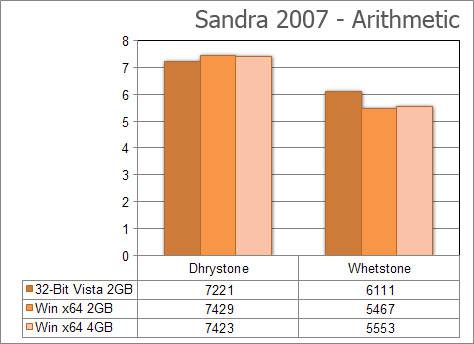
Because SANDRA would not function in the 64-Bit version of Vista, there are obviously no results from there. Comparing the 32-Bit version of Vista to the 64-Bit version of XP is surprising. While x64 takes the crown with the Dhrystone, Vista storms ahead in the Whetstone result.
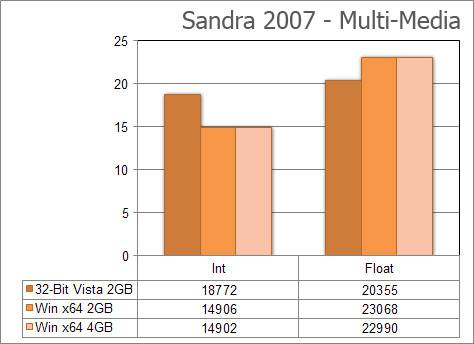
The multi-media test is vice versa. Vistas Int result is far better than what x64 could muster, although x64 performed better in the Floating-Point result.
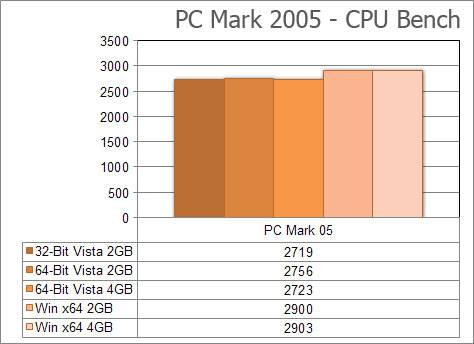
While the end result of a PC Mark run doesn’t explain much, the higher the number, the better. Although x64 scores 8% higher, I had actually expected the difference to be larger. All of those extra running processes in Vista don’t hurt the overall CPU score here that much.
|
|

Support our efforts! With ad revenue at an all-time low for written websites, we're relying more than ever on reader support to help us continue putting so much effort into this type of content. You can support us by becoming a Patron, or by using our Amazon shopping affiliate links listed through our articles. Thanks for your support!

Rob Williams
Rob founded Techgage in 2005 to be an 'Advocate of the consumer', focusing on fair reviews and keeping people apprised of news in the tech world. Catering to both enthusiasts and businesses alike; from desktop gaming to professional workstations, and all the supporting software.


