Date: June 19, 2008 - Author: Rob Williams
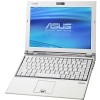
Mobile computing doesn't have to be boring - the U6E from ASUS proves that. Within its 12-inch frame is some of the best styling around and very competent hardware, along with a full-sized keyboard, fingerprint reader and four USB ports. Does this small notebook win big time?
The term 'bigger is better' gets thrown around a lot, but it's not one that's often used when talking about computers. In some cases, bigger is better, because it represents extreme and raw power, while compact machines usually offer moderate performance. But as our lifestyles evolve, it becomes increasingly evident that most of the time, smaller is better.
I used to be one of those guys who always did believe that bigger was better when it came to notebooks. Actual performance aside, I enjoyed the larger screens and much more comfortable keyboards. But we're at a time where we are on the go all the time, and carrying a 12lb notebook is not that much fun anymore.
We first saw a real surge in small notebooks with ASUS' own launch of the Eee PC, a 7.1" offering that was designed for those who wanted ultimate portability. But, it wasn't for everyone, namely because you couldn't fit the entire OS on a single screen, nor was the keyboard that feasible for anyone with big fingers. I won't even touch on the performance aspect.
But that launch proved incredibly successful, and showed how desirable small notebooks can be. But, I'm not willing to sacrifice that much functionality just to shed a few extra pounds, or to have something smaller. Plus, with these sub-notebooks now hitting 10", you might as well just go for the next step up and get a real notebook - one that offers real performance and a nice resolution. That's why I personally feel that 12" notebooks are as close to the perfect size as we can get.
Allow me to go a little off course for a moment. As I mentioned a moment ago, I've always been one of those people who preferred a robust notebook over a small one. To me, 'small' meant 'weak performance', and as an enthusiast, it's hard to just sit down in front of a machine with slow parts and be satisfied. But I clued in... large notebooks are nice, but lugging them around is not. Plus, who isn't always on the go nowadays? We all are, and that's when owning a smaller notebook is a blessing.
![]() |
I don't fly all that often, but I do fly enough to care about the size of the notebook I bring on-board. I have made the mistake time and time again of bringing a 15.4" notebook on a flight, but I quickly came to me senses and admitted I've had enough. That's when I began becoming increasingly interested in smaller notebooks, and I'm sure glad I did.
If you have ever brought a full-sized notebook on the plane and sat in coach, you are no doubt aware of the downsides. Personally, I seem to have great luck in being seated behind someone ignorant enough to not look behind before slamming the seat back. There was one particular occasion on a flight last fall where I swore the notebook I was using was going to lose its screen, but luckily enough, it was fine.
With a 12.1", though, it's almost impossible for this to be a problem. I gave this theory a good test this month when I spent over 35 hours on various planes, thanks to my Computex trip. On most of the longer flights I had, I did have people in front of me shift their seat back without warning, but because of the small frame of the notebook, there was always enough leeway so that it wouldn't be caught in a bad spot. On the three planes where I used the notebook (Boeing 77L, Boeing 747-400 and Airbus A320), I didn't experience any real issue. It was a huge relief.
That's the cool thing about a smaller notebook. It's flexible. It can fit places where larger notebooks can have issue. But, not all 12" notebooks are created equal, and some can be designed in such a way that the size might be the only benefit. Luckily, ASUS has done a great job on their U6E, and I'll touch on all of the highs and lows in this article.
I think I've well-established that a 12" notebook is my personal favorite, but again, opinions will vary, and only you yourself will know what size will perfectly suit your lifestyle. If you don't fly that often, or at all, then a larger notebook might make more sense. It all depends on how much you are on the go, and your patience level. Carrying around a large notebook all day is not anyone's idea of fun.
But as I mentioned on the last page, not all 12" notebooks are created equal. The form factor is spot on, but design flaws can ruin the experience. Take the Hypersonic AG2, for example, which I took a look at last month. That was the notebook that turned me on to 12" notebooks in general, but it had a few lacking features... namely a full-sized keyboard. Because the keyboard didn't stretch completely from end to end, the keys themselves where smaller, and some were a chore to use... primarily the period.
When I received the U6E, I was pleased (ok, ecstatic) to see a full-sized keyboard. This is a huge deal to me, because while I don't necessarily have fat fingers, I like my typing experience on a notebook to be as close to the desktop experience as possible. When shifting from a full-sized desktop keyboard to a small notebook one, I tend to make typos far more often than I'd like. So for me, the ASUS notebook was an instant winner, even before I knew of the performance-related specs.
Luckily, though, the performance specs are not too shabby, either. Included is a 2.2GHz Intel Core 2 Duo T7500 - one that's based on the 65nm process. This could be considered a downside, since the newer Penryn CPUs have been out for a few months, but the previous generation processors are less expensive, which is why they are still used more often in any manufacturer's notebooks.
Included also is 2GB of DDR2-667 memory, using the standard 5-5-5-15 timings we've come to expect. As for graphics, don't be expecting to be doing much gaming, since the integrated Intel GMA X3100 is used, but simple applications and games, like Google Earth, won't be a problem. Games that require a lot of texture memory, I've found, can be problematic. This is not a GPU for gaming, nor is that the focus of this notebook.
Specification |
ASUS U6E-A1 |
| Processor | Intel Core 2 Duo T7500 @ 2.2GHz |
| Memory | 2GB DDR2-667 |
| Hard Drive | Fujitsu 160GB 5400RPM |
| Graphics | Intel GMA X3100 |
| Audio | Realtek ALC888 Intel 82801HBM |
| Display | 12.1" @ 1280x800 |
Connectivity |
LAN Modem Audio Mic/Headphones |
| Et cetera | Multi-format Card Reader Bluetooth Intel WiFi 4965AGN 1.3 Megapixel Webcam Fingerprint Reader 6-Cell Battery |
For storage, a Fujitsu MHY2160BH hard drive is used, which includes 160GB of space and runs at 5400 RPM. The wireless chipset used is of course Intel's own creation, the 4965AGN... the same WiFi used in the majority of notebooks right now. During my entire experience with the notebook, the WiFi was exceptionally reliable, and I connected to at least ten different access points.
But how about a look at the actual notebook itself? Let's get right on that.
We can now take a trip around the U6E to see just what it's made of. I should note that the U6S is also available, but has a few important differences... the price and the GPU. The price is at $1,649 (U6E is $1,399) and comes in a cool mocha brown color. The best part is that it includes an NVIDIA GPU, the GoForce 8400. It's low-end, but I have no doubts it would be leaps and bounds better than the integrated Intel chip used here.
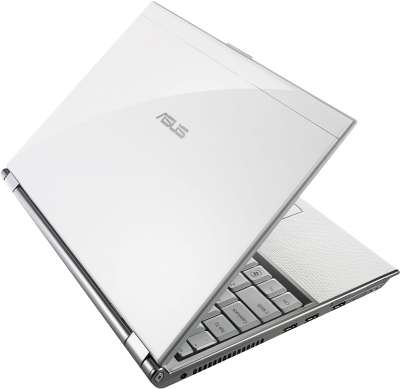
The U6E is well-built and features a solid design. It's not flimsy, despite being a 12" model.
The left side of the notebook features the power connection and also the lone side fan. Most of the heat will be exported here, so it should be left clear. Three USB ports are also found here, in addition to an ExpressCard slot. Towards the corner is a defunct port that's filled in with plastic (the same chassis is used on another model), and the WiFi enable/disable is also here.
On the opposite side can be found the DVD-RW drive, the microphone and headphones jack, another USB port and also a Kensington security lock. Directly above the DVD-RW drive is the memory card slot... very discrete.
In order to enable better battery-life, an extended battery is used here, a 6-cell model. It extends out the back of the notebook, but not enough to become a nuisance. The benefits will outweigh the downsides though, as it essentially doubles the battery-life of the notebook to ~3 hours.
The white touchpad follows the keen styling of the rest of the notebook. The pad itself is lightly textured, but still easy on the finger... something I thoroughly test. A fingerprint reader is located between the buttons - a nice touch.
Three buttons outside of the keyboard are found below the screen, two on the left and one on the right. The two left buttons represent the web cam and power savings mode, while the one on the right acts as the power button.
The full-sized keyboard is one of my favorite features of the U6E. After quickly becoming annoyed by the smaller board used on the Hypersonic AG2, this one proved to be a breath of fresh air. It's as close to a desktop keyboard as you will find on a notebook so small, so typing is made easy. I especially like the fact that the entire keyboard is flush, there are no keys that are oddly placed (such as the arrow keys).
On the back, you can see the various vents and stickers.
Everyone will have their own likes and dislikes when it comes to laptop styling, but I like this one a lot more than I thought I would. It's better-looking in person, which is somewhat of a rarity.
On the next page, I'll take a brief look at the software and installation, then move right into testing and final thoughts.
Note: Most of the text on this page was taken from our review of the ASUS M51S notebook as a lot of the information is identical.
On initial boot, I was greeted with an option to select a language and also enter a username, followed by ten minutes pre-desktop setup. I am unsure why notebooks cannot be configured to work right out of the box, but Vista had a few things to take care of, so who am I to complain? The Windows Experience Rating for this notebook is 3.4, with the weakest link being the graphics. The other components range from 4.8 - 5.1.
In the below screenshot, you can see exactly what the desktop looks like after initial logon.
After wiping away tears from seeing a Norton Internet Security setup screen, I checked out the programs list to see what has all been installed:
There's no way around it... there is a LOT of software pre-installed. For the most part though, a lot of it could prove useful for many people, so I wouldn't jump to conclusions and call it bloatware. Most of it is ASUS' home-brewed applications after-all, and is designed to both enlighten our lives and improve our desktop experience.
Non-ASUS software includes Norton Internet Security (three month trial), Adobe Reader 8 (which most people would have regardless) and Power4Phone (allows Skype phone calls, though I've never tested it). So overall, not too much third-party software.
Here is a quick run-down of the included ASUS software and what it does:
| CopyProtect | Allows you to lock certain hardware from being used, such as the DVD-Rom, external storage and also a network drive. Requires a password to lock and unlock. |
| LifeFrame | Specialized web cam software, allows video capture and image capture. Includes fun accessories and filters. |
| Live Update | Updates the notebooks drivers, if available. |
| Security Protect Manager | Advanced security, allowing users to use their thumbprints to log on. |
| Smart Login | Allows login via web cam identification. While sitting at the login screen, the web cam will scan the face of the person sitting in its path and if the person matches to a user account, it will auto-logon, forgoing the need for a password. |
| Splendid | Color enhancement. Includes presets, but also allows creations of personal ones. Splendid is an integral part of ASUS' entire line-up of products, most notably their displays. |
Below is a screenshot of both CopyProtect.
The Smart Login is an interesting application, and one I'm sure other notebook manufacturers will soon pick up on, if not already. The ability to log on by doing nothing is quite amazing, and in my tests, the software was pretty reliable. Not perfect, but given the early nature of it, it's not too surprising.
In order to have a better chance of success, you are able to have the software take more than one picture of your face, at different angles, and it will compare a live image to the ones on hand. Thumbprint readers are not so cool anymore, aye?
I would have loved to have shown a screenshot of the actual logon process, but Windows doesn't allow print screens there.
Our testing methodology for notebooks is rather simple. Depending on whether it's a high or low-end offering, we choose our benchmarks and tests accordingly. If a notebook is designed for business, for example, we don't run games on it (unless it has a capable GPU that hints that gaming should be done). Most of our benchmarks are real-world, but we do use SYSmark 2007 Preview for synthetic system-wide performance analysis.
Because the U6E has a mediocre graphics chip, no gaming tests were performed. Given the power available, there is not going to be much gaming going on, except for very simple 3D games. Regular 3D applications with simple needs (like Google Earth) will perform fast, however.
Benchmark |
ASUS U6E |
ASUS M51S |
Hypersonic AG2 |
| SYSmark 2007 Preview E-Learning VideoCreation Productivity 3D Overall |
122 97 133 127 119 |
86 93 100 93 93 |
156 134 120 144 138 |
| VirtualDub + DivX 6.7 Encode 720p Video w/o EFS Encode 720p Video w/ EFS |
221 s 393 s (SSE2) |
291 s 512 s (SSE2) |
188 s 218 s (SSE4) |
| Adobe Lightroom Convert 100 RAW to JPEG |
333 s |
448 s |
271 s |
| HD Tach RW/3 Burst MB/s Average MB/s Latency |
116.2 MB/s 36.7 MB/s 18.7 ms |
196.8 MB/s 50.6 MB/s 16.2 ms |
116.5 MB/s 51.9 MB/s 14.9 ms |
Overall, the AG2 from Hypersonic conquered all tests, which is no surprise given that it's a much faster CPU and also includes the SSE4 instruction set. We can see in the EFS DivX tests just how much of a difference that advantage can have.
The U6E performed a lot better than the M51S we took a look at last month, though. It's somewhat odd to compare very different notebooks, but it shows the differences between them at different price ranges. The U6E retails for $1,399, while the M51S settles at around $999 and the AG2 was tested at $1,599.
As for battery-life, DVD playback was at a very unimpressive 90 minutes, but with regular work, the battery will last much longer. Since our benchmark for testing such a thing (MobileMark 2007) wouldn't cooperate, I have to throw off guesstimates. During my time in Taipei a few weeks ago, I used the notebook on a regular basis while on the go, and given the averages I saw with the battery meter, the notebook should last around 3 hours. That assumes that the CPU is not being worked constantly.
I think a safe assumption would be 2h 30m - 3h 15m, depending on what you are doing. The lower-end would assume you are doing a lot of web-surfing through WiFi, while the higher would be when the notebook has a lot of idle time (such as when you are reading).
It's well-known that ASUS develops a wide variety of products. Most of our readers best know them for motherboards and graphic cards, but that's far from the only market they touch. They even now make their own smart phones and UMPCs. It goes without saying, if there is a tech market, they will try to have a part in some way.
But a common problem with companies that have too wide of a product range is that instead of their products being top-notch, they instead create massive amounts of lackluster offerings. We see this occasionally with smaller companies, but luckily, I've yet to see this with ASUS. Having the massive workforce that they do really does help.
Their notebook line-up has impressed me ever since I first laid hands on the Lamborghini VX1. Since that time, I've taken a look at around ten of their notebook offerings (not all were reviewed) and neither of them let me down. Some were better than others, of course, but it all scaled with price.
Last month, when I took a look at the Hypersonic AG2 Avenger, I thought I found my true love in the 12" arena. That notebook came in the "perfect" size, offered lots of functionality and was fast. But, while it performed exceptionally, it lacked in overall design. The notebook itself wasn't that eye-pleasing, nor was the smaller keyboard that fun to deal with.
After using the U6E for a the past month, I really, really don't want to give it back. If I was in the market right now to purchase a new laptop, this would be it. I've said that before, but I can't help but be continually impressed by what ASUS is putting out there.
Let's start with the good. The U6E, for one, looks fantastic. There is nothing I would change from an aesthetics standpoint. The faux snakeskin palm rest looks sharp and so does the full-sized keyboard. The display itself also helps add to the overall design. It's sleek and very thin, despite being very bright and crisp. Another nice design feature is the webcam built into the screen. It's not exposed to the world like most, but is rather settled behind a small sheet of plastic, to better protect itself and to cater to the look that ASUS was going for.
From a functionality standpoint, the notebook wins again. There are four USB ports available (but no Firewire) along with a LAN and Modem, ExpressCard slot, VGA output, audio and also a memory card reader. There is not much missing here, unless you happen to need Firewire.
How about the downsides? The main gripe I have is with the left and right 'mouse' buttons. During normal use, I have my index finger on the touchpad, with my thumb nearer to the buttons. These are hard to press in this position, however, and I found myself having to lift up or move my hand in order to press down on them with my index finger. If they were slightly lighter to press down on, this problem could have been solved. If you happen to use your fingers to use these, and not your thumb like me, then this will not affect you.
Another oddity is the screen brightness during boot. For whatever reason, until it reaches an OS, the screen is very dim, and the same goes for the installation (if you install from a regular Vista disc. The restore disc is fine). Because the notebook's goal is to keep good battery-life, it keeps dim until it's in the OS, but during a fresh installation, if you do things manually, it's a little annoying, especially if your screen is facing sunlight. It's a very minor issue, but I found it strange.
Lastly, although I love the display, smudges and thumbprints are very noticeable during regular use. This is a rather minor issue, but if you don't happen to have a cloth and water anywhere near, then using it for an extended period of time can be a little frustrating. This is really only a problem if you are outside, or in a room with a lot of sunlight. In a regularly lit room, they will not be that noticeable, since the bright screen will drown them out.
That all said, those three issues don't come close to outweighing the U6E's redeeming features. As I mentioned, if I was in the market for a new notebook and had a $1,500 budget, I wouldn't hesitate to pick up this one. The only real downside I found while reviewing this notebook was knowing that the sample was sitting in a box for two weeks before I decided to crack it open. I don't want to give this back... not just yet.
If you have a comment you wish to make on this review, feel free to head on into our forums! There is no need to register in order to reply to such threads.

Copyright © 2005-2008 Techgage Networks Inc. - All Rights Reserved.