Date: May 1, 2006 - Author: Rob Williams - Editor: Mark Ozimek
Without a doubt, DDR2 memory is becoming increasing popular, especially with an AM2 launch coming up. Corsair has given us some memory that's worth talking about. While it's only a 1GB kit, it's the fastest 1GB kit you can get your mitts on.
In the memory market, there is a great amount of competition. So, how is a company to handle this competition? Well, they release two new extreme high-end kits of course. At this years CeBit conference, Corsair unveiled their 1GB DDR2-8500 kit which we are looking at today. In addition, they announced their ultra-fast and dual spec 2GB DDR-550 kit, which you can expect a review of next week.
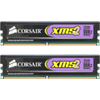
Of course the thing that stands out most about this kit is the fact that it's stock speeds are a staggering DDR2-1066. This is currently the only memory kit on the market that allows a 1:1 ratio with your Extreme Edition processor. Before we get into the nitty gritty of the specs, let's first check out the modules themselves.
As usual, the modules arrived in a clear blister pack. Unlike some companies who use the same blister pack for all their modules, Corsairs look unique depending on the type and series. The DDR2 "non-pro" series has a pure black aluminum spreader. The modules themselves are quite light due to the spreader, especially being compared to their PRO heatspreaders.
While these are not the flashiest spreaders out there, I really like the pure black look. The only way they could look better was if the PCB was also black, but that's unlikely to happen. The labels on each module gives all of the info you would expect, including the timings, speeds, density, revision and model number. Overall, these are very clean looking modules. Corsair doesn't spoil the clean look with a "Void warranty if you remove this" sticker either, which is nice.
Being the bleeding edge speeds that these modules are, I didn't expect super tight timings. Actually, these modules share similar timings to the 2GB 6400PRO kit, simply with a slightly more loose tRAS. Though 5-5-5-15 looks high, for modules of this speed, those high timings may not even matter. I did not open the modules to see what chips are used, because FBGA chips are notorious for coming off with the spreader. Corsair has told me that the chips are Micron D9GMH. Though these are not the D9 fatbodies that everybody loves to refer to, these D9's are legendary in their own regard.
These chips are very similar to the D9GKX that were used in the Super Talent PC2-6400 kit I took a look at a few weeks ago. Those modules proved extremely friendly in terms of overclockability. They also *loved* any voltage you wanted to through at them. The only real difference between the chips used between these two modules is that the D9GMH are clocked for 333MHz, as opposed to the ones used in the Super Talents that were clocked for 400MHz. Of course, it may seem funny right off that these faster Corsair use slower chips. The basic reason behind this is that the 333MHz are fully capable of the required DDR2-1066 speeds, and cost less. That in the end means cheaper modules for you.
Using modules of this speed of course requires the more than usual voltage. For stock speeds, 2.2v is the required amount of juice, which is still quite manageable. Though I didn't risk a finger, I hear that these chips can get *very* warm, so having a good 120mm fan pointing towards the modules will help keep things cool and may even help your overclocks.
As mentioned in the previous section, these chips use Micron D9 chips. These chips have had a great reputation, especially lately, with their great overclocking abilities. Now, because 1066MHz is bleeding edge as it is, I didn't expect it to get much better than that. Either way, my goal was to hit DDR2-1100, but that didn't happen.
Now one thing I have to mention is the fact that at first, I was unable to have stability at stock speeds. This is because there was a lot of stress on my motherboard compared to slower speeds. Increasing the available voltages in my BIOS such as MCH and ICH Chipset, proved to be the problem. After increases the voltages, the memory was as stable as any memory could be. If your chipset doesn't have active cooling and you are a little wary of increasing the voltages, you may want to make sure you have good airflow or even a fan blowing at the chipset heatsink.
As you can see, I didn't hit my DDR2-1100 stable goal but rather DDR2-1080... still a great overclock. As I mentioned, these chips love voltage and here's proof. With 2.4v, I was able to pull of DDR2-1100 with extremely tight timings of 4-4-4-8. Now, these are not stable speeds and timings by any means, but they may very well be with more voltage. Sadly, my un-modded P5WD2-E only goes up to 2.4v.
You may also wonder why I underclocked the modules. Well, there are two reasons for this. First, because they didn't actually have much overclocking power due to being such a high speed to begin with.. three settings is not much fun to benchmark with. Secondly, I was interested in seeing how they compared at slower speeds compared to other modules. The only setting I will actually be comparing to other modules is the fourth in the above list. That setting specifically has proven to be the best for my motherboard and CPU. It's the highest I can take my FSB but retain great timings and speeds on most any modules.
On this page, I will explain how our testing procedures go. Firstly, the hard drive that hosts the operating system is fully defragged using Diskeeper 10 to assure no hiccups will be due to the OS. All testing occurs on a standalone OS installation that's dedicated to testing. Second, all unnecessary programs in Windows are closed down, minus the essential ones. This includes virus scanners, firewalls, peripheral software, etcetera. Before any testing occurs, the memory goes through a 4 hour MemTest run at stock settings to assure that they are error free and appropriate for overclocking and benching.
To test out the modules, I used the usual variety of benchmarking tools. No games are included in our memory benchmarking, because I consider them to be a waste of time. Overclocking your memory generally means overclocking your CPU in conjunction, which makes it hard to diagnose just what kind of difference the memory made. Here is the selection of tools we use in the review:
Throughout all of our graphs, you will see this structure: "400MHz, 4-4-3-8, (200)". The number in the parentheses is the FSB while the MHz is the frequency of the memory. Multiply that frequency by 2 and that's how you will acquire the DDR2-800 speed.
SANDRA is by far one of the most popular memory benchmarking tools out there, and for good reason. The reason I personally like it, is because you have the option of tweaking countless settings in order to benchmark to your liking. I run benchmarks using default settings in addition to unbuffered.
The scores are right up to par with what I expected. As usual, DDR2-933 was the best performer, due to my CPU not being able to go far beyond 280FSB. The unbuffered favored the 2GB kits, obviously due to the extra bandwidth.


EVEREST is another great memory benchmarking program, because it allows you to get values for not only Read and Write, but latency. I prefer the good ole 2.22 (2005) version because I find it more accurate than the newer version, but I have included 2.80 benchmarks for you diehards out there.
Our 8500 has taken the cake for the top Read and Latency results, but is slightly back in the Write side of things. Clearly, there are some obvious benefits to 2GB kits that I didn't realize before.

Things are looking good in 2.80 also. Of course, here's the reason why I don't trust 2.80 like I do the older versions. Each result is clearly better than anything in 2.22, and the Write results are almost doubled??

MemTest is not really a benchmark, but rather a memory error checker. I use it to grab the bandwidth value though, because as you overclock it, it will go higher. It gives you a quick and general idea of whether your overclock did any good or not.

SM 2 is a benchmarking tool I only recently found out about. What's great about it, is that it can spit out the usual MB/s results in addition to an overall 'Sciencemark'. The Sciencemark bases it's result on various criteria including the speed and latencies of the modules.

Even though mathematical calculations like this are extremely CPU intensive, they are also ram intensive. The faster your ram, the faster the overall calculations will be also. How SuperPi works is that you can specify how many digits you want to calculate past the decimal point. If you choose 1 Million, it will begin with the 3. and continue with 14359 all the way until it hits the 1 Millionth digit mark.
The reason SuperPi 1.5 Mod is better than the original SuperPi is because it shows you the results past the decimal point, whereas the original will give you a flat out second count (29 vs 29.153 for example).

Go ahead and whine about me using Futuremark products.. do it! Despite not being entirely accurate to some people, they are still a good way to scale your overclocks. PC Mark does a great job of performing 16 different memory specific benchmarks and spitting out an overall score. As you can see, the memory results scaled well with upping the FSB. 3D Mark 01 is also there.. only because I had too much time on my hands ;)

So what have we gathered from all of our benchmarks? This stuff is FAST. Without a doubt, this should prove to be the fastest 1GB kit you can buy for your DDR2 system today. Sadly, our benchmarks don't even show the full raw power of these modules because of our limited CPU. If you have an EE processor with a stock 1066FSB, then these modules will really shine. If you are an extreme overclocker, these modules have been known to hit near 600MHz. So despite them being 'topped out' as is, there is still a lot of overclocking fun to be had.
So the question really stands.. even though these are the fastest 1GB modules in existence, is it worth it to buy more than say.. a 2GB kit? I didn't do much gaming tests with these modules, except Half-Life 2 which of course ran smooth. When moving up to games like Battlefield 2 though, it's obvious why 2GB kits are selling so quickly today. Of course, some people only have a need for a 1GB kit, and for the ultra performance, this kit should be right up your alley.
I have read some stories of people who own two of these kits for a 4 * 512MB configuration, but have yet to see any performance reports on it. If you are one of those people who plan on going this route, you will want to make sure you have a great motherboard capable of handling that much strain on your memory controller.
So, is this ram worth the $230US asking price? Well, that's obviously for you to decide. There's only one other PC2-8500 kit on the market that I know of, but I have been unable to see it for sale on any website... so that makes it not so available after all. Personally, I have become so addicted to 2GB kits that I would have to take that route. If you are in the need for an extreme 1GB kit, then you cannot go wrong with this one. Just make sure the rest of your computer can keep up ;)
If you wish to discuss this review, feel free to head on over to our forums. You do not need to register in order to reply to our content related threads!


Copyright © 2005-2008 Techgage Networks Inc. - All Rights Reserved.