Techgage logo

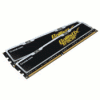
Crucial 2GB DDR2-1066 Ballistix Tracer
Date: April 27, 2007 - Author: Rob Williams

It's not often that Crucial releases a new high-end kit, but they've finally caught up to everyone else and released Ballistix clocked at DDR2-1066. Today we are taking a look at the Tracer version and look to see how far we can push them over stock.


Introduction

If there is one memory company that knows what they are doing, it would be Crucial. Although their enthusiast kits tend to be overshadowed by the likes of OCZ, Corsair and others, when they release a new high-end product, people pay attention. In fact, on the day that the press release crossed the wire, I was surprised to see it posted on sites that don't even normally include hardware news. Crucial has no doubt done well to retain their large fanbase.

If anything struck me odd though, it would be the DDR2-1066 speeds. I was curious why everyone around was so excited at that fact, when kits of those speeds have been out for well over a year. Well, that's Crucial for you. They have their ways to enthuse people ;-)

So this is not an ultra-high end kit, such as the OCZ Reaper that we took a look at last week, but on all sites I checked out it was priced right along other 8500 kits, but I will get more into this in our conclusion.

It's been about six months since I've taken a look at another Crucial kit, which was the PC2-6400 Ballistix. That proved to be a solid offering, but not for overclockers. In that regard, I was left less than impressed. Jumping into this new kit, I had renewed enthusiasm and hoped to at least push it to 600MHz as I have with all other recent kits I've reviewed.

Aside from that, this will be the first Tracer review we've had, and also the first Tracer kit I've ever touched. Until now, I wasn't even sure what the modules looked like in action, but I can say right now, I liked what I saw. Let's have a closer look.

Closer Look

Crucial doesn't use any special packaging for their modules, so this is what you will see if you order any one of their kits. Though it's not that outgoing, it keeps the modules very safe during travel, which is the important thing.

For some reason, these Tracer modules proved a little difficult to photograph while retaining good lighting and color. It could be the mirror trim, who knows. This is a very simple spreader compared to some on the market. It has no ripples/fins to help with heat dissipation, but it does leave good room for airflow.

Overall I enjoy the look of the modules, but one thing really stood out to me.

Was orange really the best color Crucial could come up with? If this sticker was black with white text, it would have looked far better. Orange stands out like... orange on a black module. You can see the LEDs at the top of the modules, but it's hard to actually see them well without squinting since it's so dark.

I'll share a photo of the LED's in action later in the review. For now, let's hop into some overclocking action.

Overclocking and Testing Methodology, Sandra

Ahh, how interesting overclocking would be with these modules. I mentioned that I didn't have much luck at all with their PC2-6400 kit, so I was a little skeptical jumping into this one. Before overclocking, I always look for the retail price in order to wager who the modules are targeted towards. If it's a $400 kit, it should be far more overclockable than a $200 kit, for example.

One popular e-tailer sells the modules for ~$270, but includes a mail-in rebate that will drop it straight down to $209. Oddly enough though, there are other e-tailers (that you might see in our affiliate ads) that are selling the kit for $199 without any sort of rebate. At that price range, this is a great kit even for stock speeds. Those LEDs really do add to the value if you love to pimp your PC.

Thanks to the good price, I didn't expect superb overclocking, but I was wrong. Here are my stable overclocked settings:

My goal was 600MHz, but these modules proved 100% stable at 609MHz. When I state 100%, I mean it passes at least 1000% in MemTest for Windows and also a full 3D Mark 06 run.

609MHz is not a record breaking overclock, but given the price, it's superb. $200 DDR2-1066 modules that overclock to DDR2-1200 stable... it's a good thing.

I am very pleased with the overclocking potential in these modules. If you have the potential to go beyond 2.5v, you might be able to push them a bit further. I hit a serious wall, however. 612MHz crashed Windows as soon as it logged on, 611MHz allowed me to open a benchmark. 610MHz crashed the PC when I opened up Photoshop. 609MHz proved 100% stable all around, throughout everything. What a difference a megahertz makes.

Testing Methodology

Throughout all of our benchmarks regardless of what we are reviewing, testing is done in a clean and stand-alone version of Windows XP Professional with SP2. Prior to testing, these conditions are met:

The testing rig used for today's benchmarking is as follows:

Sandra XI

Sandra is always the first benchmark to come to mind when we need to do memory benchmarking. Or CPU benchmarking. Or storage benchmarking. You get the idea. It's a superb all-around tool that we rely on quite often.

Good results all around, but it's too bad we couldn't a wee bit closer to the 7K mark. Let's move onto Everest, Sciencemark and Super Pi.

Everest, Super Pi, Sciencemark

Next on the list is Everest 3.5, with it's read/write and latency tests. We broke through the 8K mark in our read tests and burst through 5,500 in our write. These benchmarks are heavily CPU bound as well though, so the higher your CPU frequency, the better effects your memory overclocks will have.

Again, it would have been nice to come a little closer to 50ns, but it's hard to argue considering the price of the kit. Great performance as far as that goes.

Super Pi

This is not a memory benchmark per se, but rather one that stresses a single core of your CPU to it's full potential. Because it crunches such an insane amount of digits, tighter timings and faster memory generally offers better results. We choose to run with an 8 million test, as anything lower flies by too fast on a Core 2 Duo and it's hard to generally see the differences that way.

Sciencemark

Though it's no longer in development, Sciencemark is a tool I still like to keep in my chest... err thumb drive. It gives results far more in-depth than other benchmarking programs out there, although you'd have to be an engineer to care for -all- the information it delivers. It generates a bandwidth result just like Everest and Sandra does, and is effected by higher CPU clocks.

Finally, let's compare this kit to others previously reviewed.

RAM Comparisons, Final Thoughts

Here, we compare our overclocks of the memory being reviewed alongside other recently evaluated sticks. These graphs include benchmarks with each kit of ram at DDR2-1000 4-4-4-12-13 2.1v along with each kits own top overclock. While the DDR2-1000 results should not vary much, the top end overclocks will, given that each kit will top out differently.

For reference, here are the top overclocks for each kit of ram included:

As you can see, the Tracer 8500 was our second lowest clocked, so the graphs represent just that. However, it did surpass the Kingston 9200 kit in our latency tests to sit in third from last place.

Final Thoughts

As you've probably noticed, I review a fair amount of ram. More often than not, I am completely impressed with each and every kit I review, which makes it difficult to give one a bad rating. As it stands, I firmly believe that Crucial's Tracer 8500 kit deserves an eight out of ten, along with our Editors Choice award.

Though the kit did not overclock as high as a few others on the list, it costs far less than the majority of them. I mentioned earlier that the Tracer 8500 can be had for just over $200 from multiple e-tailers, while the others in our charts begin out at $275 and soar all the way up past $400. From that standpoint, these modules are a great choice. $200 for ram that is stable at DDR2-1200 speeds? It's difficult to discredit that.

As far as the Tracer goes, these modules will not be for everyone. If you love having additional LEDs inside your case, you will love these. When the memory is being accessed frequently, the lights just go berserk and you can easily become entranced. To add to the bling factor, the bottoms of the modules have blue LEDs, so your DIMM slots will look like a disco.

These are some fantastic modules. Crucial has taken a while to finally launch DDR2-1066 modules to the market, but they sure didn't disappoint now that it's happened.

Discuss in our forums!

If you have a comment you wish to make on this review, feel free to head on into our forums! There is no need to register in order to reply to such threads.


Copyright © 2005-2008 Techgage Networks Inc. - All Rights Reserved.



