
- Qualcomm Launches Snapdragon 4 Gen 2 Mobile Platform
- AMD Launches Ryzen PRO 7000 Series Mobile & Desktop Platform
- Intel Launches Sleek Single-Slot Arc Pro A60 Workstation Graphics Card
- NVIDIA Announces Latest Ada Lovelace Additions: GeForce RTX 4060 Ti & RTX 4060
- Maxon Redshift With AMD Radeon GPU Rendering Support Now Available

Social & RSS Feeds
Latest Videos



Latest News
e frontier Poser Figure Artist


by Jen McPherson on December 12, 2007 in Software
Don’t have access to a live model? Neither do most people, which is why an application like e frontier’s Poser Figure Artist exists. This tool gives you full control over a virtual model so that you can create the perfect pose for which to base your art off of. If you are an artist, this is a must-have.
Page 1 – Introduction
There are many books out there for artists that have poses of the human form for reference use. Of course there’s also the live model who can pose for an artist as well. Yet this can grow costly, can be uncomfortable for some people, and flexibility is limited.
Poser Figure Artist, a program developed by e frontier America, gives artists a realistic rendered model that you can pose as you like, with unlimited flexibility. It boasts a library of pre-made poses as well as hair styles, clothing, props and backgrounds, all in a 3D environment. So how exactly does this program work and can it replace alternative reference methods for artists?
Before we go further, here are the system requirements:
- Windows
- Windows 2000 or XP
- 500 MHz Pentium class or compatible (700 Mhz or faster recommended)
- 256 MB system RAM (512 MB or more recommended)
- OpenGL enabled graphics card or chipset recommended (recent NVIDIA GeForce and ATI Radeon preferred)
- 24-bit color display, 1024 x 768 resolution
- 500 MB free hard disk space (2 GB recommended)
- Internet connection required for Content Paradise
- CD-ROM drive
- Macintosh
- Mac OS X 10.3 or later
- 500 MHz G3
- 256 MB system RAM (512 MB or more recommended)
- OpenGL enabled graphics card or chipset recommended (recent NVIDIA GeForce and ATI Radeon preferred)
- 24-bit color display, 1024 x 768 resolution
- 500 MB free hard disk space (2 GB recommended)
- Internet connection required for Content Paradise
- CD-ROM drive
processor (700 MHz G4 or faster recommended); Intel Mac through Rosetta only
Installation of the program is simple. First, you read and accept the EULA, choose what directory you want it installed in and hit “Ok”. You select your installation option, and they recommend Easy Install. I chose Full.
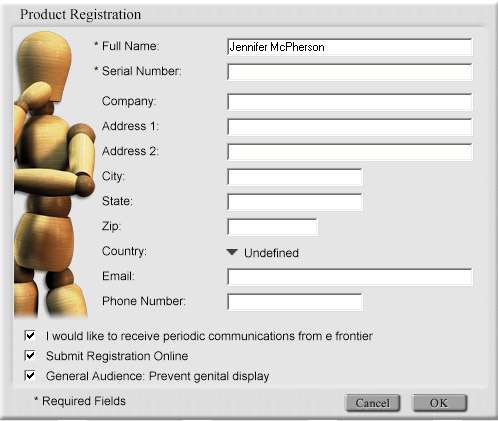
They also ask you if you if you want genitalia to show on your model. I chose the general audience option, as it is unnecessary for what I draw and I have small children at home. However as an artist, the option is available. The only thing is that if you wish to change this setting you will have to uninstall and reinstall the program, and opt to have complete nude models installed with the program.


After installation, I read through the quick start guide, but even without it’s pretty easy to figure out how things work. On the left side of the screen is the model and below that are your manipulation tools.
The right side holds the reference library, publish and tutorials. The Library tab is where you are given your poser content and where any additional content you get is placed. There is also an online tab, where you can access Content Paradise’s website to download free and for-sale content made for Poser Figure Artist.
To start, you are given a figure by default, named James, but you can remove this character from the scene by selecting them and hitting delete on your keyboard. The program comes with several different figure models, male, female, child and the typical wooden mannequin. You can use these instead of the human models, if you prefer. Select your model and then begin posing.

You can start the scene from scratch and create your own pose. However this can take a while, so there are pre-constructed poses in your library to use. Clicking on the poses tab opens up a set of folders that hold more content and sub folders. Find a pose that you like in the given list and apply it to the character by double clicking on the pose.
Once applied, they may still not look exactly as you want so you can adjust them in the window by selecting the character’s parts and moving them. The tool selections below your model are: rotate, scale, twist, magnify, translate/pull, translate out, color and direct manipulation.
I had a few troubles with the program, though they were minor. First was with the tools wanting to twist the parts – especially the ankles of the model – so drastically, it made me cringe.
These small glitches can be a bit annoying, especially when the slightest mouse movement can throw off your entire pose. It does have an undo control, thankfully. The controls also have rotate-x, rotate-y, and rotate-z, which you can adjust on a slider or reset by clicking on the arrow tab. Adjusting these sliders helped in this area, so the issue wasn’t overall impeding.


The other issues I had were the top menus closing before you could select an option. This was caused by having the model selected in your preview screen while trying to access the menu options. Again nothing big, but it was a nuisance at times, especially when you are working quickly and forget to unselect the model.
I suggest messing around with poses for a while before you move onto the other sections. It won’t take long to figure out how to move the model with each tool, and if you need help you can access the reference manual by selecting Help from the main menu.


After Poses are Expressions, Hair, Hands and Props. The expressions supplied, to me, are not very realistic, so I rarely used them. The hand poses are nice to have and gives you a quicker way to adjust the way the fingers are moving. Choose a hand pose you like and click. It will ask you what hand you wish to apply it to, and then hit apply. Sometimes the hand poses aren’t exactly spot on either, so some minor adjustment will need to be done.
|
|

Support our efforts! With ad revenue at an all-time low for written websites, we're relying more than ever on reader support to help us continue putting so much effort into this type of content. You can support us by becoming a Patron, or by using our Amazon shopping affiliate links listed through our articles. Thanks for your support!