Techgage logo

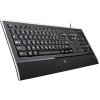
Logitech Illuminated Keyboard

Date: September 26, 2008 - Author: Jonathan Varga-Szabo

Logitech's diNovo Edge is undeniably a great-looking keyboard, but it's also undeniably expensive. The new Illuminated Keyboard promises to deliver a lot of the same features, such as a thin frame, backlit keys, smooth key presses and a slick design - but for close to half the price of the Edge. Should you be getting ready to pick one up at launch?


Introduction

Logitech has shown its expertise in peripheral development for years. Durability, comfort, and usability are always their top priority. When all is said and done, Logitech makes a very solid product. The Illuminated Keyboard is no exception. I had been looking for a keyboard with regular backlighting for a while, without the obnoxious glare of a nauseating color, like orange or blue.

Although Logitech has a few gaming products, this product belongs to their "Professional/Entertainment" line of peripherals. It's supposed to have a sleek, mature look to it, with functional elements to increase the comfort and efficiency to the user, and a medium price tag. In this case, the Logitech Illuminated Keyboard is the ideal candidate for the job.

The keyboard comes in an attractive, glossy box, but what surprised me most was just how thin it was - hardly an inch thick. Upon removing the lid, the keyboard is presented in a clear plastic cellophane, which keeps the keyboard protected while in storage, but does not impair your view of the keyboard when you unwrap. The USB cable is hidden in a separate compartment in the box, and the drivers CD is underneath the keyboard, making the package-opening almost a ceremony in itself.

Closer Look

The keyboard has a lovely textured look to it, except for the wrist-rest, which is coated in a matte rubber surface, and the line of glossy plastic between the wrist-rest and keyboard. The wrist-rest surface is great in that it is anti-slip, and almost feels slightly soft on your wrists. The keyboard also has a clear plastic border around it.

The USB cable is roughly 6 feet long; enough to reach your desktop whether it is underneath your desk or on top of it. The cable also seems especially durable, with a non-sticky, matte rubber coating. The keyboard is very thin, 9.3mm at its thickest point, and it also has an integrated number pad, which was previously absent on Logitech's diNovo Edge ultra-thin Bluetooth keyboard.

Once I plugged in the keyboard, the keys began to glow white, but then soon shut off, due to Windows' process of installing the drivers. Because I already owned the diNovo Edge, the drivers provided from Logitech in the keyboard's box merely updated the very helpful Logitech SetPoint software.

Installation was a no-brainer, and the keyboard, while usable without the software, is much more capable and customizable with the SetPoint drivers. SetPoint enables you to customize the settings of the function keys, which includes setting the key to launch an application, perform a macro, or open a web page.

The software also enables you to have multiple Logitech SetPoint enabled peripherals customized in the same driver software. To use the function keys, a function-shift key must be held, similar to a laptop. The tabs at the top of the user interface help you customize not only your keyboard, but your Logitech mouse as well, if you've purchased one.

Usage & Final Thoughts

Among the function keys on the keyboard, in the upper-right hand corner, there is a key with a light bulb on it. This controls the brightness of the backlighting, or turns it off. I found this especially useful, especially when leaving my computer on overnight, since the light can be distracting when you are trying to sleep, or whilst watching a movie.

There are four settings available: high, medium, low, and off. However, even when the backlighting is off, you can still see each key clearly. If you feel that the keys are too bright, you can set it to any of the settings to make it appeal to your eyesight.

That feature was very handy, specifically during the transition between day/night usage, where the "high" brightness level was used during the day to increase visibility, and the "medium" or "low" settings at night when my room was too dark to have a keyboard's lighting glare at me. I sure wish I had the adjustable brightness function on my Razer Tarantula!

Using the SetPoint software to customize the function keys really helped in Firefox, and I can see the customized function keys coming in handy in a plethora of other applications. I set the "Home" key to open Firefox, the "E-mail" key to open Thunderbird, the "Search" key to open Google and a few others as Firefox functions like opening a new tab, or jumping between tabs.

The board even has an eject key, which borrows from the Mac. The usual Play/Pause, Skip Forward, Skip Back buttons are also there, and are great for video or music applications. I also really liked the font used on the keyboard, a semi-futuristic, slightly wider and blockier-than-usual type. You'll also see that the Caps, Scroll, and Num Lock indicator icons are on the bottom of the keyboard, rather than the top, between the wrist rest and the number pad. If properly configured and customized, you'll see your mouse usage decrease when using the keyboard with the function keys.

Logitech's innovative PerfectStroke key system really helps set this keyboard apart from other desktop keyboards with laptop-style keys. Each keystroke feels very solid, but still soft and gradual, not ratchet, and without that slight rattling noise. Also, this keyboard is very quiet, due to the PerfectStroke key system.

The wrist-rest I mentioned earlier is also very useful, because of the soft-feeling anti-slip rubbery coating, which felt almost like a velvet or thin suede. The keyboard is very thin, and consequently, so is the wrist rest. While some see this as an issue, it felt much more natural to type on it rather than a thick bulky hand-rest.

On the back of the keyboard, there are two extendable "feet" that give the keyboard a better angle to type on. I did not use this function, but I can see how it may appeal to other typers. The bottom of the keyboard also has little rubber rectangular nubs on it which help the keyboard stay stationary on your desk.

Although not a gaming keyboard, I tried playing a few first-person shooters with it, and the keyboard performed surprisingly well. While the keys don't feel like they should be "mashed" or stomped-upon by your fingers, the action of the keys were crisp enough that they provided a good overall gaming experience.

Final Thoughts

I really appreciated the minimalist design of the entire keyboard. Logitech was also able to include a number pad while staying away from a keyboard that feels bulky. The backlit keys are also very useful, and create a strong eye-appeal. The ability to control the lighting on the keyboard was even more to my liking, since backlighting can get annoying quickly, especially when you want to watch a movie in the dark or sleep.

The soft wrist rest and crisp, slightly shallow action of the keys makes typing comfortable on the hands. Customizable keys are very useful in my usage of the keyboard, and having them controlled by a separate function key keeps the keyboard uncluttered.

Although the keyboard felt steady as a rock on a table or lap, I am concerned about the durability of such a thin keyboard. I feel like I could snap it in half with my bare hands if I really tried, (not that I would want to). Since it is so long and thin, when held and twisted slightly, you can see the keyboard flex. It's a bit heavy as well, so a good fall could easily either crack the keyboard or knock some keys off.

I'm also not sure if I really like the clear plastic bit that borders the keyboard. If it were modular or removable in some way, I'd be much happier. Lastly, the rubber coating on the wrist-rest, while comfortable, worries me. It feels great right now, but seems like the kind of coating that will "rub-off" after a while, and start to flake or peel. And because it's anti-slip, it's difficult to get any dust off with a swipe of the hand or cloth.

Aside from all that, I think the Logitech Illuminated Keyboard is an absolutely fantastic peripheral. It has everything I like in a keyboard - functionality, comfort, and looks. The backlighting on the keys is as good as I've ever seen. Although durability may seem like an issue, a careful user needn't fret.

I'd love to see a wireless version of this keyboard come along, but as long as you're not trying to use your computer from across the room, I don't see the lack of a wireless interface as a problem. The Logitech Illuminated Keyboard is definitely a worthy addition to your desktop, and will keep you and your eyes comfortable for hours at a time.

Discuss in our forums!

If you have a comment you wish to make on this review, feel free to head on into our forums! There is no need to register in order to reply to such threads.


Copyright © 2005-2009 Techgage Networks Inc. - All Rights Reserved.