
- Qualcomm Launches Snapdragon 4 Gen 2 Mobile Platform
- AMD Launches Ryzen PRO 7000 Series Mobile & Desktop Platform
- Intel Launches Sleek Single-Slot Arc Pro A60 Workstation Graphics Card
- NVIDIA Announces Latest Ada Lovelace Additions: GeForce RTX 4060 Ti & RTX 4060
- Maxon Redshift With AMD Radeon GPU Rendering Support Now Available

Social & RSS Feeds
Latest Videos



Latest News
OCZ Equalizer Laser Gaming Mouse

by Matt Serrano on April 9, 2007 in Peripherals
OCZ has been hard at work lately. Their product lineup has evolved from offering power supplies and ram to flash drives, cooling solutions, video cards and even gaming mice. However, one thing’s stayed the same: they’ve targeted themselves towards enthusiasts.
Page 1 – Introduction
|
|
Though some have varied opinions, for the most part gaming isn’t as simple as pointing and clicking. Gamers who are more competitive desire an edge, something that’s as responsive as they are. Once the core’s been taken care of, comfort and ease of use take the front stage.
Today, we’ll be reviewing OCZ’s Equalizer mouse. This product goes have some innovative features that do set it apart. Geared towards gamers, this mouse seems to be one of the most attractive solutions out there. But even though it looks great on paper, there’s always a level of skeptically that should be reached, with good reason.
- 2500 DPI Gamer-Grade Laser Engine
- On mouse 6-DPI-Shift (400-800-1200-1600-2000-2500)
- Implements Agilent 6010 Chip and high-speed 7080 FPS technology
- Triple Threat Button – 1 click, 3 shots for a gaming advantage
- Dual laser engine for enhanced tracking on a wider range of surfaces
- Right-handed ergonomic design
- Gold-Plated USB Connector
- Thin, flexible wire design feels like using a wireless mouse but without sacrificing latency
- Convenient ‘back’ & ‘forward’ buttons
- Comfortable, no-slip grip for intense gaming battles
- Plug and Play
- Included Equalware software for complete customization
- 6 Year Warranty
This product is a rebrand of A4Tech’s X-750F mouse. This practice isn’t unheard of, so there will be no reduction in score. This is essentially a review of OCZ’s adaptation of A4Tech’s product.
Closer look
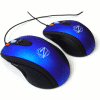
The Equalizer is in fact made up of two models noted as the "desktop" and "mobile" models. The only visible difference is the size of the mice.
OCZ has never been unified with their box designs. Every product has had different art work or theme. The Equalizer comes in a simple blue box with the mouse shown through with flames accompanying it.

The back holds the product’s feature set outlined for potential buyers.

The mouse itself has a reflective blue finish.

Next to the scroll wheel there is a button called the "Triple Threat" button, giving you the option of simulating three mouse clicks with one press.

There is a button on the top of the mouse specifically designed for changing the DPI. The Equalizer has a feature that lets you know what setting the mouse it set on.

On the left side there are forward and back buttons with a thumb grip.

Besides the mouse, a manual, driver CD and mouse feet are included in the package.
|
|
