Date: January 28, 2008 - Author:
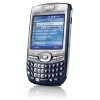
Palm's Treo 750 is one of two models offered with Windows Mobile - this one in particular using 6. Specs include a 2.5" 240x240 touchscreen, 300MHz processor, miniSD support, 1.3MP camera with 2x zoom, 4-hour talk-time, GSM/UMTS support and more.
For over a year now, I have been using a smartphone in some form or another. It started with our evaluation of Palm's popular Treo 700w that worked on the Windows Mobile 5.0 platform. In our review, we found the device more than capable to meet our expectations and we could appreciate the familiarity of working in a Windows environment.
As the product line evolved, and all successful lines do, it was only a matter of time before the next version of the Treo was announced. We saw such a device at last year's CES when Palm was showing off their then new Palm Treo 750.
Originally released by Cingular all the way back in January of 2007, the 750 continues to be an excellent choice for mobile users who don't necessarily want to lug around a notebook to do simple tasks like checking their email. Taking the design of the Treo 680, the 750 offers a far friendlier shape and styling than that of the 700w that we looked at a little over a year ago.
Keeping many of the features that we loved about the 750, as well as a few that we would have liked to have seen changed, the Treo 750 at first glance, appears to be a worthy upgrade in the immensely popular 700 series.
As we get into the testing of the phone, we'll take a look at all the highs and lows that we encountered in our time with the device. Having used the 750 for a couple of months, testing of the smartphone was done in a real world environment, used for quick email messaging, phone conversations and simple multimedia uses such as music and video on the go. Please note though, we received our 750 months ago, prior to Windows Mobile 6 being shipped with the device. Therefore, all of our testing has been done with Windows Mobile 5.
With that said, let's get down to business.
As we mentioned earlier, the 750 shares is chassis with the Treo 680. Both of these smartphones are smaller and lighter than the previous Windows Mobile Treo, the 700w. With its internal antennae, even looks more compact from a distance and fits quite nicely in any pants or coat pocket you might have. Taking a tour around the 750 itself, the business like nature of the device clearly comes through. With its non glossy surface, the 750 won't win any beauty contests but for me personally, I appreciate this approach.
On the front of the 750, we can see that little design differences can be found between the 700w and the current 750. There is a 240x240 pixel LCD touch screen powered by a 300 MHz Samsung developed processor. Under the smaller than we would like to see screen, there is a full QWERTY keypad and a 5 way directional pad.
Turning the phone over, there is little out of the ordinary. At the top, there is a large speaker for speaker phone conversations, a 1.3 mp camera and a small viewing mirror for those of you who love to take silly pictures of yourself.
Located in the top left hand corner of the phone is the stylus. Palm has done a good job of keeping the lines of the stylus area smooth as to not catch it on your pants when pulling it out of your pocket but with enough groove to allow even the most habitual nail-biter easy access to the stick.
Running down the left hand side of the Treo are three buttons to control system volume and voice functions. These buttons are easily distinguishable as they are raised slightly above the side of the phone.
On the next page, we'll look at more of the Treo 750's features.
Palm's new Treo 750 handheld offers multiple refinements over the previous 700 model that make it a worthy successor to the original. Let's take a look at more of the Treo 750's features.
The Treo's keyboard itself is a full QWERTY with secondary functions attached to each key. Flanking the 5 way directional pad are six different buttons. At the top, there is a pair of hard keys that correspond to the touch screen's soft keys. Power is turned off and on via the red hang up button. This is a bit of a misleading button as it doesn't completely power the phone down but rather turns the phone capabilities of the 750 on and off by holding the button down briefly. If you tap it once however, the screen will go black, helping to conserve as much battery life as possible.
Turning the 750 back over once again, we can see that the battery takes up a significant amount of the real estate on the back. Under the battery rests the SIM card.
The stylus of the 750 isn't anything of wonderment, but is a solid feeling piece that should withstand as much abuse as you can put it through. Like we mentioned earlier, the stylus slides down inside the phone itself when not in use.
On the right hand side of the 750, we can see that Palm has abandoned the use of a full sized SD card in favor of its smaller brother, mini SD. If you look closely, just under the card slot on the left hand side, there is a hard reset button. It's nice that this is included and in a well protected but easily accessible area. To the right of the card slot is a standard iR port for those of you that might need this extra functionality.
On the bottom of the 750, there are ports for a PC syncing cable, power charger and a small headphone jack for those who want to fill your mini SD card with music. One thing I found nice was the firmness of the power connector. There were times that the phone fell of my desk and through it all, the power cable stayed put.
On the next page, we'll take a look at the Treo 750's software, and subject it to a battery of tests.
When first powering on the Treo 750, we were reminded that this is still a Palm unit by its initial loading screen. After that, Windows Mobile 5 starts to load before settling down to the "desktop" that we all have come to expect from a Windows Mobile device. Once again, please note that we've had our review unit for a few months, prior to the time when Palm began offering Mobile 6 with the 750, hence why we are using and older version.
In our testing, and I make that sound far more glamorous that it really was, we simply used the phone as we would any other smartphone. I set it up with our exchange server information, and away we were, receiving and sending emails like it was in our job description. When replying to emails or text messaging, the small keyboard proved to be a worthy adversary at first but once I got used to the feel and layout, it was as if I had been using the device my entire life.
Palm gives the Treo 750's battery a talk time of four and a half hours with a staggering standby time of 10 days. In everyday use, I found that I could use the 750 on a full charge for over a full day and in most cases, well into a second, giving me piece of mind in knowing that if I am ever away from a power source for any length of time, the Treo's battery has me covered. That said, I would still recommend topping it off each night with a charge while you're busy dreaming about the next Techgage review.
In voice conversations, the phone quality was quite good. When asked about the call recipient's sound quality, continually I was told that they could hear me clearly. On the receiving end, I could hear everything I was being told and never had to deal with the "echo" effect. I did use the speaker phone option on a few occasions and for what it's worth, the thing is loud. I personally prefer to use the phone as a handset but for those of you who love the speakerphone option, I don't see you getting too let-down by the Treo's performance.
In using Office mobile, my only recommendation to you is to avoid it unless you absolutely have to edit something in a hurry. Outside of Outlook, I found that the other office apps were clunky and cumbersome to use but if you had to use them, they served their purpose. A lot of the issues with Office Mobile apparently have been rectified in Windows Mobile 6 but I currently do not have the means to offer a direct comparison between the two. Since the latest 750's offer Windows Mobile 6, we are hoping you will not run into the same problem.
In the handful of months that we spent with the Palm Treo 750, we enjoyed our experience virtually the entire time. There were a few hiccups, mostly with Office Mobile but our overall time with the Treo 750 was an enjoyable one. There are a few reasons to consider this year old platform and a few might steer you in another direction. With everything in order, let's start with the positives.
The 750 overall is a snappy smartphone with far more functionality than most users will need. I personally like the styling when compared to other shinier phones. Running Windows Mobile 5, the Treo 750 Exchange integration positions the device as a nice alternative to those Blackberries that litter corporate America from coast to coast. Another perk of the 750 is the 128MB of built in memory, of which 60 MB is free to the user. This is a fair amount for anyone not looking to use their Treo as a multimedia device. For those types of users, there is thankfully a mini SD slot that provides more than enough storage expandability.

With the positives out of the way, let's look at the drawbacks. While I personally love the styling, there are those who will scoff at you when you pull it out of your pocket to answer a call, reply to an email or check your voice mail simply because it's not as pretty as a Blackberry or the amazing iPhone.
I have always been one for functionality over design but when the two can find common ground you get a solid device. The other major downfall is Windows Office Mobile. Simply put, it's a poor program suite at best and almost unusable at worst. While I didn't exactly hate the app, I did find that the problems were sometimes more than I could handle, prompting me to simply turn the 750 off and pull out the notebook.
All in all, the Palm Treo 750 is a device that is still well suited to the business crowd even though it's going on a year old. Wi-Fi is excluded so those of you who are looking for that functionality should inquire about a wireless mini SD adapter for your 750. Those of you not concerned with such functionality will more than likely be happy with your Treo 750 experience. Palm has been around for a while and the 750 appears to prove that they can still develop a solid product in the face of the ever growing smartphone market.
If you have a comment you wish to make on this article, feel free to head on into our forums! There is no need to register in order to reply to such threads.
Copyright © 2005-2006 Techgage. All Rights Reserved. | Proudly hosted by Neosurge.