Date: February 25, 2009 - Author: Rob Williams
Gaming on a budget isn't as difficult as it once was, thanks to superb offerings from both ATI and NVIDIA that go for a modest price. But, what about the sub-$100 crowd? We'll find that out here, at least from the ATI side of things, with Sapphire's HD 4670 GDDR4 and HD 4830. Both feature great efficiency, and believe it or not, great overclocking as well.
It's been quite a while since we last took a look at a "budget" graphics card, so to help make up for lost time, we're going to be taking a look at two here today. Both come courtesy of Sapphire, so they're both ATI-based cards: the Radeon HD 4670 and also the Radeon HD 4830. Both include 512MB of on-board memory, although the HD 4670's largest selling feature is the inclusion of GDDR4, rather than GDDR3 of most other cards out there, including the HD 4830.
I should clarify what "budget" means to me, and most other people, because lately, it's been quite difficult to discern the true meaning. That's actually a good thing, because the value in graphics cards today (and CPUs for that matter) is incredibly good. For $150, you can get a truly amazing graphics card, despite the fact that many call it inexpensive. Budget in this case denotes cards that cost at or under $100, and in the case of both of the cards here, they fall well below that, especially if mail-in-rebates are taken into consideration.
In the past, I'd be quick to discredit a "budget" graphics card for the simple fact that they've usually been quite under-whelming. Compared to cards even 50% higher in cost (which here would equate to $40 - $50), the performance just wasn't there, and I'd actually feel bad for anyone who found themselves having to suffer with what they had. As just mentioned though though, today's lower-end and mid-range cards offer tons of performance for a modest price, so I had much higher hopes with these cards here today than anything else in the sub $100 category that I've taken a look at in the past.

It's still important to note, however, that as with any sub $100 graphics card, you're not going to get anywhere near the performance as the next step-up on the ladder. Today we'll be able to see some proof of that, as the HD 4830 does indeed follow the HD 4670 on ATI's hierarchy. On the other hand, such cards are generally quite ideal for those wishing to run either a low-power machine, or an HTPC. Both of today's cards are of a small form-factor, and they both have complimentary power consumption and temperatures as well.
If you're asking yourself, "Why did he include the type of RAM in the title for the HD 4670 but not the HD 4830?", then I'll tell you. Normally I don't even list the amount of on-board memory in the title, but in this particular case, the GDDR4 is supposed to be one of the card's main selling points, and Sapphire themselves have included it officially in the title. Is it really that big of a deal? Not in the grand scheme, but nobody is going to push away faster memory as long as temperatures and power consumption are kept in check, so there's little to complain about.
I have to mention, I actually find Sapphire's "Ultimate" edition card to be of much more interest, as it features near-identical clock speeds (memory is 27MHz slower), but a completely passive cooler in lieu of a fan. Now, after testing this GDDR4 version, I can attest to the fact that the fan is quite silent, but completely silent definitely gets my nod where a card like this is concerned.
But I digress. As mentioned above, the HD 4670 from ATI is designed for those value-conscious consumers who don't want to spend a lot of money, but don't want to sacrifice all of their gaming ability either, as they'd expect from a ~$50 offering. While it won't offer anywhere near the performance of say, the Radeon HD 4850, it will most certainly have enough "oomph" for gamers using resolutions of 1680x1050 or less, and who don't have the desire for anti-aliasing (and at this price-point, you really shouldn't expect that in games outside of Solitaire).
Of course, that's not the only GPU we'll be taking a look at here, as we also have the Radeon HD 4830, a card that's designed to out-perform the HD 4670 for an extra ~$20, but fall right below the stellar Radeon HD 4850. Most HD 4830's I've seen on e-tailers like Newegg currently retail for very close to $100, and most fall well below after a mail-in-rebate. Overall, both cards look attractive for the gamer on the budget, and as we'll see throughout the article, the performance isn't half-bad either.
Model |
Core MHz |
Mem MHz |
Memory |
Bus Width |
Processors |
| ATI Radeon HD 4870 X2 | 750 |
900 |
1024MB x 2 |
256-bit |
800 x 2 |
| ATI Radeon HD 4850 X2 | 625 |
993 |
1024MB x 2 |
256-bit |
800 x 2 |
| ATI Radeon HD 4870 | 750 |
900 |
512MB |
256-bit |
800 |
| ATI Radeon HD 4850 | 625 |
993 |
512 - 1024MB |
256-bit |
800 |
| ATI Radeon HD 4830 | 575 |
900 |
256 - 512MB |
256-bit |
640 |
| ATI Radeon HD 4670 | 750 |
900 - 1100 |
512 - 1024MB |
128-bit |
320 |
| ATI Radeon HD 4650 | 600 |
400 - 500 |
512 - 1024MB |
128-bit |
320 |
| ATI Radeon HD 4550 | 600 |
800 |
256 - 512MB |
64-bit |
80 |
| ATI Radeon HD 4350 | 575 |
500 |
512MB |
64-bit |
80 |
As you can see in the table above, ATI currently has nine different desktop Radeon cards on the market, from the ultra-low-end HD 4350, all the way up to the high-end dual-GPU HD 4870 X2. Although their roadmap is still up in the air, based on leaks we should be seeing an HD 4890 in the coming months. That card is targeting a completely different audience than this article though, so we won't talk about it here.
With so much competition in the graphics card market nowadays, companies have to work hard to differentiate themselves from the competition. After all, the root of the product sits either with ATI or NVIDIA, so people have to have a good reason to choose one brand over another. In the case of Sapphire, they're making sure that their cards look unlike anything else out there. We first saw proof of this a few months ago when we took a look at their Radeon HD 4850 X2, which featured a very unique, yet efficient cooler.
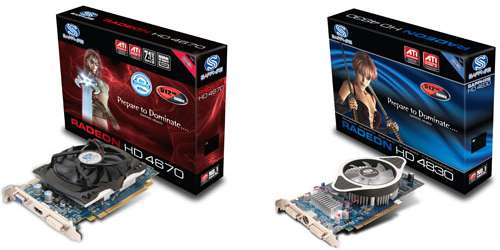
Starting off with the HD 4670, we can see a leaf-blower fan takes up almost the entire card, which isn't too difficult given that the card is actually quite small. Thanks to this large fan though, the card operates at near-silent noise levels at idle (no 3D graphics), and is in no way audible even at full load, unless you open up your chassis and put your ear near it.
What differentiates a budget card from a low-end or mid-range? The absolute lack of a power connector, of course. Powered only by the PCI-Express bus, this card can be installed into any SFF PC without the worry of power requirements (TDP is a modest 70W), and despite it's low-end status, it even supports CrossFireX. Also notice the addition of an HDMI port. If this isn't built for an HTPC, I'm not sure what is.
The cooler on the HD 4830 card is efficient, but I don't really care much for its aesthetic properties. You may disagree, however, as it's all really a matter of opinion. What does matter, though, is that it does a good job of cooling your card, and this one does.
In way of accessories, neither card includes a game, but does include hopefully everything you'll need to get up and running. The HD 4670 packs a manual, driver CD and an OEM copy of both CyberLink's DVD Suite and also PowerDVD, along with a CrossFireX bridge connector. The HD 4830 lacks the software, but also includes a driver CD and manual, along with VGA>DVI and HDMI>DVI adapters, and also an S-Video cable and 4-Pin Molex to 6-Pin PCI-E power converter cable.
For the most part, the cards themselves look great, especially the HD 4670, and the accessories are pretty representative of what you'd expect to see with a sub $100 offering. The included software with the HD 4670 is a nice added touch, though, especially if you decide to use it. Now with a look at the cards out of the way, let's first review our testing methodology and system, and then move right into our look at Call of Duty: World at War performance.
At Techgage, we strive to make sure our results are as accurate as possible. Our testing is rigorous and time-consuming, but we feel the effort is worth it. In an attempt to leave no question unanswered, this page contains not only our testbed specifications, but also a fully-detailed look at how we conduct our testing.
If there is a bit of information that we've omitted, or you wish to offer thoughts or suggest changes, please feel free to shoot us an e-mail or post in our forums.
The below table lists our testing machine's hardware, which remains unchanged throughout all GPU testing, minus the graphics card. Each card used for comparison is also listed here, along with the driver version used. Each one of the URLs in this table can be clicked to view the respective review of that product, or if a review doesn't exist, it will bring you to the product on the manufacturer's website.
Component |
Model |
| Processor | Intel Core i7-965 Extreme Edition - Quad-Core, 3.2GHz, 1.25v |
| Motherboard | ASUS Rampage II Extreme - X58-based, 0903 BIOS (12/31/08) |
| Memory | OCZ Gold PC3-12800 - DDR3-1333 7-7-7-24-1T, 1.60v |
| ATI Graphics |
Palit Radeon HD 4870 X2 2GB (Catalyst 8.12 Hotfix) Diamond Radeon HD 4870 1GB (Catalyst 8.12 Hotfix) Sapphire Radeon HD 4830 512MB (Catalyst 9.2) Sapphire Radeon HD 4670 GDDR4 512MB (Catalyst 9.2) |
| NVIDIA Graphics |
Zotac GeForce GTX 295 1792MB (GeForce 181.22) Zotac GeForce GTX 285 1GB AMP! (GeForce 181.22) NVIDIA GeForce GTX 285 1GB (GeForce 181.22) Palit GeForce GTX 280 1GB (GeForce 181.22) XFX GeForce GTX 260/216 896MB (GeForce 181.22) |
| Audio | On-Board Audio |
| Storage | |
| Power Supply | |
| Chassis | |
| Display | |
| Cooling | |
| Et cetera |
When preparing our testbeds for any type of performance testing, we follow these guidelines:
To aide with the goal of keeping accurate and repeatable results, we alter certain services in Windows Vista from starting up at boot. This is due to the fact that these services have the tendency to start up in the background without notice, potentially causing slightly inaccurate results. Disabling "Windows Search" turns off the OS' indexing which can at times utilize the hard drive and memory more than we'd like.
For graphic card reviews that pit us with a mid-range card or higher, we test at three popular resolutions that span the mid-range to high-end ground, consisting of monitor sizes of 20" (1680x1050), 24" (1920x1200) and 30" (2560x1600).
In an attempt to offer "real-world" results, we do not utilize timedemos in our graphic card reviews, with the exception of Futuremark's automated 3DMark Vantage. Each game in our test suite is benchmarked manually, with the minimum and average frames-per-second (FPS) captured with the help of FRAPS 2.9.5.
To deliver the best overall results, each title we use is exhaustively explored in order to find the best possible level in terms of intensiveness and replayability. Once a level is chosen, we play through repeatedly to find the best possible route and then in our official benchmarking, we stick to that route as close as possible. Since we are not robots and the game can throw in minor twists with each run, no run can be identical to the pixel.
Each game and setting combination is tested twice, and if there is a discrepancy between the initial results, the testing is repeated until we see results we are confident with.
The six games we currently use for our GPU reviews are listed below, with direct screenshots of the game's setting screens and explanations of why we chose what we did.
1680x1050 |
1920x1200 |
2560x1600 |
1680x1050 |
1920x1200 |
2560x1600 |
1680x1050 |
1920x1200 |
2560x1600 |
1680x1050 |
1920x1200 |
2560x1600 |
1680x1050 |
1920x1200 |
2560x1600 |
1680x1050 |
1920x1200 |
2560x1600 |
While some popular game franchises are struggling to keep themselves healthy, Call of Duty doesn't have much to worry about. This is Treyarch's third go at a game in the series, and a first for one that's featured on the PC. All worries leading up to this title were all for naught, though, as Treyarch delivered on all promises.
To help keep things fresh, CoD: World at War focuses on battles not exhaustively explored in previous WWII-inspired games. These include battles which take place in the Pacific region, Russia and Berlin, and variety is definitely something this game pulls off well, so it's unlikely you'll be off your toes until the end of the game.
For our testing, we use a level called "Relentless", as it's easily one of the most intensive levels in the game. It features tanks, a large forest environment and even a few explosions. This level depicts the Battle of Peleliu, where American soldiers advance to capture an airstrip from the Japanese. It's a level that's both exciting to play and one that can bring even high-end systems to their knees.


Given the fact that we're dealing with two budget graphics cards, I didn't expect too much at all in terms of performance throughout any of our tests, but we're off to a good start here. The only "playable" setting in all of these goes to the HD 4830 at the 1680x1050 resolution, but overall, the performance is impressive across the board, especially since we're taxing the cards with our 4x anti-aliasing setting.
Graphics Card |
Best Playable |
Avg. FPS |
NVIDIA GTX 295 1792MB x 2 |
2560x1600 - Max Detail, 8xAA |
90.283 FPS |
NVIDIA GTX 285 1GB x 2 |
2560x1600 - Max Detail, 8xAA |
63.401 FPS |
Zotac GTX 295 1792MB |
2560x1600 - Max Detail, 8xAA |
52.461 FPS |
Palit HD 4870 X2 2GB |
2560x1600 - Max Detail, 8xAA |
37.825 FPS |
Zotac GTX 285 1GB AMP! |
2560x1600 - Max Detail, 4xAA |
43.711 FPS |
NVIDIA GTX 285 1GB |
2560x1600 - Max Detail, 4xAA |
41.510 FPS |
Palit GTX 280 1GB |
2560x1600 - Max Detail, 4xAA |
38.192 FPS |
XFX GTX 260/216 896MB |
2560x1600 - Max Detail, 4xAA |
32.723 FPS |
Diamond HD 4870 1GB |
2560x1600 - Max Detail, 0xAA |
30.372 FPS |
Sapphire HD 4830 512MB |
1920x1200 - Max Detail, 0xAA |
40.157 FPS |
Sapphire HD 4670 512MB |
1920x1200 - Max Detail, 0xAA |
28.101 FPS |
But, by turning AA off, we were able to run the game just fine on both cards at 1920x1200, with max detail settings. I should note that while the HD 4670 scored only 28 FPS overall, I was impressed by how playable it actually was, especially since we feel this to be the most demanding level in the entire game. CoD: World at War at 1920 on a ~$60 GPU? Sounds great to me.
As PC enthusiasts, we tend to be drawn to games that offer spectacular graphics... titles that help reaffirm your belief that shelling out lots of cash for that high-end monitor and PC was well worth it. But it's rare when a game comes along that is so visually-demanding, it's unable to run fully maxed out on even the highest-end systems on the market. In the case of the original Crysis, it's easy to see that's what Crytek was going for.
Funny enough, even though Crysis was released close to a year ago, the game today still has difficulty running at 2560x1600 with full detail settings - and that's even with overlooking the use of anti-aliasing! Luckily, Warhead is better optimized and will run smoother on almost any GPU, despite looking just as gorgeous as its predecessor, as you can see in the screenshot below.
The game includes four basic profiles to help you adjust the settings based on how good your system is. These include Entry, Mainstream, Gamer and Enthusiast - the latter of which is for the biggest of systems out there, unless you have a sweet graphics card and are only running 1680x1050. We run our tests at the Gamer setting as it's very demanding on any current GPU and is a proper baseline of the level of detail that hardcore gamers would demand from the game.


Whose cruel idea was it to subject these poor graphics cards to such torture? Well, me of course, but don't worry - it was I who was crying during the benchmarking run. Crysis at 11.8 FPS? Not fun! We of course didn't expect to see anything amazing here, especially since even the HD 4870 1GB had a hard time with the game past 1680x1050. But what if we dropped the "Gamer" profile?
Graphics Card |
Best Playable |
Avg. FPS |
NVIDIA GTX 295 1792MB x 2 |
2560x1600 - Enthusiast, 0xAA |
42.507 FPS |
NVIDIA GTX 285 1GB x 2 |
2560x1600 - Gamer, 0xAA |
45.835 FPS |
Zotac GTX 295 1792MB |
2560x1600 - Gamer, 0xAA |
37.97 FPS |
Zotac GTX 285 1GB AMP! |
2560x1600 - Mainstream, 0xAA |
53.308 FPS |
NVIDIA GTX 285 1GB |
2560x1600 - Mainstream, 0xAA |
51.283 FPS |
Palit GTX 280 1GB |
2560x1600 - Mainstream, 0xAA |
46.912 FPS |
XFX GTX 260/216 896MB |
2560x1600 - Mainstream, 0xAA |
40.750 FPS |
Diamond HD 4870 1GB |
2560x1600 - Mainstream, 0xAA |
33.849 FPS |
Palit HD 4870 X2 2GB |
2560x1600 - Mainstream, 0xAA |
30.670 FPS |
Sapphire HD 4830 512MB |
1920x1200 - Mainstream, 0xAA |
37.051 FPS |
Sapphire HD 4670 512MB |
1920x1200 - Mainstream, 0xAA |
25.175 FPS |
Well, like Call of Duty: World at War, the best we could do in the resolution department was 1920x1200, but even that impresses me quite a bit given the price-point of both of these cards. The HD 4670 came quite close to having to go down yet another notch, but like CoD, the game was surprisingly playable. It's certainly not ideal, but if someone had to choose between that and moving down to 1680, I'm doubtful they'd choose the latter.
Sequels are common, and three of our six games used here prove it. But what's different with Far Cry 2, though, is that while the other sequels here don't throw you for a loop when you first load it up and generally give you what you'd expect to see, this game does the absolute opposite. We knew for months that Far Cry 2 wasn't going to be a direct continuation of the original, but for the most part, this game could have gone by any other name and no one would even make a connection. Luckily for Ubisoft, though, the game can still be great fun.
Like the original, this game is a first-person shooter that offers open-ended gameplay, similar to S.T.A.L.K.E.R. You'll be able to roam the huge map (50km^2) of a central African state which will mostly be traversed by vehicle, as walking even 2% in any direction gets very tedious after a while. This game is a perfect GPU benchmark simply because the graphics are better than the average, with huge draw distances, realistic nature and even a slew of animals to pass by (and kill if you are evil enough).
Our run through takes place in the Shwasana region, and consists of leaving a small hut and walking towards four people prepared to kill me for no apparent reason (except that this is a game). After the opponents are eliminated, a walk along the dirt road continues for another twenty seconds until we reach a small hut with supplies.


Though Far Cry 2 is a rather attractive-looking title, it also looks like one that would run on most hardware, but it's not until I tried running the game off these two cards that I realized just how hardcore it actually was. Our highest resolution of 2560x1600 was so unplayable, that we were simply unable to continue with the run. Again, this isn't something that should surprise anyone.
Graphics Card |
Best Playable |
Avg. FPS |
NVIDIA GTX 285 1GB x 2 |
2560x1600, Max Detail, 8xAA |
46.502 FPS |
NVIDIA GTX 295 1792MB x 2 |
2560x1600, Max Detail, 4xAA |
88.608 FPS |
Zotac GTX 295 1792MB |
2560x1600, Max Detail, 4xAA |
55.951 FPS |
Palit HD 4870 X2 2GB |
2560x1600, Max Detail, 4xAA |
43.600 FPS |
Diamond HD 4870 1GB |
2560x1600, Max Detail, 4xAA |
41.777 FPS |
Zotac GTX 285 1GB AMP! |
2560x1600, Max Detail, 4xAA |
40.375 FPS |
NVIDIA GTX 285 1GB |
2560x1600, Max Detail, 4xAA |
37.785 FPS |
Palit GTX 280 1GB |
2560x1600, Max Detail, 0xAA |
43.460 FPS |
XFX GTX 260/216 896MB |
2560x1600, Max Detail, 0xAA |
38.527 FPS |
Sapphire HD 4830 512MB |
1920x1200 - Max Detail, 0xAA |
38.323 FPS |
Sapphire HD 4670 512MB |
1920x1200 - Max Detail, 0xAA |
28.819 FPS |
Not too much changes between Far Cry 2 and our previous titles. 1920x1200 is still the maximum resolution we were able to push, but both cards gave pretty good average FPS there. Again, the HD 4670 was on the border to going down further to 1680x1050, but anywhere that close to 30 FPS is feasible.
Not too many game publishers can brag about having such a great track record like Valve can. None of their major game releases have ever been released to anything but praise, which goes to show that not rushing to release a game to please investors can make a huge difference. Take Half-Life 2, Team Fortress 2 and Portal, for example.
Left 4 Dead is one game I didn't take seriously up until its launch. After playing it though, my opinions changed drastically, and even as I type this, I feel like saving the document and going to play. But, I'm also scared of Zombies, so continue writing I shall. Like Dead Space, this game is a survival shooter, but unlike that game, this title focuses completely on co-op. For the most part, the game is dulled in single player, but team up with three of your friends and let the laughs and excitement begin.
The portion of the level we use for testing is contained within the No Mercy campaign. The ultimate goal in the entire campaign is to make it to the top of a hospital in order to be picked up and brought off to safety. Our run through takes place in the final part of the the campaign, which leads up towards the roof tops. If one thing can be said about this title, it's that causing a Boomer to explode (as seen in the above screenshot) proves to be one of the most satisfying things to do in any game I've played in a while.


Valve's releasing of games that both look great and run well on most machines is nothing new, with Left 4 Dead being the latest in their collection to be able to brag about such a thing. Though not ideal, even the HD 4670 could be considered playable at 2560x1600 with 4xAA. That's impressive. It's a $60 graphics card!
Graphics Card |
Best Playable |
Avg. FPS |
NVIDIA GTX 295 1792MB x 2 |
2560x1600, Max Detail, 8xMSAA |
117.701 FPS |
Palit HD 4870 X2 2GB |
2560x1600, Max Detail, 8xMSAA |
117.039 FPS |
NVIDIA GTX 285 1GB x 2 |
2560x1600, Max Detail, 8xMSAA |
109.491 FPS |
Zotac GTX 295 1792MB |
2560x1600, Max Detail, 8xMSAA |
102.422 FPS |
Zotac GTX 285 1GB AMP! |
2560x1600, Max Detail, 8xMSAA |
73.075 FPS |
NVIDIA GTX 285 1GB |
2560x1600, Max Detail, 8xMSAA |
72.072 FPS |
Palit GTX 280 1GB |
2560x1600, Max Detail, 8xMSAA |
66.775 FPS |
Diamond HD 4870 1GB |
2560x1600, Max Detail, 8xMSAA |
66.294 FPS |
XFX GTX 260/216 896MB |
2560x1600, Max Detail, 8xMSAA |
56.608 FPS |
Sapphire HD 4830 512MB |
2560x1600 - Max Detail, 4xMSAA |
48.612 FPS |
Sapphire HD 4670 512MB |
2560x1600 - Max Detail, 0xAA |
39.770 FPS |
Although 4xAA was mostly playable, I felt that the game ran much smoother with anti-aliasing disabled, and I'm willing to bet most people would agree. This is a fast-paced game, so any lag at all can ruin some of your fun. Disabling AA gave us another 11 FPS to almost hit 40 FPS, which is quite good. It goes without saying that almost no one will attempt this resolution on this GPU though, except us, so what we can basically surmise is that this card will run the game fine for anyone.
What was the last first-person game on the PC to truly blow you away, or offer some unique gameplay experience? New first-person shooters come out quite often, and while some show off some new features and gameplay twists, few of them truly regenerate the genre like we'd hope. Mirror's Edge is a title that strived to do just that, and for the most part, I'd have to say they've done a great job.
First and foremost, Mirror's Edge isn't so much a first-person shooter as it is a first-person adventure game, because for the most part, combat isn't the main focus. Throughout some of the few levels I played through, at times there could be a full ten-minute span without even seeing a single person, which is actually somewhat refreshing. The game focuses on figuring out the best way to get from point A to point B, heavily utilizing the parkour style of travel.
Most levels in Mirror's Edge offers a similar level of system-intensity, so I based our choice on one that was fun to play through, and one that allowed an easily-replicable run-through. It takes place in chapter six, "Pirandello Kruger", and Checkpoint A. We begin in a large building, behind a window, looking out at the city. Our run-through takes us outside of this building, down to the street and up to the top of the building shown to the right in the above screenshot.


In this particular title, 40 FPS is ideal for smooth gameplay, but anything between 30-40 would considered playable by most standards. In a game where you have an open world like this, and you need absolutely quick reflexes to pull off a few maneuvers, having as many FPS at your disposal as possible is a good thing. That said, the HD 4830 could handle the game just fine at 1920x1200, while the HD 4670 runs much better at 1680x1050... at least with anti-aliasing enabled.
Graphics Card |
Best Playable |
Avg. FPS |
NVIDIA GTX 295 1792MB x 2 |
2560x1600, Max Detail, 8xAA |
118.680 FPS |
NVIDIA GTX 285 1GB x 2 |
2560x1600, Max Detail, 8xAA |
88.346 FPS |
Zotac GTX 295 1792MB |
2560x1600, Max Detail, 8xAA |
70.562 FPS |
Zotac GTX 285 1GB AMP! |
2560x1600, Max Detail, 8xAA |
51.733 FPS |
NVIDIA GTX 285 1GB |
2560x1600, Max Detail, 8xAA |
48.385 FPS |
Palit GTX 280 1GB |
2560x1600, Max Detail, 8xAA |
44.806 FPS |
Diamond HD 4870 1GB |
2560x1600, Max Detail, 8xAA |
41.452 FPS |
XFX GTX 260/216 896MB |
2560x1600, Max Detail, 8xAA |
38.122 FPS |
Palit HD 4870 X2 2GB |
2560x1600, Max Detail, 8xAA |
35.297 FPS |
Sapphire HD 4830 512MB |
2560x1600 - Max Detail, 4xAA |
32.589 FPS |
Sapphire HD 4670 512MB |
1920x1200 - Max Detail, 0xAA |
39.204 FPS |
Although the performance on the HD 4830 was a tad on the slower side at 2560x1600, gameplay felt quite reasonable in my tests (which expanded beyond our testing level). 1920x1200 on that card would be a much better experience, but the performance was still "good enough" at 2560x1600 to be fully playable. On the HD 4670 side of things, 1920x1200 was the best we could do, sans AA, which delivered a very respectable 39 FPS.
The Need for Speed series is one that remains close to my heart, as I've been played through each title since the release of the second title. Although the series has taken some strange turns most recently, the series still manages to deliver a great arcade-like experience that can be enjoyed by NFS die-hards and casual gamers alike. Sadly, more serious racing fans have had to look elsewhere lately, so hopefully the next NFS incarnation will finally perfect what fans are really looking for.
While ProStreet diverted from the usual "open-world" design, Undercover returned to it. Also returning are police cars, a favorite of most fans. I'm a firm believer that most NFS titles should include police chases, and for the most part, they're executed well in Undercover. There's not too much that exists in this world that proves more frustrating than running over a spike strip after a clean 30-minute run, though.
For all of our tests, the graphics settings available are maxed out to their highest ability, with 4xAA being our chosen Anti-Aliasing setting.


In this game, the HD 4830 performed quite well throughout all three of our resolutions, but the HD 4670 was a tad lacking. Even though the HD 4670 scored the same FPS at 1920x1200 as the HD 4830 did at 2560x1600, the former "lagged" (more appropriately, stuck) throughout some of the gameplay, making it unplayable for the most part. This sticking wasn't so pronounced that you couldn't play the game like that, but it's far from a great gameplay experience. Disabling AA fixed everything there, though.
As mentioned in previous GPU reviews, certain games don't run at all at 2560x1600 on our Gateway XHD3000H with NVIDIA-based GPUs, hence the absolute lack of results from the green team in that graph. I recently received a driver that fixed the issue, however, and once it's verified stable, I'll go ahead and put their cards through this title in order to fill out that particular graph.
Because of the lack of 2560 results for NVIDIA, a "best playable" table really wasn't necessary, however in the case of these two cards, both were deemed fully playable with anti-aliasing disabled at 2560x1600. The HD 4830 finished that run with an average of 45.493 FPS, while the HD 4670 finished with 29.852 FPS.
Although we generally shun automated gaming benchmarks, we do like to run at least one to see how our GPUs scale when used in a 'timedemo'-type scenario. Futuremark's 3DMark Vantage is without question the best such test on the market, and it's a joy to use, and watch. The folks at Futuremark are experts in what they do, and they really know how to push that hardware of yours to its limit.
The company first started out as MadOnion and released a GPU-benchmarking tool called XLR8R, which was soon replaced with 3DMark 99. Since that time, we've seen seven different versions of the software, including two major updates (3DMark 99 Max, 3DMark 2001 SE). With each new release, the graphics get better, the capabilities get better and the sudden hit of ambition to get down and dirty with overclocking comes at you fast.
Similar to a real game, 3DMark Vantage offers many configuration options, although many (including us) prefer to stick to the profiles which include Performance, High and Extreme. Depending on which one you choose, the graphic options are tweaked accordingly, as well as the resolution. As you'd expect, the better the profile, the more intensive the test.
Performance is the stock mode that most use when benchmarking, but it only uses a resolution of 1280x1024, which isn't representative of today's gamers. Extreme is more appropriate, as it runs at 1920x1200 and does well to push any single or multi-GPU configuration currently on the market - and will do so for some time to come.


There's nothing too unexpected here, with the two new cards on our test bench sitting in dead-last. Ultra-high resolutions like 2560x1600 proved a little complicated for the HD 4670 with this test. I had to run the Extreme test twice before it would complete, and when the resolution was changed to 2560x1600, it crashed the computer. Poor card... it's gone through so much in the process of writing this review.
As I mentioned in the introduction, it's been quite a while since we've taken a look at "budget" graphics cards, but I'm glad we did, because these two here are quite impressive. Aside from the nice performance, both cards have great temperature and power consumption results as well. Since we recently overhauled our testing suite (again), I don't have enough information to create a graph for either of these, but I will tackle the specific results of these cards here.
The HD 4830 was without question the more power-hungry of the two, as it topped out at 290W during our OCCT 3.0 15 minute run, although it idled at a somewhat modest 171W. The HD 4670 on the other hand, topped out at 219W, and idled at 156W. On the temperature front, the HD 4830 idled at 35°C, and hit 72°C at the top-end, while the HD 4670 idled at 31°C and hit 62°C at load. Considering that OCCT 3.0 tends to push cards a lot harder than most games on the market, these same temperatures are unlikely to be hit in normal circumstances, unless you are running the PC in a very tight area.
The fun doesn't stop there, though. Where overclocking is concerned, there becomes more reason to be impressed. Due to time, I didn't test out the cards with their overclocked settings like I usually do, but I did stress-test each max stable setting to make sure they were indeed stable. For the HD 4830, which has base clocks of 575MHz/900MHz, I was extremely impressed by the fact that it could handle our overclock of 700MHz/950MHz just fine. The memory was a lot more difficult to overclock than the core, which is typical.
The HD 4670 was also quite overclockable, but due to extreme limits set by the Catalyst Control Center, the highest we could push it was 800MHz/1150, up from 750MHz/1100MHz. I need to stress that both of these cards were considered fully stable at these high clocks, so gaming on them is just fine.
Normally when I say that a graphics card is "impressive", it's because it delivers extremely good performance that most any gamer is going to be satisfied with. With these cards though, I'm impressed for slightly different reasons. The performance between the two wasn't terribly impressive, but it was given the price-point of each. If I had to choose between the two of which I liked more, it would have to be the HD 4670, without question.
Although there are a few $70 models floating around from other brands, Sapphire's card costs $10 more at a popular e-tailer for this particular model. The increase in cost is likely due in part to the inclusion of GDDR4, and also the fantastic cooler. I mentioned earlier that silence is better than having a fan, but this card was so silent, that if you didn't know any better, you might actually assume it had a passive cooler installed.
Is the price increase worth it? That's really something I can't answer, since I haven't tested other HD 4670's, but I wouldn't be too troubled by paying a little extra for what I believe to be the best-looking model of the bunch. The quiet cooler helps, and given that the actual passive model costs even more, the in-between price of $80 seems reasonable.
Although the HD 4670 impressed me quite a bit, the HD 4830 was also a great card. For those who don't want to opt for the HD 4850 or higher, the HD 4830 is a fantastic card for the money, enabling better performance over the HD 4670, for those who want to increase their graphics detail in games just a pinch more. But, here's where things get a little confusing...
As it stands right now, both of these cards are available at Newegg, and both cost the exact same ($90 - $10 MIR). That's a little odd, and proof that we have too many GPU models on the market at any given time. For a normal PC, it makes way more sense to pick up the HD 4830, but for a SFF/HTPC, the HD 4670 is still a great choice due to its power draw, temperatures and size. It's about 3 inches shorter than the HD 4830, so it's definitely more appropriate for that application.
Given this information, it's up to you to decide which one is better-suited for your tastes.
Have a comment you wish to make on this article? Recommendations? Criticism? Feel free to head over to our related thread and put your words to our virtual paper! There is no requirement to register in order to respond to these threads, but it sure doesn't hurt!
Copyright © 2005-2010 Techgage Networks Inc. - All Rights Reserved.