Techgage logo

Super Talent 2GB PC2-6400 T800UX2GC4

Date: April 18, 2006 - Author: Rob Williams - Editor: Matt Harris

Most people have not even heard of Super Talent, but they are not new to the memory market. They are however new to the enthusiast side of things. It looks like they know what they are doing, because these modules are FAST. Let's take a deep look and see just how impressive they are.


Introduction

When you look to purchase new memory, there is a plethora of company names that instantly come to mind. Then there are some others that you rarely hear about, and because of this they usually get overlooked. Until the enthusiast market get's ahold of them, that is. Super Talent has been around for a while, but have only recently started delivering modules to the enthusiast and gamer market. What classifies the modules as being made for the enthusiast? High speeds and tight timings to name a few. The best chips from Micron and Samsung don't hurt either.

The modules I am taking a look at today are for the DDR2 crowd, so if you want to beef up your Intel, don't leave this review. Of course, it's only a matter of another 6 weeks before the consumer can utilize DDR2 with their AMD systems, once the AM2 socket launches. Because of this, even if you have no interest in DDR2 right now, you should still read up on it because it is going to be the common standard by the summer.

Let's take a look at what we are dealing with today.

Close look at the Super Talent 2GB PC2-6400

Let's begin with the packaging. It's hard to tell from looking at the pictures, but this is by far the smallest blister pack I have seen modules come in. They don't leave much room for anything else, but the modules are still quite secure when sealed up. One thing you may notice immediately is that the packaging has very little info about the modules inside, except that this is a 2 * 1GB kit. The lack of information surprised me actually. There is no note of the speed, timings or required voltages. You could split up the model number to figure some of it out, though: T800UX2GC4. Obviously this represents DDR2-800 speeds, and I assume the U has something to do with the low latency. C4 is likely the CL (CAS Latency), which is 4. X2 is for two modules, G for gaming enthusiast and T represents a DDR2 module.

To get the timings information, you will have to hit up their web site, but even then, there are no mention of voltages. As per JEDEC standard, I assume that at DDR2-800 speeds and stock timings, these modules should work flawlessly on 1.8v or 1.9v.

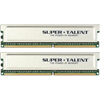
Back to the modules themselves. Heat spreaders are pretty much a standard now, and Super Talent realizes this. These modules are equipped with a very light aluminum spreader that's indented to press against all 16 chips on each module. Nothing innovative here, but I am happy to see them be as light as they are. Generally, the lighter the heat spreader is, the easier the modules are to cool, especially with lots of overclocking. The spreaders are glued on, so if you wish to remove them you will want to have the proper glue to re-apply, or perform the task quickly. Removing the heat spreaders are generally not advised with BGA chips, due to the fact that they can come off the PCB far easier than TSOP ones.

Further Details

As you could probably tell by now, these modules are clocked for 400MHz, which is effectively DDR2-800 or PC2-6400. According to their web site, the timings for the modules are 4-3-4-8. This is a part that will confuse some people, and it did me. I was confused when I could not get the modules to boot at 4-3-4 with 1.9v. The only way it would boot was if I had 2.3v or more.

The reason behind this, is because Super Talent uses a slightly different timing order than most of us have become accustomed to. Here is a quick example to help clarify it:

This is something you will want to bare in mind. Whereas you may look at the timings on their site and see 4-3-4-8, depending on how you usually read timings, it's actually 4-4-3-8. Now, because I did find 4-3-4-8 to be stable with 2.3v+, this is going to be some interesting over clocking memory, I can tell.

In regards to the chips that lie beneath the spreaders, Super Talent told me that they are Micron Rev. D. Upon further investigation, the chips are D9GKX (MT47H64M8B6-25E). Other recent Micron chips have had the tendency to thrive on voltage, so I expect the same here.

Overclock Ability

I quickly found out that this memory is addictive. I found myself spending near the entire weekend overclocking it, trying to push it further and further. I don't usually become such a frantic overclocker, but these modules dragged me in. First off, it was evident that these modules loved any voltage you could throw at them. At stock speeds with 2.3v, 3-3-3-8 was completely possible and 100% stable after a 4 hour MemTest run.

You'll notice that I have more successful overclocks than in other memory reviews, but that's because as I was tweaking the timings, I didn't expect each setting to be completely stable. I will only use 8 of the below settings in our graphs, although all settings went through complete testing.

I was told to expect DDR2-1000 to be possible, with 5-5-5-15 timings. As you can see, that was blown away also, because DDR2-1000 was again 100% stable with 4-4-4-8 timings with only 2.2v. Last month, I took a look at Corsairs PC2-6400 kit, which could also mimic those settings, but I couldn't push it over DDR2-1000 speeds and remain completely stable. I was able to bring these modules all the way up to DDR2-1080 speeds, but with the lax timings of 5-5-5-12. Note that DDR2-1060 and DDR2-1080 speeds were not completely error free in a Windows MemTest run, however DDR2-1040 was.

The ASUS P5WD2-E Premium only goes up to 2.4v and I am not sure if any VDIMM mod currently exists. If you have a motherboard that can go beyond 2.4v, I fully believe that this memory can be pushed even further than I was able to push it. I could see the last two above settings be perfectly stable with 2.6v, if you dare go that high. Don't quote me, but I can see it be completely possible because this memory *loves* voltage.

Testing Procedures & SANDRA

On this page, I will explain how our testing procedures go. Firstly, the hard drive that hosts the operating system is fully defragged using Diskeeper 10 to assure no hiccups will be due to the OS. All testing occurs on a standalone OS installation that's dedicated to testing. Second, all unnecessary programs in Windows are closed down, minus the essential ones. This includes virus scanners, firewalls, peripheral software, etcetera. Before any testing occurs, the memory goes through a 4 hour MemTest run at stock settings to assure that they are error free and appropriate for overclocking and benching.

To test out the modules, I used the usual variety of benchmarking tools. No games are included in our memory benchmarking, because I consider them to be a waste of time. Overclocking your memory generally means overclocking your CPU in conjunction, which makes it hard to diagnose just what kind of difference the memory made. Here is the selection of tools we use in the review:

Throughout all of our graphs, you will see this structure: "400MHz 4-4-3-8 (200)". The number in the parentheses is the FSB while the MHz is the frequency of the memory. Multiply that frequency by 2 and that's how you will acquire the DDR2-800 speed.

SANDRA Lite 2005

SANDRA is by far one of the best memory benchmarking tools on the market, for numerous reasons. The first being that you can test the memory Buffered and Unbuffered, Unbuffered stressing the memory solely while leaving the CPU alone. This gives a more accurate idea of how well our memories overclock scales. In addition, when overclocking to the extreme, some benchmarking tools may escalate scores. So does SANDRA, but if your Int and Float results are very close to one another, that's a good sign that it's an accurate score.

If you want to know the settings we used for our Unbuffered testing, you can check out a screencap here.

These are some seriously impressive results. The Super Talent kit managed to keep right up to the Corsair kit in our buffered tests. It actually surpassed the Corsair kit in the Unbuffered tests by more than 100 MB/s. Let's move right along to our EVEREST and Sciencemark tests.

EVEREST & Sciencemark

EVEREST Ultimate Edition 2005 (2.22)

For our EVEREST tests, I am using a slightly older version. The latest version out is 2.80, but the results are very inflated compared to last years version, which is why I refrain from using it. It just doesn't make sense that 2.22 can show a read speed of 8,000MB/s while 2.80 shows 10,000MB/s. Since 2.22's results are more in line with our SANDRA results, we will stick to it.

Note: Read and Write (Higher the better) and Latency (Lower the better).

Sciencemark 2

SM 2 is a benchmarking tool I only recently found out about. What's great about it, is that it can spit out the usual MB/s results in addition to an overall 'Sciencemark'. The Sciencemark bases it's result on various criteria including the speed and latencies of the modules.

Once again, the results are top rate and very comparable to other performance modules.

MemTest, Super Pi & PC Mark 05

MemTest 1.65+

MemTest is not really a benchmark, but rather a memory error checker. I use it to grab the bandwidth value though, because as you overclock it, it will go higher. It gives you a quick and general idea of whether your overclock did any good or not.

SuperPi 1.5 Mod

Even though mathematical calculations like this are extremely CPU intensive, they are also ram intensive. The faster your ram, the faster the overall calculations will be also. How SuperPi works is that you can specify how many digits you want to calculate past the decimal point. If you choose 1 Million, it will begin with the 3. and continue with 14359 all the way until it hits the 1 Millionth digit mark.

The reason SuperPi 1.5 Mod is better than the original SuperPi is because it shows you the results past the decimal point, whereas the original will give you a flat out second count (29 vs 29.153 for example).

PC Mark 05

Go ahead and whine about me using Futuremark products.. do it! Despite not being entirely accurate to some people, they are still a good way to scale your overclocks. PC Mark does a great job of performing 16 different memory specific benchmarks and spitting out an overall score. As you can see, the memory results scaled well with upping the FSB.

Conclusions

Despite the fact that Super Talent are new to the enthusiast market, they undoubtedly know what they are doing. These modules were so fast, that they easily kept up to the Corsair PC2-6400PRO and GeIL PC2-8000 modules we have taken a look at recently. The sad part is that my computer can't handle 300FSB (4.2GHz) 100% stable, so I was unable to bench at those speeds. If you are able to hit 300FSB and beyond, or even beyond 2.4v, you will get results far better than what I was able to muster. If you have an EE, then you are going to have an absolute blast with these.

The fact that I was able to hit 3-3-3 at stock speeds was the first sign that these are great overclockers. If you like taking the extreme overclocking route, then with enough voltage you may be able to continue those timings up to DDR2-900 speeds. I also wasn't able to keep DDR2-1080 stable due to the fact that I was stuck at 2.4v. During overclocking tests, I found that these modules love voltage.

The only downsides to these modules, are few. The first is the fact that you cannot purchase them yet. I scanned through 6 online e-tailers and came up empty handed. That includes the e-tailers mentioned on Super Talents website. The second downside may be that they are very generic looking modules. Even though they are not a 'value series', they look like they belong in that line. I have two requests to make of Super Talent. First, please make your packaging more informative. We don't need pretty flowers or flashy stickers, but something that denotes the timings and voltages. Secondly, on your product pages on your site, you should make it known that your timings follow the CAS-TRP-TRCD-TRAS scheme, so that nobody remains confused.

Super Talent may be a new name to most of you, but this will not be the last you hear of them if they keep this up. At publishing time, there are no SRP for the modules, but you should be able to expect them in the ~$300 area. Overall, these modules well deserve a 9/10 and our Editors Choice award. Whether you are an overclocker or not, I well recommend these modules if you can get ahold of them.. you will not be disappointed with a purchase.

Addendum: Since this article was completed, Super Talent took some of our concerns and fixed them up. The memory on their website will now show the correct timings of 4-4-3-8. In addition, they have given me a link to eWiz where you can purchase the modules for $381US at the time of writing. They have also mentioned that their packaging is going to be going through changes over the next few months, which should take care of all the concerns mentioned earlier in the review. Thanks to Super Talent for being so quick to action!

Discuss in our forums

If you wish to discuss this review, feel free to do so in our related thread. You do not need to register in order to reply to our content threads.


Copyright © 2005-2008 Techgage Networks Inc. - All Rights Reserved.