
- Qualcomm Launches Snapdragon 4 Gen 2 Mobile Platform
- AMD Launches Ryzen PRO 7000 Series Mobile & Desktop Platform
- Intel Launches Sleek Single-Slot Arc Pro A60 Workstation Graphics Card
- NVIDIA Announces Latest Ada Lovelace Additions: GeForce RTX 4060 Ti & RTX 4060
- Maxon Redshift With AMD Radeon GPU Rendering Support Now Available

Social & RSS Feeds
Latest Videos



Latest News
Migrating Your EA Games from Steam or Retail to Origin


by Rob Williams on October 25, 2013 in Gaming
A little known fact about EA’s Origin gaming platform is that most EA titles purchased outside of the service can be registered within it. The problem: EA doesn’t offer a good list of supported titles, preferring to leave it up to gamers to figure out. Thanks to that, we’ve been compiling our own list, and welcome submissions to help it become definitive.
EA’s digital gaming platform, Origin, received a major boost to its user base in late 2011 thanks to the release of Battlefield 3. At the time, fans of the series weren’t pleased. In effect, EA was forcing them into using a gaming platform which, let’s face it, was lackluster when compared to the competition (in this case, Valve’s Steam).
A lot of gamers don’t even care for Steam, or game launchers in general. But if you’re going to be forced into using one, wouldn’t it be nice if it delivered on modern expectations? Well, since its release, Origin has gotten a lot better, but compared to Steam, many would argue that it still has a lot of catching up to do (come on, EA, at least let us make simple backups of our games!).
There is one way to improve your Origin experience just a wee bit, though: Importing EA games you’ve either bought at retail or on Steam. Granted, this is going to have limited appeal, but there are a couple of perks. Own a game that supports co-op or multiplayer, but doesn’t require online access? Do I need to say more? Or, it could simply be that you need or want to install a game out of Steam for any other reason. Fortunately, if it’s an EA title, chances are good that you’ll be able to activate it on Origin and treat it as if you purchased it there.

Inside of Origin’s main menu, an option named “Redeem Product Code” can be found. As alluded to above, if you own an EA game on disc, the code found inside the packaging could be used (or rather, tried) here. Likewise, if Steam offers you the ability to snag your CD key for a given game, you can try that as well. This is a nice perk that EA offers here, but it’s worth pointing out that Valve offers much of the same thing – there, though, non-Valve developers can get in on the action if they choose to.
While Valve offers a list of games that can be imported into Steam this way, EA leaves the bulk of the guesswork up to you – or us, which is the purpose of this article.
But first – how to acquire a CD key from Steam? If the game supports it, a “View CD key” option will be found when right-clicking it. In the example below, we can see that Crysis 2: Maximum Edition is one such title that does.
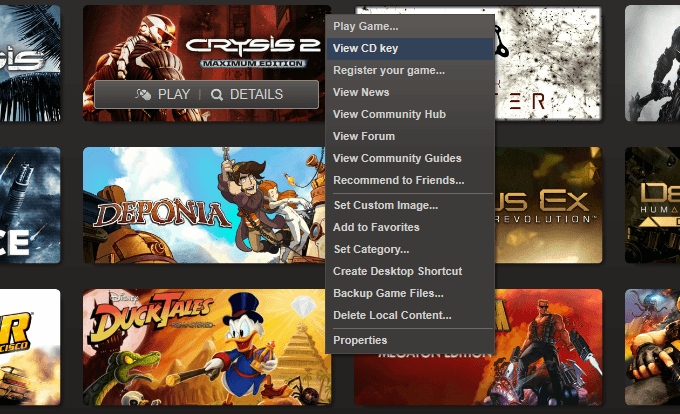
Unfortunately, not all EA titles in Steam will offer a CD key, but a lot do. In the event that a game doesn’t, I believe the prospect of registering that game at Origin is a lost cause. Also, some games might offer more than one key; either two codes that do the same thing but are available in two formats, or extra codes for DLC. If a game is registered on Origin, it’s wise to test out the DLC code as well if one is available.
After putting a code into Origin that it accepts, you’ll receive a prompt like this:
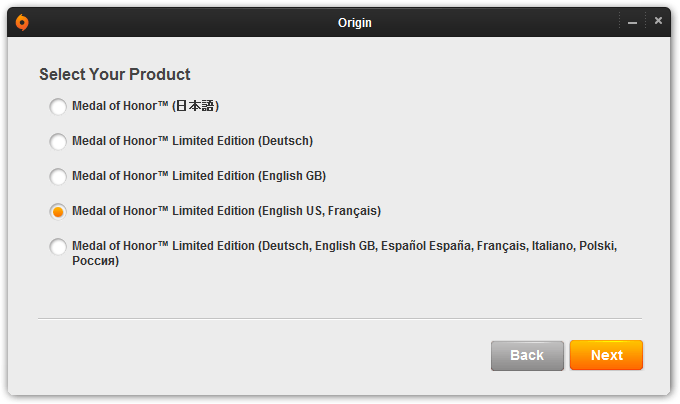
The choice here shouldn’t be made in haste, because as far as I can tell, there’s no going back. For some games, even if the code isn’t accepted, there might be a workaround. For games released in 2008 or earlier, another website (referenced below) might be required for registration. There, you simply put in your CD key and account credentials, and if all goes well, the site will confirm the title to be added to the account. If for some reason this gets you nowhere, contact Origin customer support (and good luck).
Here is a list of EA games / DLC and their confirmed status:
| Game Title | Success | Notes |
| Alice: Madness Returns | Yes | Success |
| Battlefield: Bad Company 2 | Yes | Success |
| Battlefield: Bad Company 2 – Vietnam | Yes | Success |
| Battlefield: Bad Company 2 – SPECACT | Yes | Success |
| Bulletstorm | Yes | Success |
| Burnout Paradise: The Ultimate Box | Yes | Success |
| Command & Conquer: Red Alert 3 | Yes | Success |
| Command & Conquer 4: Tiberian Twilight | Yes | Success |
| Crysis | No | Origin Rejects Key |
| Crysis Warhead | Yes | Register on Website* |
| Crysis 2 | Yes | Success |
| Crysis 2: Maximum Edition | Yes | Success |
| Darkspore | Yes | Success |
| Dead Space | Yes | Success |
| Dead Space 2 | Yes | Success |
| Dragon Age: Origins | Yes | Success |
| Dragon Age: Origins – Awakening | Yes | Success |
| FIFA Manager 09 | No | Steam Doesn’t Provide Key |
| FIFA Manager 10 | No | Origin Rejects Key |
| FIFA Manager 11 | Yes | Success |
| Gatling Gears | Yes | Success |
| Mass Effect | No | Origin Rejects Key |
| Mass Effect 2 | Yes | Success |
| Medal of Honor | Yes | Success |
| Mirror’s Edge | No | Steam Doesn’t Provide Key |
| Need for Speed: Hot Pursuit | Yes | Success |
| Need for Speed: SHIFT | No | Steam Doesn’t Provide Key |
| Need for Speed: Undercover | No | Steam Doesn’t Provide Key |
| SHIFT 2: Unleashed | Yes | Success |
| Spore | Yes | Success |
| Spore: Creepy & Cute | No | Steam Doesn’t Provide Key |
| The Sims 3 | Yes | Register on Website* |
| The Sims 3: Ambitions | Yes | Register on Website* |
| The Sims 3: Fast Lane | Yes | Register on Website* |
| The Sims 3: Generations | Yes | Register on Website* |
| The Sims 3: High-End Loft Stuff | Yes | Register on Website* |
| The Sims 3: Into the Future | Yes | Success |
| The Sims 3: Late Night | Yes | Register on Website* |
| The Sims 3: Movie Stuff | Yes | Success |
| The Sims 3: Outdoor Living Stuff | Yes | Register on Website* |
| The Sims 3: World Adventure | Yes | Register on Website* |
| The Sims: Medieval | Yes | Success |
| The Sims: Medieval – Pirates & Nobles | Yes | Success |
| WARP | Yes | Success |
| * https://activate.ea.com/applyentitlement.do | ||
Is there a chance that non-EA games can be carried over from Steam? To test, we cross-checked our available games on Steam with those available on Origin, aaaaand, the outlook is not so good:
| Non-EA Game Title | Success | Notes |
| Age of Empires III | No | Origin Rejects Key |
| Alan Wake | No | Steam Doesn’t Provide Key |
| Assassin’s Creed III | No | Origin Rejects Key |
| Batman: Arkham Asylum | No | Steam Doesn’t Provide Key |
| Batman: Arkham City | No | Origin Rejects Key |
| Bejeweled 3 | No | Steam Doesn’t Provide Key |
| Book of Unwritten Tales: Critter Chronicles | No | Steam Doesn’t Provide Key |
| Cities XL 2012 | No | Steam Doesn’t Provide Key |
| Crusader Kings II | No | Origin Rejects Key |
| Darksiders | No | Steam Doesn’t Provide Key |
| Darksiders II | No | Steam Doesn’t Provide Key |
| Dead Island | No | Steam Doesn’t Provide Key |
| DmC Devil May Cry | No | Steam Doesn’t Provide Key |
| Euro Truck Simulator 2 | No | Steam Doesn’t Provide Key |
| F1 2012 | No | Steam Doesn’t Provide Key |
| F1 Race Stars | No | Steam Doesn’t Provide Key |
| Far Cry 3 | No | Origin Rejects Key |
| Farming Simulator 2013 | No | Origin Rejects Key |
| F.E.A.R. 3 | No | Steam Doesn’t Provide Key |
| Giana Sisters: Twisted Dreams | No | Steam Doesn’t Provide Key |
| GRID 2 | No | Steam Doesn’t Provide Key |
| Goodbye Deponia | No | Steam Doesn’t Provide Key |
| Hitman: Absolution | No | Steam Doesn’t Provide Key |
| LEGO The Lord of the Rings | No | Steam Doesn’t Provide Key |
| Lord of the Rings: War in the North | No | Steam Doesn’t Provide Key |
| Metro 2033 | No | Steam Doesn’t Provide Key |
| Metro: Last Light | No | Steam Doesn’t Provide Key |
| Omerta: City of Gangsters | No | Steam Doesn’t Provide Key |
| Remember Me | No | Steam Doesn’t Provide Key |
| Resident Evil 6 | No | Steam Doesn’t Provide Key |
| Resident Evil: Operation Raccoon City | No | Origin Rejects Key |
| Roller Coaster Tycoon 3: Platinum! | No | Steam Doesn’t Provide Key |
| Saints Row: The Third | No | Steam Doesn’t Provide Key |
| Sniper Elite V2 | No | Steam Doesn’t Provide Key |
| Super Street Fighter IV: Arcade Edition | No | Origin Rejects Key |
| Star Wars: Knights of the Old Republic | No | Steam Doesn’t Provide Key |
| Street Fighter X Tekken | No | Origin Rejects Key |
| The Walking Dead | No | Steam Doesn’t Provide Key |
| The Witcher 2: Assassins of Kings | No | Origin Rejects Key |
| Tom Clancy’s Splinter Cell: Blacklist | No | Origin Rejects Key |
| Tom Clancy’s Splinter Cell: Conviction | No | Origin Rejects Key |
| Tomb Raider (2013) | No | Steam Doesn’t Provide Key |
| Trials Evolution Gold Edition | No | Origin Rejects Key |
| Two Worlds II | No | Origin Rejects Key |
This is unfortunate, and something that EA should consider fixing. It could be assumed that it’s just not possible for EA to add support for games that it doesn’t own the rights to, but remember that Steam link from earlier? If Valve can do it, we’d imagine EA should be able to, too. In fact, there are some games that are available on both services, but only Steam allows you to activate them even though they were purchased elsewhere. Age of Empires III, Darksiders, and F.E.A.R. 3 are a couple of examples.
If people could activate more of their games on Origin, we’d have to imagine that it would be a good thing, not a bad thing.
Because the Techgage team doesn’t own every EA game available on Origin, we welcome a heads-up. Own a game we don’t? Test out the import and let us know if it works!
Article originally published on September 30, 2011. Last updated on October 25, 2013.

Support our efforts! With ad revenue at an all-time low for written websites, we're relying more than ever on reader support to help us continue putting so much effort into this type of content. You can support us by becoming a Patron, or by using our Amazon shopping affiliate links listed through our articles. Thanks for your support!

Rob Williams
Rob founded Techgage in 2005 to be an 'Advocate of the consumer', focusing on fair reviews and keeping people apprised of news in the tech world. Catering to both enthusiasts and businesses alike; from desktop gaming to professional workstations, and all the supporting software.


