
- Qualcomm Launches Snapdragon 4 Gen 2 Mobile Platform
- AMD Launches Ryzen PRO 7000 Series Mobile & Desktop Platform
- Intel Launches Sleek Single-Slot Arc Pro A60 Workstation Graphics Card
- NVIDIA Announces Latest Ada Lovelace Additions: GeForce RTX 4060 Ti & RTX 4060
- Maxon Redshift With AMD Radeon GPU Rendering Support Now Available

Social & RSS Feeds
Latest Videos



Latest News
abit AirPace WiFi PCI-E Card

by Greg King on July 17, 2007 in Networking
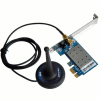
abit is well known for their graphic cards and motherboards, especially to the enthusiast crowd. However, network cards was a new one on us, but that changed now that we’ve taken a look at their reliable PCI-E WiFi card. The best part : It’s currently available for $6 after MIR at one popular e-tailer.
Page 1 – Introduction
If you can work through the inevitable headaches that more often than not come with wireless networking, the results can be quite rewarding. The single most valuable feature of any wireless network is, well, being wireless. The ability to roam your home completely independent from the standard assortment of necessary cables is an awesome feeling. A good and secure wireless network gives the user a freedom unobtainable on a wired network.
It’s difficult to go anywhere anymore without seeing a Wi-Fi sign. Most college campuses, airports, Starbucks and public libraries all offer this convenience, some for a small fee, and others completely free.
In the networking world, there are a few tried and true companies. A brief jog of the memory brings to mind names like Linksys, Cisco (which owns Linksys), Netgear and D-Link. We have even reviewed a few D-Link products recently in the DIR-655 N Router and the DNS-323 NAS. One company that doesn’t come to mind when the topic of wireless networking comes up is abit.
We were excited when abit shipped us their AirPace Wi-Fi PCI-E card along with their latest IP-35 Pro P35 based motherboard. While the board is still on the bench, we are taking a look at this interesting wireless adapter that just so happens to be the first to use the PCI-Express bus.
Packaging
The AirPace is packaged in small box with specs adorning all sides.

On the back, there are a few diagrams explaining the different uses that one can get out of the AirPace card. Not only does this card allow the host PC to connect to the network wirelessly, but can also share a wired connection wirelessly when used in AP (Access Point) mode.

Once opened, the interior is compartmentalized to keep each piece separate.

Included in the bundle is a driver disk containing abit’s SoftAP software, the card and antennae, a PCI bracket should the AirPace is to be used in a small form factor case as well as a small manual to help you get up and running.


Getting to the card itself, it’s certainly not any larger than it absolutely has to be. The PCB is just as long as the PCI-Express x1 connectors needed to install it in the appropriate slot. While it comes ready to go in a x1 slot, there isn’t anything stopping anyone from using this card in a x4 or an x16 slot as well. Sticking out of the back of the PCI bracket is where the antennae is connected and directly to the right is a small green LED to signify signal and activity. That’s all there is to it. It’s a very simple device that serves a simple purpose.


Before we get into the software and conclusions, let’s take a look at the specs of the AirPace Wi-Fi.
| WLAN Standard | IEEE 802.11b/g, Wi-Fi compliant |
| Host Interface | PCI Express |
| Dimension | 46.5mm x 68mm x 12mm (not including SMA connector and pin headers) |
| Frequency Range | 2.4 GHz ISM radio band |
| Number of Channels | 802.11b: USA, Canada and Taiwan – 11(2412~2462MHz) Most European Countries – 13, France – 4, Japan – 14 802.11g: |
| Receive Sensitivity | 802.11b: typical -80dBm at 11Mbps 802.11g: typical -71dBm at 54Mbps |
| Data Rates | 802.11b: 1, 2, 5.5, 11Mbps 802.11g: 6, 9, 12, 18, 24, 36, 48, 54Mbps |
| Security | WEP 64-bit and 128-bit encryption WPA(Wi-Fi Protected Access) |
| Operating System | Windows XP/server 2003/64bit XP |
Let’s install some software and give the Wi-Fi card a test.
|
|

Support our efforts! With ad revenue at an all-time low for written websites, we're relying more than ever on reader support to help us continue putting so much effort into this type of content. You can support us by becoming a Patron, or by using our Amazon shopping affiliate links listed through our articles. Thanks for your support!