Date: February 21, 2007 - Author: Rory Buszka
In a world of gratuitously flashy enthusiast PC cases, Antec sets itself apart by focusing on elegant design and a superb user experience. Their new SOLO case embodies these two ideals, offering a blend of style and substance as well as some thoughtful features aimed at convenience and low noise. Is this perfection in a computer case? Read on to find out…
What qualifies a true ‘high-end’ product? Is it a fusion of style and performance? (Antec has a case called the Fusion as well.) Or is it in the subtleties of the product – the ease of use, or its thoughtful features? Is it in the execution? Should the product be free of any design and manufacturing flaws whatsoever? Whichever metric you prefer, if you’re in the market for a high-end mid-tower PC case, you’d do well to at least take a look at Antec’s new SOLO case.
Admittedly, I entered this review with a few assumptions about Antec. They’ve been building solid and functional PC cases for almost 20 years, and I’ve been a fan of their products for as long as I’ve been a PC enthusiast. My very first case ever was an Antec Gemstone-series ATX Mid-Tower, which initially caught my eye with its colorful but elegant design, and held my first and second self-built systems. My second case was a Charcoal-colored Chieftec Dragon, which most older enthusiasts know better as the popular Antec SX1040.
When the SX1040 first showed up on the scene, many hardware review sites hailed it as the ultimate overclocker’s case, and it also served as the base for a bevy of heavily-modded machines – in the days before you could buy a blinged-out case off-the-shelf for $80 with a blue CCFL that flashes with the beat of your music, spinners on the fan grilles, and a speaker behind the front bezel that belches the alphabet.
In this world of gratuitous PC case-bling, Antec and a few other case manufacturers make a defiant stand, refusing to succumb to the rice-box phenomenon. Antec, in particular, has focused instead on improving the functionality and user experience associated with their products. Instead of appealing to the gaudy street-tuner persuasion all too prevalent in the enthusiast market, Antec’s more recent products feature elegant and understated styling, high-quality exterior finishes, and unique features and designs that reduce the machine’s noise output.
This design focus has produced unique cases like the Fusion, NSK2400, and the towering P180, as well as more conventional-looking cases like the P150, SOLO, and the other NSK-series cases. Even Antec’s new statement case, the Nine Hundred (named, most likely, for its combined 920mm of total fan diameter), features an elegant yet austere aesthetic and fans which have a three-speed switch that allows them to run quietly.
I’m pleased for the opportunity to review one of these newest Antec cases, the SOLO. This case offers a combination of solid construction, an attractive aesthetic design, and innovative, state-of-the-art features designed to reduce operating noise and make your job easier as you’re assembling a system. It’s also the one I think is most likely to appeal to the broadest range of PC enthusiasts seeking a solidly-built, great-looking, well-engineered case for their next system. Let’s take a look inside, and see what I’m talking about.
The SOLO case arrived on my doorstep in a huge outer carton. It appears that Antec’s well aware of UPS’s tendency to not play so nicely with heavy packages, and Antec didn’t take any chances with my review sample.
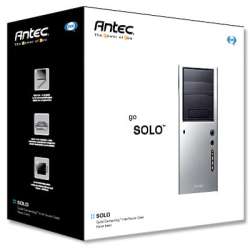
The Solo’s retail carton is big, glossy, and heavy. For those who judge the quality of a component based on its weight, this box has a reassuring heft. Even the cardboard itself is of a high quality. Even so, Antec sent this review sample packed in a larger, air-cushioned external box that defied UPS to do their worst. The retail box boasts high-quality product images, informative specification tables, and an invitation to the consumer to “Go Solo.”
Opening the box reveals a well thought out packing scheme. The top and bottom of the case are each supported by endcaps made from numerous layers of foam sheeting bonded together to create a block. This foam is much softer than the typical Styrofoam; in transit, the Solo practically rides on air. Extracting the case from its carton is a simple matter of turning the box upside down and sliding it upward; no extraneous parts or pieces fell out while removing the case from its box. It’s clear to see that Antec realizes that in the enthusiast market, the user experience begins from the very moment the box is opened.
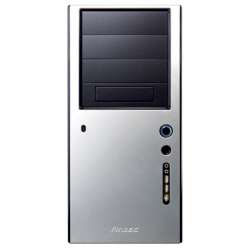
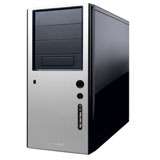
The case itself is protected by a foam bag; ‘undressing’ the Solo further reveals a captivating piano-gloss black finish that’s remarkably free from “orange-peel” effect, though not quite perfectly smooth. The only black parts of this case that aren’t glossy are the drive bay covers, but even they are ringed by a strip of glossy trim. Brushed-aluminum accents on the front panel (much like the P180) provide a striking contrast that imparts a profound sense of elegance and style, and the Antec logo is stamped subtly into this aluminum at the bottom of the front bezel. This is one case that makes a bold styling impression wherever it’s likely to be used, akin to dressing your system in a tuxedo.
Specification |
Comments |
|
| Model | SOLO | The product names in Antec’s Lifestyle Series use musical terms, such as Minuet, Fusion, Sonata, and Overture. SOLO fits with that naming scheme. |
| Case Type | ATX Mid Tower | Most enthusiast cases use the ATX form factor, because most of the enthusiast motherboards that anyone would be interested in are also ATX. |
| Exterior Dimensions (H x W x D) |
17.5” x 8.1” x 18.5” | This case is on the compact side, just large enough to accommodate an ATX board, though with enough room internally to accommodate longer video cards. |
| Cooling Provisions | 1x120mm Tri-Cool (rear); 2x92mm (not included) | The twin 92mm fans in the front of the case are a break from the industry standard, but the combined effect of two 92mm fans is greater than a single 120mm. |
| Drive Bays | 8 Total 3x 5.25” External 1x 3.5” External 4x 3.5” Internal |
The 3.5” external bay is actually built onto a 5.25” sled, which means that it can be exchanged for a fourth 5.25” drive. |
| Material | SECC Steel | This case appears to use 0.8mm-thick steel for its side panels, which adds ruggedness and noise reduction properties. The front door of the case is plastic, with an aluminum layer bonded adhesively. |
| Expansion Slots | 7 | Not much to say about this – it’s an ATX case, and this is a requirement of the specification. |
| Power Supply | Not Included | This affords the system builder a bit of extra flexibility in selecting the best power supply for the hardware and budget constraints. |
| Weight | 11.5kg without power supply | This is one hefty case, with its thick steel and additional damping layers adding to the weight even without a power supply, drives, and heavy cooling solutions installed. This case doesn’t travel light. |
| Motherboard Support | ATX, Micro ATX | This case is just large enough to accommodate an ATX motherboard comfortably while remaining compact. |
The Antec SOLO shares its external and internal design with another case, Antec’s P150, with only two differences: the P150 is white where the SOLO is black, and the P150 also includes an Antec NeoHE 430W power supply. The P150 became available toward the end of 2005, but its white color and included power supply weren’t well-received by customers (at least in part due to the fact that early production runs of NeoHE power supplies suffered from extreme unreliability; these problems have been fixed in the most recent “Revision A4” units).
Antec’s customers responded, “Do you have it in black?” Essentially, the SOLO is Antec’s response to these customers, fulfilling the request for a high-quality ‘Piano Black’ finish (also found on their Sonata case) and no bundled power supply. All the other features of the P150 are retained – so everything that’s said here about the features of the SOLO case can also be applied to the P150, except that the P150 is finished in a glossy ‘Piano White’.
The front bezel of the SOLO features a clean and elegantly simple design, with a prominent power and reset button, and front-panel audio, USB, and Firewire connectors. Those who share the industry’s collective mania for blue illumination will appreciate the bright blue LEDs used for both the power indicator and HDD activity indicator. However, if you’re sick of blue LEDs, they can be changed with little effort. I think they go nicely with the Solo case’s black color, however. Front air intake is via a row of tiny slots along the sides of the front bezel, allowing the front of the case to remain free of any vent openings while allowing plenty of unrestricted airflow.
The rear of the case also features a clean layout, with a large honeycomb-punched 120mm fan grille and an additional intake grille beside the expansion slots. If you can’t have a wire fan grille, this particular type of punching is the next best thing; it’s open and unrestrictive. Like just practically every other case made today, the I/O panel for the motherboard can be exchanged for one which fits your motherboard’s particular set of rear panel ports. Installed in the rear of the case is a 120x25mm Antec-branded “Tri-Cool” case fan, which features a three-position switch for speed control. I’m happy to see a screw-mounted fan instead of a clip-in bracket; a screw-mounted fan generates less vibration noise.
The left side panel (the one you’ll remove to install components) is secured by a pair of spring-loaded, retained thumb screws – there’s no risk of losing them, and they’re a joy to use. The interior sides of both side panels as well as the top of the case are lined with a vinyl sheet, whose purpose is to add mass to the side panels, decreasing their natural (resonant) frequency and causing them to pass less noise to the outside. Tapping on the side of the case with all side panels installed results in a dull ‘thud.’ In the SOLO review sample, these damping layers were securely adhered to the side panel, though in my first-gen P150 case (over a year old), the adhesive is beginning to let go. I can’t say whether this is an issue with the SOLO or second-generation P150, however.
The interior of the SOLO case isn’t the roomiest of interiors, though this is the price paid for a compact form factor. Those wishing for more internal room should check out the P180. Still, even the largest ATX motherboards will fit comfortably. All the internal sheet steel is of the same thickness as the exterior steel – 0.8mm. This is where the SOLO case gets most of its weight, but it’s also very structurally robust. Thankfully, the expansion slots aren’t tool-less – those tool-free solutions that I’ve encountered have all been extremely fussy and difficult to work with – I much prefer using screws to secure my expansion cards, especially in the case of double-height cards.
The front bezel of the SOLO swings open like a door after releasing the three tabs that secure it. If you’d prefer to remove the front bezel while working on the front of your machine, it can be removed by lifting it from its hinges. The hinges themselves are made of steel. This type of attention to detail is what has always attracted me to Antec’s cases, which are always a pleasure to work on. Both the 5.25” bays and the 3.5” internal bays are loaded from the front; the internal bays are accessed via another door, by releasing another pair of thumbscrews. This arrangement also provides easy access to both sides of the twin 92mm intake fans for cleaning. The intake filter, however, is simply a piece of perforated plastic, and fairly restrictive. You’ll likely want to toss it aside – the other case air intake at the rear of the case is not filtered.
The SOLO’s mounting scheme for hard drives offers two methods for noise reduction. The four individual sleds feature soft silicone grommets, which absorb vibration. Alternatively, four sets of elastic shock-cords are provided, allowing hard drives to be mounted with no rigid attachment to the case whatsoever. This also gives the added flexibility of using 2.5” hard drives, which some find to be quieter. In fact, the world’s fastest hard drive, the Seagate Savvio, could be used in a similar way. 5.25” drives use the familiar plastic rails for mounting. The 3.5” external drive bay is also removable, and a fourth optical drive may be substituted.
The SOLO also offers a thoughtful cable-management system. On the right side of the internal 3.5” bays, a series of eight hooks allows the system builder to wrap the excess wire from the front panel connections out of sight, as well as the SATA cables for the hard drives. This is another of the genuinely novel ideas that I’d expect to find only on an Antec case.
The features of the Antec SOLO are designed to keep operating noise inside, and make building a system as hassle-free as possible. Up next, we’ll look at the build process, and the impact that each of these features has on the entire system-building experience.
Once again, it’s another of my PC-enthusiast friends who has volunteered their rig for my mad-scientist tinkering. Zach’s former case, a Thermaltake Tsunami Dream, was on its last legs. Its thin aluminum skin was dented and scratched, and it had certainly seen better days. It just wasn’t built to last. Internally, its design is extremely similar to the Antec SLK3700 used as the reference in my last case review. The Tsunami Dream had some issues accommodating the extended-length ATi Radeon X1800 video card; we’ll see if that’s a major factor in the SOLO.
The first thing you’ll want to do when building a system in the SOLO case is install the power supply. If your CPU heatsink is especially tall, you won’t be able to extract the power supply; there isn’t enough room to simply slide the PSU out the side of the case. The task of installing the power supply is straightforward enough. However, once the motherboard is installed, it will need to be removed if access to the PSU is desired in the future. The hardware pack is zip-tied inside one of the 5.25” bays; you’ll need these screws later. Also, all the installation was done with the case laying on its side on a towel – I didn’t want to risk scratching the Solo’s finish carelessly.
The SOLO comes with four of its motherboard standoffs pre-installed; the rest you’ll have to install yourself based on the form factor of the motherboard you’re using. There isn’t enough room to simply drop the motherboard straight in – it had to be inserted at an angle. Installation of the expansion cards went quickly, without fighting against a screwless card-retention mechanism. That had been my biggest complaint with Zach’s Tsunami Dream case – double-slot cards like the ATI wouldn’t go easily into and out of the retention mechanism.
Here, however, dealing with the big Radeon card was much easier. The Radeon card on this particular motherboard probably wouldn’t interfere with the second hard drive sled, but the hard drives were installed in the third and fourth sleds anyway, for the cleanest and most accessible installation. A longer card, like a GeForce 8800, would likely block the second hard drive space, with an SLI rig also blocking the third hard drive space, limiting the total number of hard drives to two.
Installing hard drives in this case is a breeze – simply slide out the mounting sled, use the special provided screws (with a large lag section for use with the grommets), and slide the sled back into place. I didn’t try mounting a 3.5” hard drive in the shock cords – they are known to allow the drive to move back and forth within them, making them unsuitable for situations where the case must be moved frequently. Both hard drives were mounted to the sleds instead, which is where you’ll want to put your own drives if you plan on moving your computer around (say, to a LAN party).
These shock cords are improved over the rubber material used in the first-generation P150 case, which was known to snap unexpectedly and spend the drive tumbling onto the drive sled below. The second-generation P150 case features the same improved shock cords as the SOLO. This method of drive mounting would be most useful for those who focus on a thoroughly noiseless PC; for whom even the seek noise of a hard drive is too much.
After installing everything, it was a simple matter of tucking the front panel cables out of the way, wrapping them around the cable-management hooks behind the 3.5” bays. The resulting installation is significantly cleaner than in the previous case, with far less extraneous cabling. The modular cables of Zach’s Antec SmartPower 2.0 500W power supply aren’t exactly conducive to a neat wiring job, but it’s quite livable, since most of the cable clutter is confined to the top of the case.
With the system installation complete, let’s take a look at the difference in cooling between the Antec SOLO case and the Tsunami dream, as well as the successfulness of the SOLO’s low-noise features.
One of the SOLO’s major selling points is its complement of features designed to keep noise inside. However, equally important is the impact that these noise-reduction features may have upon system cooling. Before moving the hardware, idle and load temperatures of three heat-producing components were measured and recorded in the system’s original case, a Thermaltake Tsunami Dream, which is representative of most enthusiast-oriented ATX cases currently available.
ATITool was used to stress the CPU, Northbridge, and GPU, and the same test with default settings was run for each configuration tested. For each temperature measurement, the motherboard’s onboard data acquisition system and internal thermistors were used. Through all testing, Cool n’ Quiet features of the motherboard were enabled, as they will likely be in actual use. The video card’s fan was thermally controlled by board itself. Temperatures were read through ATITool and ASUS Probe software. Accuracy isn’t key here – it’s consistency and relative change.
In the Antec SOLO, the low speed and high speed operating modes of the Tri-Cool case fan were tested. The ‘low’ speed setting yielded silent operation, and cooling performance that I’d consider adequate for most users. The ‘high’ speed setting produced a significant amount of noise and airflow, producing cooling that even outperformed the Thermaltake Tsunami Dream, though this amount of cooling isn’t really necessary for most applications. This is the only noise-producing component that is bundled with the case, so we’ll only evaluate the noise of the case fan. The stock cooling should be good enough for preserving livable noise levels with a balance of cooling.
The SOLO’s damping material had some effect on the amount of noise that was able to penetrate the walls of the case, though most of it simply escaped from the rear. The noise was dulled, but still detectable. The primary contributor to the machine’s noise signature was an overenthusiastic fan on the motherboard chipset, with the next worst offender being the Radeon X1800 card’s cooler. The damping material on the side panels helps reduce the offensiveness of the noise, but it’s no substitute for choosing quiet-running components in the first place. The seek noise from the hard drives mounted to the grommets in the SOLO case were much quieter than they had been in the Tsunami Dream as well.
Those who wish to improve the cooling scheme of the SOLO case have few options, but there’s little need for any improvement in the first place. That said, if relying on a single 120mm case fan just isn’t good enough for you, install a pair of 92mm fans in the front fan spots. However, adding these fans unnecessarily will only increase the noise produced by the machine with marginal cooling improvement; test your hardware in the SOLO first before deciding that you need additional case fans. If you want to remain noise-conscious, but just need those extra case fans, I recommend Evercool’s “Evergreen” fans, which I’ve found to be extremely quiet even at full voltage.


In particular, it looks as though the CPU benefits most from running the SOLO’s case fan at high speed. However, the difference in temperature between low speed and high speed was never more than 2 degrees C for any component. One factor that likely handicapped the case’s cooling was the fact that the motherboard did not come with an I/O shield, and I did not source one in time for this review. Perhaps in a pinch, one could have been made from cardboard, ghetto-style. However, I don’t suspect that it would have had a significant effect – the additional airflow short-circuit created was no worse than that created by the case’s rear intake vent. The case still cools about as well as the Tsunami Dream, which also did not have an I/O shield installed.
As I remarked before, I entered into this review with a few assumptions about Antec and their products. Even so, the SOLO surpassed my expectations. I have no reservations in saying that this is quite likely the finest case I have ever encountered, and despite my every attempt to retain stern-faced objectivity, I can’t help gushing about the SOLO’s myriad virtues. From looks to cooling to structural integrity, the SOLO is a class act, as well as its white-painted cousin, the P150.
If the P150 was glamorous in its pearly “piano white” paint job, the SOLO is absolutely captivating in gloss black, with its aluminum-skinned front panel providing an appealing contrast. This case is really a knockout when it comes to looks, reflecting Antec’s attention to detail in all aspects of the design of this case. Inside, thoughtful features abound, including the cable-management clips on the hidden side of the 3.5” bays, and the elastic hard drive suspensions, as well as the silicone grommets on the bay sleds themselves. This case is a joy to work on, and installing hardware is a snap.
In addition, it’s refreshing to see that Antec has demonstrated a proactive attitude toward noise, with the inclusion of a silent-running (on low speed) TriCool case fan, vinyl damping sheets on the side panels, and various methods of isolating the vibration of the hard drives. This doesn’t mean the SOLO sacrifices any cooling ability – its dual 92mm intake fans can move more air than a single 120mm fan operating at the same speed, and the addition of a passive rear vent near the expansion slots provides ample make-up air. I’d like to see quieting features like these become more commonplace as companies begin to demonstrate a greater commitment to reducing noise.
Nothing is perfect, and the SOLO has a few minor shortcomings. First of all, removing and reinstalling the power supply with the motherboard and CPU heatsink installed is virtually impossible, especially with tall CPU heatsinks like the Scythe Ninja or Arctic Cooling Freezer. There’s not exactly a lot of space in this case. A full-ATX motherboard needs to be angled as it is lowered into the case, which may cause difficulty if you’ve already mounted an extremely large or tall CPU heatsink. The front filter is restrictive – I simply discarded it. Also, the painted exterior is easy to scratch or fingerprint. For this reason, use care when handling – this might not be the case you want to tote to every LAN party, if that’s your thing. Give this case the white-glove treatment.
The Antec SOLO is every bit a high-end case. I can heartily give it my fullest recommendation and a TechGage score of 9. If white is your color, check out the Antec P150 – it shares all the features of the SOLO, but also includes an efficient, nearly-inaudible 430W power supply. Finally, a special thanks to Antec for supplying the review sample. This product was a pleasure to review.
If you have a comment you wish to make on this review, feel free to head on into our forums! There is no need to register in order to reply to such threads.

Copyright © 2005-2008 Techgage Networks Inc. - All Rights Reserved.