
- Qualcomm Launches Snapdragon 4 Gen 2 Mobile Platform
- AMD Launches Ryzen PRO 7000 Series Mobile & Desktop Platform
- Intel Launches Sleek Single-Slot Arc Pro A60 Workstation Graphics Card
- NVIDIA Announces Latest Ada Lovelace Additions: GeForce RTX 4060 Ti & RTX 4060
- Maxon Redshift With AMD Radeon GPU Rendering Support Now Available

Social & RSS Feeds
Latest Videos



Latest News
Antec Sonata III Mini Tower

by Matt Serrano on August 1, 2007 in Cases & PSUs
The Sonata was Antec’s flagship case for it’s time and set the standard for the competition. It offered quiet performance with an affordable price tag for the budget market, which made it a favorite among system builders. Two generations later, Antec is using the Sonata III to improve on it’s legacy and offer builders the same quality and bang for their buck.
Page 1 – Introduction
Creating a quiet PC is something of an art. It takes time, effort, and usually a lot of money. Since not everyone is going want to spend money on a water cooling setup or take the time to maintain it all, air is really the only viable solution. But air’s loud! Air doesn’t cool as well, phase cooling or nothing at all! Well guess what, pony up or go home.
Antec is a company that has always impressed us in the past. Throughout recent years, the company has delivered products that have served enthusiasts time and time again. Notable mentions include the Lanboy, Aria, Nine Hundred, P180, and derivatives there of.
Antec’s Sonata line was well received for its noise and relative cooling performance. Back when the first version was released, it offered a lot of features that were considered innovative at the time. Using insulators to reduce noise from vibration emanating from hard drives and fans, bundling fans with an integrated speed control and even using a filter to help keep dust and hair out was a simple idea that wasn’t as adopted as it is today.
Going from every incarnation, I’ve noticed Antec has only made minor changes to every case in the line. Every version has been an evolution from the last, but nothing radical was ever done. The third model, which Antec has called the Sonata III, is their latest product that has replaced its older brothers.
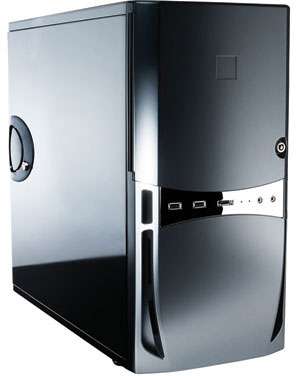
Today, the Sonata line is made up of the Sonata II, Sonata II, and the lower end Solo.
Specifications, Closer Look
Here are the case’s specifications from Antec’s website:
- Improved overall air intake for better and quieter cooling
- EarthWatts 500 Watt power supply (80 PLUS(R) certified)
- Front mounted USB, eSATA, HDA & AC’97 Audio In/Out ports
- 9 Drive Bays:
- – 3 x 5.25″ external drive bays
- – 2 x 3.5″ external drive bays
- – 4 x 3.5″ internal drive bays in individual trays with silicone grommets to absorb hard drive vibrations
- Metal double hinge allows the door to open up to 225°
- Cooling System:
- – 1 rear 120mm Tricool(TM) fan (standard) with 3-speed control to balance quiet with cooling
- – 1 front 120mm case fan (optional)
- Built-in washable air filter keeps harmful dust out of your case
- 0.8mm cold rolled steel for durability
- Motherboards up to Standard ATX
- Dimensions: 16.7″ (H) x 18.2″ (D) x 8.1″ (W)
- 42,5cm (H) x 46.3cm (D) x 20.6 cm (W)
- Net Weight: 20.2lbs / 9,1kg
- Gross Weight: 25.5lbs / 11.6kg
The case shipped in an ordinary brown box. The retail box is a simple design. There’s not really much to say about it besides that it looks aesthetically clean and subdued. The back lists the case’s specifications, and the sides list the product’s features and included hardware, all in English, French, and Spanish.


The case is covered by a plastic wrap, housed between two Styrofoam blocks at the top and bottom. Taking it out is a chore since there’s not a lot of room to get the proper leverage, but it’s by no means impossible. Antec used the same piano black finish, which makes this case a huge finger print magnet.

If you have ever seen one of the first two Sonata cases, you’ll immediately notice the differences here (if you haven’t already looked at the box, that is). The middle section where the front access door was previously held has been completely redone. The door, which was a major source of complaints in the past, has been shafted in favor of a newer one. Antec seems to have used a different kind of plastic for the front, which gives the front of the Sonata III a smoother feel over the last version, and in my opinion, a bit sturdier build. The bottom portion has a vent for air to travel in.

The front with the door open looks exactly like the first two models, with the same three 5.25″ drive bays and 3.5″ bays. This time, the door only opens up about 225° degrees instead of actually hitting the case. The power and reset buttons have been replaced, and are shinier now. We like shiny things.

The cases’ behind, we can see the seven expansion slots, 120mm fan, and IO plate. At the bottom right, you may notice an exhaust grill (the same one that was featured on the Sonata II). Oddly enough, even though the holes and mounting points are still included, the ventilation system is not.
Personally, I never liked the exhaust system because it used too much room, had to be taken off every time the case was open to get anything done, and proved to make the internal temperature hotter from the decreased airflow for the rest of the components. Even if someone wanted to use the part, Antec in fact doesn’t even sell it separately, so it looks like Antec skimped out on the back, and just used leftover Sonata II parts.


The stands at the bottom are unfortunately glued on and prone to falling off if there is too much friction. One of the stands on my case was glued in the wrong spot, closer to the edge of the case (it was touching the corner, in fact). It wasn’t wobbly when it was standing up, so I didn’t think much about it.

Like any other retail case, you’ll get a manual and the obligatory box of screws and motherboard standoffs. A pair of keys for the front door and access to the inside are included, as well as a sticker to put on the front door if you chose to do so. I’ve never been a fan of “keys” on computer cases, generally because most manufacturers tend to use the same locks, which defeats the purpose. It’s better than nothing if you don’t want someone stealing a few parts at a LAN party, but let’s face it, if someone wanted to steal something they’d find a way in, or walk away with the tower).


Support our efforts! With ad revenue at an all-time low for written websites, we're relying more than ever on reader support to help us continue putting so much effort into this type of content. You can support us by becoming a Patron, or by using our Amazon shopping affiliate links listed through our articles. Thanks for your support!