Date: April 28, 2008 - Author: Rob Williams
Have a $1,000 budget for a new notebook? Look no further than the ASUS M51S. Touted as a multi-media notebook, it offers a 15.4" screen, 250GB HD and 3GB of RAM. Included also are 4 USB ports, DVI and VGA outputs, full numpad, fingerprint reader, a face-detection logon system and more.
ASUS is well-known for producing top-quality products, and as a result, their products tend to cost a little more than the competition. The M51S, however, is a little different. In the past, we've taken a look at two ASUS notebooks valued at close to $3,000, and to date, the least expensive model was just under $1,500. So I was surprised when I first received the M51S, as it's priced right around the $1,000 mark. I immediately knew this was going to be an interesting product to test.
Before jumping into things, let's clear up a few things about this model, and where it stands in relation to the rest of the ASUS line-up. First and foremost, the "M" stands for "Multimedia". Some models will also have another letter at the very end, which in our case is "n". There is an "r" version as well which includes an ATI GPU and faster processor. It retails for around $300 more than the "n" model.
Also, when ASUS releases a revised version of a notebook, they'll add a revision letter and number at the end. Our model is -A1, which has just been replaced by the -B1. The primary difference I can see is that the processor has been upgraded from a 1.66GHz offering to a 1.83GHz one. Both notebooks appear to have identical pricing, so it's something to be on the lookout for.
To make things a little more confusing, ASUS also has M50S notebooks, and despite the lower number, it's a higher-end offering. The M50S notebooks have better specs overall and some include a Blu-ray drive for high-def movie viewing. These retail for around $400 more than the M50S.
ASUS designed the M51S for those who want a capable multi-media notebook at a great price. In the case of this exact model, the SRP is $1,029US (~$1,059CAN). Comparing the M51S to other notebooks on the market, the ASUS proves to carry a small premium, within the ~$50 range. One Dell notebook, for example, had an Inspiron offering with similar specs, but cost $100 less. It also had a much weaker GPU, however. So all in all, this notebook is priced competitively.
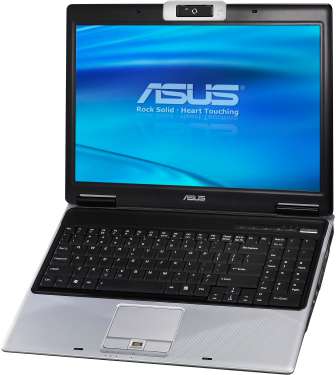
Included here is a 15.4" display capable of the 1280x800 resolution, a large 250GB hard drive, 3GB of DDR2-667 and wireless with support for 802.11n. To power the machine, ASUS chose to use Intel's T5450 Core 2 Duo, clocked at 1.66GHz and equipped with 2MB of L2 Cache and a 667MHz FSB.
As mentioned above, though, the latest revision of this notebook includes a T5550, a similar offering but bumped up to 1.83GHz. As far as I can tell, the exact revision I am using would be discontinued, because all e-tailers I see, seem to be carrying the model with the faster processor. Given both are priced the same, be sure you are picking up the one with the T5550.
The M51S' chassis is coated with a sleek textured black skin. It's difficult to see the texture in the small thumbnail, so I recommend viewing the full image.
On the left side of the notebook, we have the Kensington security lock and also our DVD-RW drive.
Most of the peripheral ports are to be found on the right side of the notebook. From left to right we have a USB port, IEEE1394 port, a seemingly empty port, TV-Out port, DVI-D, VGA and finally, modem and LAN ports. Not shown, to the absolute left of this side is an ExpressCard slot.
The "empty" port is one that confuses me, and by press time, I was unable to find an answer. In the manual, it's referenced to as being an Antenna Input, but on "select models" only. This notebook doesn't have a TV tuner card built-in, so I'm led to believe this is left empty (or plugged, rather), because it doesn't exist. It might be upgradable later. Once I find out a definitive answer about this, I will toss an addendum at the end of the review.
In the back, we have a power port and two more USB ports.
Finally, in front we can see a wireless LAN on/off, microphone and audio output ports and also the "Push" button to raise the cover. Though not shown in this image (another image later shows this), to the absolute right-hand side of the front is another USB port and also a multi-card reader.
Overall, I have absolutely no complaints about the peripheral support or locations of the ports. The M51S includes not two, but four USB ports, support for both DVI/VGA and also a TV-Out. The only thing lacking is an HDMI support, but that's moot given the fact that this is a ~$1,000 notebook.
One small complaint I have, is that the rubber bands around the web cam, as seen in the above photo, have the potential to come off if pulled out of a stuffed notebook bag or backpack. It didn't happen to me on this particular notebook, but has on a similar ASUS notebook in the past. As long as you don't yank the notebook out of a tight bag (so that it rubs tightly against books or something else), it shouldn't be a problem. If they do come off, they easily fit back into place.
The M51S might be a "budget" multi-media notebook, but it still packs in the features that are important to this crowd. One fad that's catching on fast (that I absolutely love) is the implementation of numpads. This is a huge bonus if you use a calculator often, or at all use the number keys on a regular basis. It can also help in certain games that utilize it.
As for product stickers, there are the usual NVIDIA / Windows / Intel product stickers, which cannot be removed (easily). Although I didn't test this for myself, ASUS has told me that the feature stickers (the specs and also the "Infusion") can be removed with minimal effort, and they claim that absolutely no residue will be left behind. This is contrast to years ago when you'd have to literally scrub and use Goo Gone or something similar.
The touchpad included features both a thumbprint reader and raised buttons that are easily clicked. The touchpad feels a little too plastic for my liking. Although it's very smooth, I didn't find it overly comfortable to use, and when the notebook heats up, it's even less enjoyable. This could just be me, as I'm fussy with most touchpads to begin with and rarely find one I like.
Luckily, every key is located in the usual position and overall, the keyboard comes close to a real desktop offering. The arrow keys are a little small for my liking, but since ASUS had a lot to fit in here, it's understandable.
From left to right, the media keys are "InstantFun" (can launch a media player), "Power4Gear" (changes power mode), "Touchpad Lock" (disables the touchpad), "Splendid" (alters color mode) and finally, "Internet Launch" (it launches a web browser. No, really). The power is of course located to the immediate right.
The speakers are located underneath the black mesh that runs across the top. One speaker is located about 20% from the left and the other 40% from the left, so they are not entirely even.
Below, you can see the USB port and card reader that I mentioned earlier, and also see the texture used on the gray surface of the entire notebook, which is similar to the texture on the cover.
Like all current multi-media notebooks, this one includes a web cam, with a resolution of 1.3 megapixels.
The bottom has a few different vents for good airflow and also user-removable expansion slots. You can upgrade either the RAM or hard drive with minimal effort.
In way of accessories, ASUS includes a very detailed and straight-forward manual, support reference card, phone cord, AC power adapter and of course, the 4800mAh battery.
Last but not least, included are support CD-Roms (to fully restore the system to initial state), a cable tie, soft dust cloth and also a custom Logitech notebook mouse.
ASUS did a fantastic job with the design of this notebook. For $1,000, the M51S includes a perfect blend of components and performance. Though the fastest processor is not included, it's feature-rich in other ways, such as with the included DVI port, thumbprint reader, full numpad, et cetera.
Time to boot up and see what shovelware we are going to be blessed with!
On initial boot, I was greeted with an option to select a language and also enter a username, followed by ten minutes pre-desktop setup. I am unsure why notebooks cannot be configured to work right out of the box, but Vista had a few things to take care of, so who am I to complain? What it was prepared to tell us, though, was the Windows Experience Index rating. The M51S scored 4.5... very respectable.
In the below screenshot, you can see exactly what the desktop looks like after initial logon.
After wiping away tears from seeing a Norton Internet Security setup screen, I checked out the programs list to see what has all been installed:
There's no way around it... there is a LOT of software pre-installed. For the most part though, a lot of it could prove useful for many people, so I wouldn't jump to conclusions and call it bloatware. Most of it is ASUS' home-brewed applications after-all, and is designed to both enlighten our lives and improve our desktop experience.
Non-ASUS software includes Norton Internet Security (three month trial), Adobe Reader 8 (which most people would have regardless) and Power4Phone (allows Skype phone calls, though I've never tested it). So overall, not too much third-party software.
Here is a quick run-down of the included ASUS software and what it does:
| CopyProtect | Allows you to lock certain hardware from being used, such as the DVD-Rom, external storage and also a network drive. Requires a password to lock and unlock. |
| InstantFun | Front-end media center. Similar to Windows Media Center, but lighter on features. |
| LifeFrame | Specialized web cam software, allows video capture and image capture. Includes fun accessories and filters. |
| Live Update | Updates the notebooks drivers, if available. |
| Security Protect Manager | Advanced security, allowing users to use their thumbprints to log on. |
| Smart Login | Allows login via web cam identification. While sitting at the login screen, the web cam will scan the face of the person sitting in its path and if the person matches to a user account, it will auto-logon, forgoing the need for a password. |
| Splendid | Color enhancement. Includes presets, but also allows creations of personal ones. Splendid is an integral part of ASUS' entire line-up of products, most notably their displays. |
Below is a screenshot of both CopyProtect and InstantFun.
The Smart Login is an interesting application, and one I'm sure other notebook manufacturers will soon pick up on, if not already. The ability to log on by doing nothing is quite amazing, and in my tests, the software was pretty reliable. Not perfect, but given the early nature of it, it's not too surprising.
In order to have a better chance of success, you are able to have the software take more than one picture of your face, at different angles, and it will compare a live image to the ones on hand. It's a very cool concept and one I find incredibly neat to be on a $1,000 notebook. Thumbprint readers are not so cool anymore, aye?
I would have loved to have shown a screenshot of the actual logon process, but Windows doesn't allow print screens there.
Next up, battery-life tests and performance testing.
Our testing methodology for notebooks is rather simple. Depending on whether it's high or low-end offering, we choose our benchmarks and tests accordingly. If a notebook is designed for business, for example, we don't run games on it (unless it has a capable GPU that hints that gaming should be done). Most of our benchmarks are real-world, but we do use SYSmark 2007 Preview and PCMark Vantage for synthetic system-wide performance analysis.
We currently have no basis for comparison performance-wise, since we haven't published a notebook review in a little while (that will change), so I apologize for delivering results that might not mean too much right now. If you have a notebook and are thinking of upgrading, you could use these for comparison that way.
In the table below, we list all of the tests we conducted. "EFS" in our DivX test represents "Experimental Full Search", which is an advanced algorithm that thrives on the SSE4 instruction set. Once we have a notebook in with a Penryn CPU, we'll be able to see the benefits there.
Benchmark |
Results |
| SYSmark 2007 Preview E-Learning VideoCreation Productivity 3D Overall |
86 93 100 93 93 |
| PCMark Vantage PCMark Suite Memories TV and Movies Music Communications Productivity |
2898 1911 2070 2879 2558 2249 |
| VirtualDub + DivX 6.7 Encode 720p Video w/o EFS Encode 720p Video w/ EFS (SSE2) |
291 s 512s |
| Adobe Lightroom Convert 100 RAW to JPEG |
448 s |
| Autodesk 3DS Max 9 1080p Single-Frame Render |
128s |
| HD Tach RW/3 Burst MB/s Average MB/s Latency |
196.8MB/s 50.6MB/s 16.2ms |
| Futuremark 3DMark 06 1024x768 Overall Score 1280x1024 Overall Score |
4123 3704 |
The results are not jaw-dropping, but given the price-range and CPU used, I didn't expect anything else. Having a faster CPU would make a large difference in almost all of these tests. As mentioned earlier, the newer revision of this notebook contains a processor that's 170MHz faster, so all of these results would be heightened a bit had I been given that revision for review.
As we would expect, the M51S does not excel with superb battery-life. With the help of MobileMark's productivity suite, we calculated that during regular work use, the notebook will last upwards of 1h 49m before dying. That's assuming that you turn the notebook off at the 5% battery-life remaining mark.
Watching a DVD shows even worse performance, with a manual test of playback lasting us 1h 26m. Not impressive, but again, not unexpected. Even higher-end notebooks don't improve on battery-life too much.
Because notebooks come in a wide variety of shapes and sizes, we don't benchmark games in the traditional sense, as we would with an actual gaming PC review or a review of a desktop graphics card. So, we don't report our average FPS, either. Instead, we load up four different titles and play through a selected intensive level and adjust the settings until we find one that makes the game fully playable (no lagging or outright stalls).
Our immediate goal is to run the game at the notebooks native resolution, and if we have to, then we'll lower it in order to make a game playable. Most often, though, games can run at native resolutions with weaker texture settings, which we prefer over lowering the resolution. Non-native resolutions do not look good on LCD panels.
Below are reports from the four games tested, with both the actual screenshots of the settings used, and also a direct screenshot from the game to show the detail of those chosen settings.
Each gameplay screenshot has an FPS counter from FRAPS in the upper right-hand corner, which represents the FPS we saw at that exact moment, which might give you an idea of overall performance. We don't recommend judging real performance by that number, however, since 20FPS might be playable in one game, but not in another. So with that said, none of these settings were "barely" playable. All of them were 100% playable without any real lag.
Crysis
Half-Life 2: Episode Two
Unreal Tournament III
Need for Speed: Pro Street
When looking over the notebook specs, I didn't expect to see much in way of gaming performance, but I was wrong to doubt the NVIDIA 9500M GS. Each game tested ran well, and looked good, all at the same time.
I am impressed by the gaming performance of the M51S. We might be dealing with a small resolution (1280x800) and had to keep moderate texture settings, but in the end, the games looked good (they actually seem to look better on the notebook itself than the screenshots prove) and performed well.
What impressed me the most, however, was that even after longer periods of playtime, there was not a single hint of lag during any part of the gameplay, not once. The notebook has some great airflow, because most notebooks tend to overheat when their GPUs are put to good use.
That said, let's get right in my final thoughts on the next page.
Oh, where to begin. When I first received this notebook, I for some reason thought it was a $1,500 offering, given the feature-set and styling. When I looked up the price online and saw it was $1,029, I was thrown back in my chair. Nowadays, it's truly amazing what you can get for your money. I shudder to think of the $3,000 notebook I bought in 2004, which even at the time wasn't overly impressive.
ASUS did a masterful job with the M51S and I wholeheartedly recommend it to anyone who's looking for a multi-media notebook within this price-range.
I am personally a fussy bugger, so I'd opt for a bigger model, like the M50S, which features a better processor and higher screen resolution, but it's all a matter of taste. The important thing is what the M51S does include, is industry standard for notebooks of this price-range.
Design-wise, I have no immediate complaints. As I mentioned on the second page, I don't quite care for the touchpad, but for semi-regular use, it's not a deal-breaker. I am not the kind of person who will use a touchpad unless absolutely necessary, so I'm no authority on saying what's killer and what's not. I do know that after a lot of use, it began to bother my fingertip, so it was at that point that I plugged in a mouse.
It's clear that ASUS wanted to make sure there was great value in this notebook, and there certainly is. Not only are there four USB ports and a firewire available, the notebook includes both a VGA and DVI port, so regardless of which one you need, this notebook will have it. They even went as far as to color them black to match the rest of the notebook... a nice touch.
Performance-wise, we discovered that the M51S will certainly not break records, but again, given the price-range, it's to be expected. For the most part, it's performance will not hold you back, especially with most of what this notebook is designed for: multi-media.
Then we have gaming. Though not even designed as a gaming notebook, the M51S managed to play all four of our chosen games with no issue... even Crysis! Sure, we are using a low resolution (but native) and moderate settings, but the games all looked good and played well. It was the first notebook in a long time to not lag in a game after a few minutes, so this notebook no doubt has a good airflow scheme.
To touch on other parts that I didn't in the rest of the review... the WiFi performance was excellent, as would be expected. The audio was not overly impressive, so for better quality, an external sound card would be recommended. Gaming even with my higher-end Ultrasone PRO 750s showed quality issues that might be improved with a better audio solution. Not too much is to be expected from most on-board solutions anyway, though.
No question, this is an absolutely fantastic notebook offering from ASUS, and one that well deserves an Editor's Choice award. I have used numerous notebooks over the years (and many other ASUS notebooks, even ones not reviewed), and this is the first time I walk away truly impressed with the value factor. For those looking to invest ~$1,000 into their notebook, it's impossible to go wrong with the M51S.
If you have a comment you wish to make on this review, feel free to head on into our forums! There is no need to register in order to reply to such threads.

Copyright © 2005-2008 Techgage Networks Inc. - All Rights Reserved.