Date: January 29, 2008 - Author: Rob Williams
There are few P31-based motherboards on the market, but as we find out, they are well-deserving of some attention. The board we are taking a look at today hovers around $100, but despite it's value status, it's a great offering.
Intel launched their P35 chipset to much fanfare last May. Although it was an evolutionary upgrade, it brought a lot to the table and offered exceptional performance. The problem, though, was that it was designed for mid-range and high-end motherboards, cutting out the budget offerings entirely. So naturally, a month or two after that launch, Intel followed-up with the introduction of the P31 and G31 chipsets for the value-conscious.
The launch of P31 was interesting, most notably because I didn't even know about it until months after the fact. I didn't receive a single press release, either from Intel themselves or board partners. To say it was a quiet launch would be an understatement. In all likeliness, Intel didn't want to push the chipset too hard in order to better promote their higher-end and far superior P35 and G35, considering most of those motherboards still go for reasonable prices.
With most budget chipsets or motherboards in general, corners are cut and features are taken out in order to cut down on costs, to create a motherboard that is affordable for anyone, and P31 is no exception. However, as we find out in our performance reports, this chipset shouldn't be undermined... it's a solid performer, making the price/performance ratio a good one.
So why is there no P31 love? It's a good question. As it stands right now, there are three available P31 motherboards on one popular e-tailer, and this board isn't one of them. Compare that to the close to fifty that are available with P35. The cheapest P35 boards retail for around $100, but their feature-sets are cut down so much, it almost becomes a P31 board in itself with better memory support. Most P31 boards, however, retail between $70 - $80, with the GA-P31-DS3L retailing for ~$100.
The fact of the matter is this: If you are looking for a solid Intel motherboard and are not picky with features, P31 is a good choice. As seen in the table below, the biggest hits are with the south bridge downgrade and lack of overall USB ports. But even with the downgrades, most people are unlikely to even notice, or care.
Plus, things are not as bad as they seem, since Gigabyte has released BIOS upgrades and special functionality to help make up for what P31 takes away. Instead of the limited 6 USB ports for example, 8 is possible on this board. The same goes for the top-end FSB frequency, which Gigabyte bumped up to 1333FSB to match the current 45nm dual and quad core processors. Even the NIC uses a Realtek chipset to enable 1Gbit operation, so in the end... this board is not that feature-lacking overall.
Specification |
Intel P35 |
Intel P31 |
| Southbridge | ICH9 ICH9R ICH9-DH |
ICH7 |
| Front Side Bus | 800/1066/1333MHz | 800/1066MHz |
| Memory | DDR2-800 (12.8GB/s) DDR3-1066 (17GB/s) 8GB Maximum |
DDR2-800 (12.8GB/s) 4GB Maximum |
| PCI-E 1.1 Graphics | 1x PCI-E 16x | 1x PCI-E 16x |
| USB 2.0 | 12 USB Ports Dual EHCI USB Port Disable |
6 USB Ports EHCI |
| Integrated NIC | 10/100/1000MBps | 10/100MBps |
| Et cetera | Supports 45nm C2D/C2Q | Supports 45nm C2D/C2Q |
| Codename | Bearlake | Bearlake |
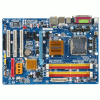
Like all of Gigabyte's offerings, the P31-DS3L arrived in one of the cleanest-looking motherboard boxes around. Professional, bright and informative. The first thing I noticed, however, was how light the box was when compared to other offerings. Indeed, the board itself is smaller than most, and the included extras are also few.
Care to have a little trip around the board? First stop is the bottom-right-hand corner, where we have two on-board USB connectors (each can handle two ports, helping to bring the board total to eight), the single IDE port, four S-ATA 3Gb/s ports, ATX connectors and also a 4-pin fan connector.
It might be a value motherboard, but the slots are plentiful. I appreciate the fact that there are three PCI slots. Even most enthusiast motherboards include less than this. In addition to those, there are 3x PCI-E 4x and a single PCI-E 16x for your graphics. The floppy connection is located below all of those, in what could be the most inconvenient location on the board.
Neither the P31 or ICH7 chipsets generate much heat, so simple sinks are used. Silence is golden... and so are these heatsinks.
Four DDR2 ports are found, although 8GB is the maximum allowed due to chipset limitations. I didn't test out running 2GB modules, but they should function fine, as long as there is only two. A 3-pin fan connector is found here as well, perfect for a RAM cooler.
On the side panel we have PS/2 keyboard and mouse ports, S/PDIF output, serial and parallel ports, 4x USB 2.0, a single LAN and also the audio, powered by the Realtek ALC888 chipset.
Accessories include the manual and driver CD, installation instructions (perfect for new computer builders), two S-ATA cables, single IDE cable, single floppy cable and also the I/O guard.
The P31-DS3L might not be an enthusiast-level offering, but given the price, it's a great-looking package. As far as the layout is concerned, I cannot find much complaint. If anything, the floppy connection seems to be in an inconvenient location, with the cable needing to stretch across the chassis. Though, I'm assuming the vast minority will have to deal with this issue, as floppy drives are not commonplace anymore.
There are three spare fan connectors, which I consider to be great for a value board, and the PCI-E slot is clear of anything, so installing a large card won't be a problem.
Up next we will take a look at the boards BIOS and see if it also represents that of a budget offering.
The P31-DS3L, as we've found out, is a value offering, so does the BIOS reflect that? Yes and no. While there is no major functionality missing, there is none added, either. Many people who purchase this board are unlikely to be concerned with that though.
I am not a fan of Award BIOS' at all... I find them clunky and difficult to wade through, and this one is no different. AMI's offerings, to me, makes more sense from a functionality standpoint, but it could all be a matter of personal tastes.
The Standard CMOS Features screen allows you to configure the time, hard drives, ODDs, floppy drives and also "halt on" error configuration.
The Advanced BIOS Features is where things become more interesting. By default, SMART is turned off, but should be turned on if you wish to track hard drive information (such as temperatures). The boot configuration is also found here, although F12 can be pushed during POST to select a different device if need be.
Integrated Peripherals is your one-stop shop for configuring USB devices, LAN devices, IDE/S-ATA connectors and audio.
Power Management is a screen I've never had to touch in any BIOS, but you might have specific needs that need to be addressed here. The same applies to the PCI/PnP configurations.
PC Health is the first screen I tackle on any new build, to make sure that temperatures and PSU voltages are within reason. The BIOS here doesn't delve too much into such information, but all the bases are covered.
Of course, it's the tweaking screen that will get the most attention from overclockers, and overall, this one doesn't disappoint too much. In order to access full functionality, CTRL + F1 needs to be pressed at the BIOS main screen.
While the BIOS covers the bases here, such as voltages and basic memory timings, it will leave much to be desired for the enthusiast overclocker. That said, there is still some fair potential here, and as we will discuss on the final page of the review, 430FSB was possible with a 100% stability rating (8 hours of stressing), so there is definitely some potential.
The biggest downside here is the FSB voltages, but even that might not hold many back from tweaking out every last inch of performance. When I ran the motherboard at 440MHz FSB, I deemed it unstable after a few hours worth of testing, which is why I dropped it down to 430MHz, which did prove to be a very stable solution. As with overclocking in general, your mileage may vary.
Time for benchmarking!
Throughout all of our benchmarks regardless of what we are reviewing, testing is done in a clean and stand-alone version of Windows XP Professional with SP2. The exception is PCMark Vantage, which is tested under Windows Vista. Prior to testing, these conditions are met:
The testing rig used for today's benchmarking is as follows:
Please note that for our DDR3 motherboards, we use DDR3-1333 speeds with 7-7-7-20 timings, and for our DDR2 boards we use DDR2-1066 5-5-5-15. Lastly, all tests are run twice, with the results averaged between the two.
SYSmark is an industry leading system benchmarking tool, which is completely automated but utilizes real-world tests. It installs common applications such as Microsoft Word and Excel, Photoshop CS2, 3DS Max, SketchUp! among others.
SYSmark grades the performance of the system by how well it could handle different operations. Systems with more than one core will benefit in the tests, since there is a lot of multi-tasking throughout. Once the test is completed, it will provide you with an overall score, in addition to showing areas where the computer excelled.


When comparing a "value" board to high-end boards, it has little chance of beating any of them. However, even though the board did prove to be the slowest of the bunch, it's results were not far behind the others.
Futuremark has long offered benchmarking tools to enthusiasts that allow them to gage their systems worth. There is a lot of skepticism revolving around the importance of the overall scores, but we enjoy running them because it's a quick fix to see differences between platforms. Real world benchmarks are by far more important, and we will cover those on the next few pages.
They launched their latest PCMark version late last year, called Vantage. It's not a simple upgrade, but rather a completely revamped benchmark that competes with the likes of SYSmark 2007. The good thing about Vantage though, is that it's easier on the nerves, since SYSmark 2007 has the tendency to error out often.
PCMark Vantage consists of eight different scores, with PCMark Suite being the primary. All of the secondary results are included here as well, though, to get a better idea of which board excels where.

Now here's a spin on things - the P31-DS3L had top honors here. Let's see if that keeps up. We'll continue with our multi-media tests, up next.
Where video conversion is concerned, one of the applications I've grown to enjoy over the years is Nero Recode. Though it's export options are extremely limited, they offer high image quality and decent file weight. Nero 8 was launched last fall, and you can read our review, if interested.
For this test, we've first ripped our copy of our concert DVD, Killadelphia, by Lamb of God. The original DVD rip weighs in at 7.7GB, but we are using Nero to reconvert it to 4.5GB so that it will fit on a normal-sized DVD to use as a backup. Our "mobile" test consists of converting the main concert footage to the same resolution a Sony PSP uses (480x272) which results in a 700MB file.

The P31-DS3L continues to do well, hitting the second spot here for the DVD Recode. Things change with the iPod video - it took the longest.
For our DivX testing, we use a 0.99GB high-quality DivX .AVI of Half-Life 2: Episode Two game play. The video is just under 4 minutes in length and is in 720p resolution, which equates to a video bit rate of ~45Mbps, not dissimilar to standard 720p movies. We converted the video two different ways.
First, we encoded the video at the same resolution but a lower quality, so as to achieve a far more acceptable file size (~150MB). The second method is encoding of the same video, but to a 480x272 resolution, similar to what some mobile devices use.

Differences between the higher-end boards is nil, but the P31-DS3L proved 3 - 4 seconds slower in each test.
Years ago, you'd have to fork over many Benjamins in order to get a piece of great technology, but that's not the case anymore. For a modest fee, you can set yourself up with some absolutely killer hardware. Luckily, one area where that's definitely the case is with digital cameras. It's cheaper than ever to own a Digital-SLR, which is the reason why they are growing in popularity so quickly. As a result, RAW photo editing is also becoming more popular, hence the topic of our next benchmark.
Adobe Lightroom is an excellent RAW photo editor/organizer that's easy to use and looks fantastic. For our test, we take 100 RAW files (Nikon .NEF) which are 10 Megapixel in resolution and then export them as JPEGs in 1000x669 resolution... a result that could be easily passed around online or saved elsewhere on your machine as a low-resolution backup.

Our board turned out to be the slowest performer once again. This could be due to many factors, most likely the power components on the board. The higher-end boards have higher-quality components, which helps push out maximum performance.
As an industry-leading 3D graphics application, Autodesk's 3DS Max is one of our more important benchmarks. If there are people who will benefit from faster CPUs with lots of cores, it's designers of 3D models and environments and animators. Some of these projects are so comprehensive that they can take days to render.
For our test, we are taking a dragon model which is included with the application, Dragon_Character_Rig.max, and rendering it to 1080p resolution (1920x1080). For a second test, we render the same model, but all 60 frames, to a 490x270 resolution .AVI.

The tradition continues here. Hard drive and gaming tests up next.
Different motherboards use different chipsets for SATA controllers, so these tests are a good way to see how one board will compare to another. The first test is synthetic, using HD Tach RW/3, while the File Compression is real world, which involves compressing a 4GB folder (4,809 files) using 7-Zip.


The differences are so minute here, that they are almost moot. Our P31-DS3L had the slowest scores of them all, but the differences are painfully small.
One game that needs no introduction, Half-Life 2: Episode Two was a proper sequel to Episode One, although the duration in which people had to wait between the two was a little questionable. Luckily for fans though, Episode Two proved to be more of what we love. It was a win/win. Introduced with this version were achievements as well, which let you know how much of a fan you really are.
We are using the Silo level for our testing. During our game play, we shoot down a total of three striders (their locations are identical with each run, since we are running a saved game file) and a barn is blown to smithereens. Pure win!

The ultimate gaming motherboard isn't the P31-DS3L, but once again, the differences between them are minimal.
FEAR first hit our PCs in fall of 2005. When it did, it proved to almost everyone just how badly our computers needed upgrading. It was one of the first games to truly benefit from having 2GB of RAM installed, but of course also a massive graphics card. Even today, running a high-resolution FEAR is a visual treat.
The third level is our destination today, which begins us out beside two friends who send me off through various buildings, kicking some ass en route. I am unsure where the final destination is, as I've never explored that far, but throughout our five-minute game play we encounter four enemies, outdoor and indoor areas and even have a strange horror sequence occur.

The results were consistent, but the board will still not let you down where gaming is concerned. It's slower than the others, but I'd be hard-pressed to see someone notice a difference while immersed in their favorite game.
If you guessed that the P31-DS3L was not developed for overclocking, you would be correct. However, that doesn't mean much of anything, because there is a fair amount of tweaking ability here. My goal with any motherboard is 450FSB, but on this board, I was unable to keep it stable. At those speeds, SP2004 would fail after 15 minutes, but lowering to 430FSB rid the instabilities altogether.
The screenshot below shows the CPU speed as 2.58GHz, but it was actually 3.87GHz. It was lowered due to EIST taking care of business while sitting at idle. At these speeds, the computer was deemed stable after an eight hour period of running four instances of SP2004 - one for each core. Following that, 3DMark 06 was looped ten times, all without issue.
For the performance to be stable, the FSB voltage was set to it's maximum of +0.3v, which I believe equates to 1.5v. This is still well within reason and would require absolutely no extra cooling, unless your room also happens to be a sauna. So overall, the overclocking performance wasn't too bad. I believe though, that even higher heights could be reached. I could tell the board wanted to go higher, but was unable. You might achieve a better overclock than I did.
I admit that I wasn't expecting much from this board at all, but I left impressed. Although the feature-set is far from robust, and the accessories is lacking, the board looks good and has a great layout. I appreciate the fact that more than two fan connectors are included, since most value motherboards ignore the fact that people like to have more than than two fans.
Though I still don't understand the reason for including 3x PCI-E 1x slots, those are there for those who need them, alongside three standard PCI slots, perfect for audio, network cards and the like. Since this board includes one NIC port, adding a second might be in the cards. No pun intended.
Even though the board costs far less than the higher-end offerings, its performance kept right up. It did place last in most of the "races", but the differences were negligible. It would be difficult for someone to tell the difference unless they are hopped up on a few cases of Red Bull.
The P31-DS3L is a small board, but packs a surprising punch. Inte's P31 was never publicised much, but it should have been - it's a true win for budget shoppers.
If you have a comment you wish to make on this review, feel free to head on into our forums! There is no need to register in order to reply to such threads.


Copyright © 2005-2008 Techgage Networks Inc. - All Rights Reserved.