Techgage logo

Noctua NF-R8 and NF-S12 Fans, NC-U6 Chipset Cooler
Date: July 19, 2007 - Author: Greg King

There are many companies that exist for the sole purpose of helping your PC keep it's cool, but Noctua believes they do that better than anyone. So, we are putting their 80mm fan, 120mm fan and chipset cooler to the test, to see if they live up to the hype.


Introduction

As with most anything, time and consideration needs to be taken when designing a PC build. There are so many components that need cooling and sometimes the stock cooling isn't enough to keep up with our needs. You can't likely overclock your CPU as far on a stock cooler as you could on a more robust cooler using heat pipes to pull the heat away from the processor. The same can be said for the video card and chipset coolers as well.

We have seen manufacturers release more and more products with heatpipes on them and nowhere is this more obvious than on today's motherboards. Just last month, Rob took a look at the Asus P5K3 Deluxe, Asus' latest offering of the DDR3 variety. One look at that board will validate the heat pipe as the preferred method of cooling in today's hardware.

What if your board doesn't use heatpipes to keep itself cool? Many motherboards still use the heatsink and fan method while others can get away with passive cooling and there are advantages and disadvantages of both methods.

The primary advantage of the heatsink and fan pairing is that you have a constant flow of air across the chipset's heatsink. The trade off is often is sound. The small fans can create a lot of noise and over time, are susceptible to failing. With a passive cooler, the sound issues of a fan are gone but so is the cooling performance of direct airflow.

Today we have a trio of products from the Noctua, a cooling company based out of Austria. We are looking at their uniquely designed 80 and 120mm fans, as well as their NC-06 chipset cooler.

First.. The Fans

Starting off with the fans, we notice that Noctua went the extra mile in their presentation. Being marketed as a quiet cooling solution, Noctua has included in their package a set of four rubber "vibration compensators", otherwise known to me as nipples. One such device can be seen though the clear section of the packages.

Around the back, we see the information about the fans including airflow and decibel information.

Once out of the boxes, we see that each come in a clear shell with compartments for the accessories that ship with the fans. These include 4-pin Molex to 3-pin adapter cables, cable extenders, the aforementioned rubber vibration compensators and a set of screws should those rubber thingies not be used.

Side by side, it's clear which one is the 120mm fan and which one is the 80. Both share the same color scheme and fin design and both have a power cable that is wrapped in what feels like a rubber-ish material.

Taking a closer look at the 120mm NF-S12-1200, we can see the noticeably different blade design. The fins are more vertical in the center and curve out from there. It's a different designed blade but one that is supposedly able to move a significant amount of air.

Moving onto the 80mm, the NF-R8 is exactly the same as the NF-S12, only smaller.

Now that we have seen the fans themselves, let's take a look at their specs. The main specs we are most concerned with is the airflow and noise. Let's see how they compare.

As we can see, both fans share the same noise rating but the significant difference is the amount of air that each one pushes at that noise level.

Noctua is working hard to get the word out that their fans are quality, quiet cooling solutions that any enthusiast should consider when purchasing a better fan for their PC. If you have to have an 80mm fan, they have you covered and if a 120mm is what you are looking for, the NF-S12 should get your consideration as well.

With those out of the way, let's take a look at the NC-U6 chipset cooler.

Then the Cooler

The Noctua NC-U6 chipset cooler looks much like any heatpipe cooler that one would use to either keep their chipset cooler or quiet a noisy fan. Regardless of the reasoning behind upgrading, the benefits to upgrading are there.

Packaged in a simply blister pack, the cooler is easily seen alongside its accessories. Flanked by its installation adapters, we can see that the NC-U6 is a simple vertical heatpipe cooler that can capture air form either a case fan or the CPU fan. It's a simple design but one that has been proven to work in various other models from various other companies.

Out of the packaging, Noctua has included the bare essentials to getting this cooler installed. Included with the NC-U6 is a simple but precise manual, a pair of mounts for push pin and hook mount motherboards, a small amount of thermal paste that most likely will never get used unless I'm in a bind, a foam spacer, and a small screw to attach said mounts to the cooler.

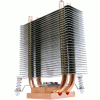
Taking a closer look at the cooler itself, we see that it uses a pair of heatpipes to pull the heat away from the copper block and dissipate it out among the aluminum fins. Notice the small hole on top of the block. This is threaded to allow the included screw to be tightened down, holding the mounts in place.

From the top, we can see a hold running all the way down the entire length of the cooler. This allows easy access to tighten down the mounting screw. There are also, what appear to be, grooves on the ends of the sinks to apparently attach a 60mm fan should one be needed.

Interestingly enough, Noctua does not provide fan mounting hardware, nor do they even manufacture a small enough fan to work on this cooler. The exclusion of the fan mounting hardware is unfortunate but not a deal breaker in our opinion. Regardless, we are hoping that the performance of this cooler will be good enough to not need a directly attached fan.

Knocking the NC-U6 over, we see the base in all its glory. While not the smoothest base that we have see, it's certainly not the worst and when used with quality thermal paste, should provide a solid surface against the chipset.

Installation, Testing, Final Thoughts

Installation of the NC-U6 is as straight forward as they come. We simply picked a motherboard without a heatpipe (DFI Infinity 975 X/G), removed the stock heatsink, stuck the foam spacer on the bottom, applied a fair amount of Zalman ZM-STG1 thermal paste and laid her down on the chipset.

Yeah, I know that the foam spacer isn't centered but there is still plenty of room for the chipset itself.

Prior to hooking it down, we want to match our mounts with the motherboard. DFI chose to use the hook method so we are using the appropriate mount.

With the mount installed on the cooler with the provided screw, we are ready to place it on the chipset and lock it down. In our case, we simply had to hook it onto the metal loops that stick out of the motherboard itself. It's a rather simple process.

Mounting the cooler parallel with the PCI-E slots presented us with our first problem. It seems that with our bench cooler, a Zalman 9700, the cooler is too wide and actually touches the NC-U6. This is a bit of a problem since many aftermarket coolers are just as wide.

Not ones to sit around idly, we simply rotated the CPU cooler 90 degrees and were back in business. This not only allowed the NC-U6 to fit, but also directed a lot of airflow across the fins of the Noctua cooler.

When everything was hooked up, we ran a few tests. We measured the temps of the Intel 775 chipset at idle and at full load. It's difficult to really stress a chipset but we tried our best by looping 3D Mark '06 for an hour. Our results weren't earth shattering but did provide us with much lower temps than that of the passive stock cooler that DFI stuck on the Intel 775 chipset.

Temperatures
Idle
Load
Stock Cooler 38C 49C
Noctua Chipset Cooler 33C 41C

In the end, we like what Noctua has to offer. Also in their lineup is a pair of CPU coolers that unfortunately, we were not able to include in this round up. Never the less, we were impressed with the simplicity of the chipset cooler and the overall sound and air movement of the fans. Starting with the fans, we liked the design of them and the air they moved was nice but their single greatest shortcoming is an unavoidable one... they are fans. Great fans.

Most people will pick up the first fan they come to and get it, not realizing that some move more air while others are silent. For me, it's difficult to say much about a fan because to me, a fan is a fan is a fan. You plug them in, face them in the appropriate direction and viola, you get air movement.

Can I recommend them? Yes. If you can get past the fact that the 80mm and 120mm fans cost $8.99 and $24.99 (US) respectively, I certainly recommend them. They move a good amount of air and they are quiet but they do so with a higher than normal price tag.

However, if you're willing to pay a few dollars more for the 80mm fan, and anywhere between 5 and 10 dollars extra for the 120mm fan, you won't be disappointed with your purchase. Both fans get an 8 out of 10.

Moving onto the NC-U6, we were impressed with style, performance and ease of installation. While some motherboard might run into clearance issues, depending upon how close the chipset is to the CPU socket, the work around in our case was a simple one. By rotating the fan, and assuming you can do that with your cooler, we were able to not only free up enough room to allow us to install the NC-U6, but we were also able to push a great deal of air across the cooler's fins, adding to the cooling power of the cooler.

It's a bit pricey at $32.99 (US) but unlike the fans, it's an easier pill to swallow as the performance difference was impressive in our case. The closest competitor to the NC-U6 is the Thermalright HR-05 and it can be had for around $25. Does the extra eight dollars get you better performance? We aren't sure, but rest assured, we will bring you the cooler results of that Thermalright shortly. With the pros and cons weighed, the Noctua NC-U6 gets an 8 out of 10.

Discuss in our forums!

If you have a comment you wish to make on this review, feel free to head on into our forums! There is no need to register in order to reply to such threads.


Copyright © 2005-2008 Techgage Networks Inc. - All Rights Reserved.


