Techgage logo

ATI HD 4870 1GB vs. NVIDIA GTX 260/216 896MB
Date: November 24, 2008 - Author: Rob Williams

In the $250 - $300 price-range, there exists two graphics cards that want to see your dollar, but which one deserves it the most? To find out, we're taking a thorough look at each. In addition to general performance comparison, we're also taking a look to see which excels where power consumption and temperatures are concerned, in addition to overall pricing.


Introduction

The computer hardware landscape is constantly changing, and if there is one area to look for proof of that, it would be graphics cards. Never before has there been so much value in almost every current model available. Gone seem to be the days where killer performance could be seen only on a $400+ GPU. Today, even some sub $100 cards can handle the latest games at the ultra-high resolution of 2560x1600, which in all respects is rather incredible.

We've established over the course of the past few months in our other graphics card reviews that lower-end gamers can see some great value with budget cards, but that sentiment is no less true for the higher-end gamers as well. Although we've been in the mindset that "high-end" graphics was equal to separating yourself from $400, today's $250 - $300 GPUs are in every-single regard, high-end.

In fact, some of today's affordable GPUs can actually make you step back and wonder what the true value in a multi-GPU setup is. If one GPU can handle most games at incredible resolutions, what's the need for even more power? Wouldn't it go to waste? That depends on the resolution, of course, and your desire for robust anti-aliasing. If you aren't so fussy about AA, multi-GPU setups are probably not for you.

The highest-end cards available right now from both camps are the GeForce GTX 280 and Radeon HD 4870 X2, but both are getting into a much higher price-point, so the appeal is limited. For the upper-end of the mid-range cards, NVIDIA has their GeForce GTX 260 / 216, while ATI has their Radeon HD 4870 1GB. Both cards were released as an attempt to directly counteract the other's release, ironically enough.

While the "holiday season" means many things to many people, for gamers, it's without question one of the best times of the year. It doesn't take a brainiac to figure out why game publishers decide to push out so many games at this time of year, but we won't argue. This year is no exception. There are so many great games out now, that we have to wonder how we'll find time to play them all. Five such games are featured in today's article.

NVIDIA contacted us a couple weeks ago with this story idea, and since we haven't published a proper "head-to-head" before, the idea struck me as a "must-do". Their claim: The GTX 260/216 can beat out the HD 4870 1GB in each one of the holiday's biggest titles.

Sounds like a fair claim to me, but I wasn't about to conclude on anything until some hard time was spent in front of the PC. All of what I discovered was rather interesting, and it made me even more glad I decided to tackle this article idea. Before we head into our testing results, let's take a quick look at today's contestants.

NVIDIA GeForce GTX 260 / 216

When NVIDIA released their GTX 200-series in June, both launch models offered excellent performance. In fact, the performance was so good, that I considered it to be a "major" jump. Their 9-series offered little more than overclocked 8-series cards, but the GTX 200 was the real deal. The GTX 280 in particular offered incredible performance that belittled ATI's at-the-time current offerings, which is one reason the company decided to charge a staggering $649 at launch for it.
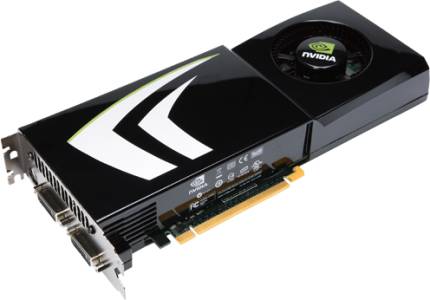
Not long after, ATI released their HD 4800-series, which to our surprise, did a great job of counter-acting NVIDIA's launch. It was the first time in a long while we saw that happen, and when it did, you could almost hear the sheer number of jaws being dropped in unison. To counteract that launch, NVIDIA followed up with a GTX 260 card that increased the number of cores from 192 to 216. Other specs remained the same, but the jump in cores is still significant enough to show important increases.

ATI Radeon HD 4870 1GB

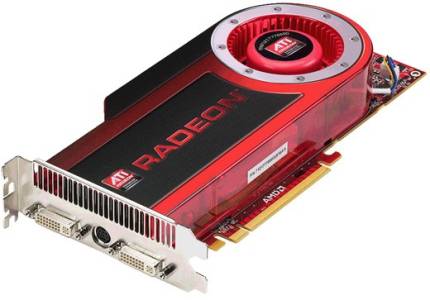
Months after ATI released their HD 4800-series, they followed-up with a card that should have been available on day one... a 1GB version of the HD 4870. NVIDIA had the right idea for a while that our graphics cards need more memory to battle with today's high-resolutions. For those who play at under 1920x1200, the need for lots of memory isn't as important, but it becomes exponentially important as you move further up - especially at 2560x1600.

The same can be said for anti-aliasing, though, so all-around, it's more important than ever to have a GPU equipped with a good helping of memory. Nowadays, doubling the memory of a graphics card doesn't increase the price near as much as it used to. You can still sometimes expect a $30 - $40 premium, but if you are running a high resolution and love AA, it's more than worth it to pick it up.

So are NVIDIA's claims well-founded? Our goal today is to deliver a definitive answer. Bear in mind that while we are tackling game titles that are hot this holiday season, performance values should carry over to other titles, as well. In addition to general performance, we'll be taking a look later at power consumption, temperatures and pricing as well, to see which card excels in these different areas.

Before we take a look at all of our results, we highly recommend you read through our testing methodology on the next page. We take our testing very seriously, and as a result, it's conducted a little different than at most other sites. We're borderline obsessive, but we feel the extra effort is well worth it. Following that, we'll begin with both Call of Duty: World at War and Crysis Warhead.

Test System & Methodology

At Techgage, we strive to make sure our results are as accurate as possible. Our testing is rigorous and time-consuming, but we feel the effort is worth it. In an attempt to leave no question unanswered, this page contains not only our testbed specifications, but also a fully-detailed look at how we conduct our testing.

If there is a bit of information that we've omitted, or you wish to offer thoughts or suggest changes, please feel free to shoot us an e-mail or post in our forums.

Test System

The below table lists our testing machine's hardware, which remains unchanged throughout all GPU testing, minus the graphics card. Each card used for comparison is also listed here, along with the driver version used. Each one of the URLs in this table can be clicked to view the respective review of that product, or if a review doesn't exist, it will bring you to the product on the manufacturer's website.

For each card, we used the absolute latest driver version possible. For NVIDIA, we used 180.48, which became a significant release for the company. It brought multi-monitor SLI, dedicated GPU PhysX and general performance enhancements to the table. ATI's 8.11 Catalyst driver wasn't as significant of a release, but their upcoming 8.12 is aiming to deliver important performance increases, similar to NVIDIA's release.

Component
Model
Processor
Intel Core 2 Extreme QX9770 - Quad-Core, 3.6GHz (Overclocked), 1.35v
Motherboard
ASUS Rampage Extreme - X48-based, 0501 BIOS (08/28/08)
Memory
Corsair XMS3 DHX 2x2GB - DDR3-1333 7-7-7-15-1T, 1.91v
ATI Graphics
Diamond Radeon HD 4870 1GB (Catalyst 8.11)
NVIDIA Graphics
XFX GeForce GTX 260 / 216 896MB (GeForce 180.48)
Audio
On-Board Audio
Storage
Seagate Barracuda 500GB 7200.11 x 2
Power Supply
Corsair HX1000W
Chassis
SilverStone TJ10 Full-Tower
Display
Gateway XHD3000 30"
Cooling
Thermalright TRUE Black 120
Et cetera
Windows Vista Ultimate 64-bit

When preparing our testbeds for any type of performance testing, we follow these guidelines:

To aide with the goal of keeping accurate and repeatable results, we alter certain services in Windows Vista from starting up at boot. This is due to the fact that these services have the tendency to start up in the background without notice, potentially causing slightly inaccurate results. Disabling "Windows Search" turns off the OS' indexing which can at times utilize the hard drive and memory more than we'd like.

Game Benchmarks

For graphic card reviews that pit us with a mid-range card or higher, we test at three popular resolutions that span the mid-range to high-end ground, consisting of monitor sizes of 20" (1680x1050), 24" (1920x1200) and 30" (2560x1600).

In an attempt to offer "real-world" results, we do not utilize timedemos in our graphic card reviews, with the exception of Futuremark's automated 3DMark Vantage. Each game in our test suite is benchmarked manually, with the minimum and average frames-per-second (FPS) captured with the help of FRAPS 2.9.6.

To deliver the best overall results, each title we use is exhaustively explored in order to find the best possible level in terms of intensiveness and replayability. Once a level is chosen, we play through repeatedly to find the best possible route and then in our official benchmarking, we stick to that route as close as possible. Since we are not robots and the game can throw in minor twists with each run, no run can be identical to the pixel.

Although for most of our GPU content we run through a given setting twice, we upped that number to three here, since we are doing a direct head-to-head and want to fine-tune our results as much as possible.

The six games we chose for this article are shown below, with direct screenshots of their respective setting screens.

Call of Duty: World at War

1680x1050
1920x1200
2560x1600


Crysis Warhead

1680x1050
1920x1200
2560x1600


Dead Space

1680x1050
1920x1200
2560x1600

Fallout 3

1680x1050
1920x1200
2560x1600

Far Cry 2

1680x1050
1920x1200
2560x1600

Left 4 Dead

1680x1050
1920x1200
2560x1600

Call of Duty: World at War, Crysis Warhead

While some popular game franchises are struggling to keep themselves healthy, Call of Duty doesn't have much to worry about. This is Treyarch's third go at a game in the series, and a first for one that's featured on the PC. All worries leading up to this title were all for naught, though, as Treyarch delivered on all promises.

To help keep things fresh, CoD: World at War focuses on battles not exhaustively explored in previous WWII-inspired games. These include battles which take place in the Pacific region, Russia and Berlin, and variety is definitely something this game pulls off well, so it's unlikely you'll be off your toes until the end of the game.

For our testing, we use a level called "Relentless", as it's easily one of the most intensive levels in the game. It features tanks, a large forest environment and even a few explosions. This level depicts the Battle of Peleliu, where American soldiers advance to capture an airstrip from the Japanese. It's a level that's both exciting to play and one that can bring even high-end systems to their knees.

The relative domination didn't take long to begin, with the GTX 260/216 gaining close to 10 FPS at each resolution. The biggest gain was found at 1680x1050, with a 12.8 FPS increase, while our highest-end 2560x1600 enjoyed a 9.1 FPS boost.

Crysis Warhead

As PC enthusiasts, we tend to be drawn to games that offer spectacular graphics... titles that help reaffirm your belief that shelling out lots of cash for that high-end monitor and PC was well worth it. But it's rare when a game comes along that is so visually-demanding, it's unable to run fully maxed out on even the highest-end systems on the market. In the case of the original Crysis, it's easy to see that's what Crytek was going for.

Funny enough, even though Crysis was released close to a year ago, the game today still has difficulty running at 2560x1600 with full detail settings - and that's even with overlooking the use of anti-aliasing! Luckily, Warhead is better optimized and will run smoother on almost any GPU, despite looking just as gorgeous as its predecessor, as you can see in the screenshot below.

The game includes four basic profiles to help you adjust the settings based on how good your system is. These include Entry, Mainstream, Gamer and Enthusiast - the latter of which is for the biggest of systems out there, unless you have a sweet graphics card and are only running 1680x1050. We run our tests at the Gamer setting as it's very demanding on any current GPU and is a proper baseline of the level of detail that hardcore gamers would demand from the game.

Things become a little bit tighter with Crysis, although our 1920x1200 run showed a full 50% performance boost with the GTX 260. Minor increases were seen at 1680x1050, while the HD 4870 managed to inch ahead of the GTX at our top-most resolution of 2560x1600. Neither of the 2560 settings were "playable" though, as the game generally requires 30 FPS to enjoy smooth (or almost smooth) gameplay.

Dead Space, Fallout 3

Not to be confused with the general mass that floats around inside my head, Dead Space is a cross between Quake IV and Resident Evil, offering survival horror action that's surprisingly great. In fact, almost all of the game's initial reviews have praised the title for its story (rare to see), gameplay and overall experience. It might be a Resident Evil in space, but EA showed that they could still impress even in a relatively over-saturated genre.

The game is innovative in more than one way, with the main being the awkward view of the player. Rather than seeing the camera situated directly behind the player, it's instead pushed slightly to the left, for more of an over-the-shoulder view. It's odd at first, but after a while of playing, it grows on you. Another notable innovation is the absolute lack of a HUD, except when needed. Seems minor, but the experience looks far better without a HUD filling up a quarter of the screen.

The level we use for testing is "New Arrivals", which is Chapter 1 of the game. This is based off an NVIDIA-based saved game file that begins us 50 minutes in the game, and gives us a perfect opportunity to do a quick run through a certain area of the ship. No battles take place, but we do shoot a gas canister along the way, because after all, explosions are fun.

Overall, the gains on the GTX 260/216 are stark... there's absolutely no comparison. Well, there's especially absolutely no comparison with our 2560x1600 test, as the resolution was not supported on our NVIDIA card for some reason. By "not supported", I mean it wasn't even a selectable option, and couldn't be forced (through an edit of the game's configuration file). Prior GeForce driver versions didn't help either, but after searching the web, I seem to be the only person with this issue, as I found others using the same resolution on their own GeForce cards.

I'm unsure who to blame here, but if I had to pick someone, it would be Gateway. Although this is the first time I've ever seen this happen with any game, previous issues with our XHD3000 lead me to believe that anything is possible. After all, others can play the game at this resolution on GeForce cards, and every-single other game out there has worked at that resolution as well. Ultimately, I believe it to be an issue with the EDID, but that's something even a firmware update couldn't fix, from what I'm aware.

That all aside, given that we saw such great gains at our other two resolutions, I have no reason to believe that 2560x1600 wouldn't exhibit the same.

Fallout 3

If there is one game that's been hyped up this year for the PC, it would have to be Fallout 3. Building on the foundation that has captivated countless fans, the third game in the series instantly became a well-respected action role-playing game... a genre we rarely ever see great games from. Bethesda did a masterful job here.

It's not often that a PC game gets released that delivers over 50 hours of gameplay, but this is one of them. In fact, if you beat the game in 30 hours, you probably didn't play it right. I've even seen accounts people who've played it for 80 hours. Now that's value! The game takes place in 2277, with you as a survivor of a nuclear 'fallout'. Your father mysteriously disappears, and it's up to you to find him. Along the way, you meet many friends, kick a lot of ass, and take in a world that's very dirty, but still fun to explore at the same time.

The area in the game we use for testing is Dupont Circle, and the test consists of a general walk through the area, with light combat along the way, in addition to a few good explosions... something there is a lot of in this game. You can see the heart of the area in the screenshot above. To make sure our character doesn't die during the play through (there are a lot of landmines), we use God mode.

Fallout 3 will turn out to be the tightest of all the games included here, with 5 FPS being our largest gain. Nothing major, but it's a gain nonetheless, and one NVIDIA is no doubt proud to gloat about. Whether or not ATI's upcoming 8.12 driver release will work to fix this problem, we don't know.

Far Cry 2, Left 4 Dead

Sequels are common, and four of our six games used here prove it. But what's different with Far Cry 2, though, is that while the other sequels here don't throw you for a loop when you first load it up and generally give you what you'd expect to see, this game does the absolute opposite. We knew for months that Far Cry 2 wasn't going to be a direct continuation of the original, but for the most part, this game could have gone by any other name and no one would even make a connection. Luckily for Ubisoft, though, the game can still be great fun.

Like the original, this game is a first-person shooter that offers open-ended gameplay, similar to S.T.A.L.K.E.R. You'll be able to roam the huge map (50km^2) of a central African state which will mostly be traversed by vehicle, as walking even 2% in any direction gets very tedious after a while. This game is a perfect GPU benchmark simply because the graphics are better than the average, with huge draw distances, realistic nature and even a slew of animals to pass by (and kill if you are evil enough).

Our run through takes place in the Shwasana region, and consists of leaving a small hut and walking towards four people prepared to kill me for no apparent reason (except that this is a game). After the opponents are eliminated, a walk along the dirt road continues for another twenty seconds until we reach a small hut with supplies.

NVIDIA's card continues to impress here, but similar to Fallout 3, the gains are rather minor. The performance gains are best-appreciated at 2560x1600, where every extra pinch of performance can be noticed. Like Crysis, this is another game that should hit 30 FPS to be fully enjoyable, and both cards score that just fine in all three resolutions.

Left 4 Dead

Not too many game publishers can brag about having such a great track record like Valve can. None of their major game releases have ever been released to anything but praise, which goes to show that not rushing to release a game to please investors can make a huge difference. Take Half-Life 2, Team Fortress 2 and Portal, for example.

Left 4 Dead is one game I didn't take seriously up until its launch. After playing it though, my opinions changed drastically, and even as I type this, I feel like saving the document and going to play. But, I'm also scared of Zombies, so continue writing I shall. Like Dead Space, this game is a survival shooter, but unlike that game, this title focuses completely on co-op. For the most part, the game is dulled in single player, but team up with three of your friends and let the laughs and excitement begin.

The portion of the level we use for testing is contained within the No Mercy campaign. The ultimate goal in the entire campaign is to make it to the top of a hospital in order to be picked up and brought off to safety. Our run through takes place in the final part of the the campaign, which leads up towards the roof tops. If one thing can be said about this title, it's that causing a Boomer to explode (as seen in the above screenshot) proves to be one of the most satisfying things to do in any game I've played in a while.

Nice gains are again seen here, with the two top delivering 7 FPS more on average with the GTX 260. Both cards offered near-identical gameplay though, and I'd be hard-pressed to find someone who could tell the difference between the two. The engine in general isn't as robust as some others out there, like Crytek's, and Valve knows that the largest part of their customer base uses low-end or mid-range systems, so the game is definitely optimized to work on most any recent PC.

3DMark Vantage, Power Consumption

Although we generally shun automated gaming benchmarks, we do like to run at least one to see how our GPUs scale when used in a 'timedemo'-type scenario. Futuremark's 3DMark Vantage is without question the best such test on the market, and it's a joy to use, and watch. The folks at Futuremark are experts in what they do, and they really know how to push that hardware of yours to its limit.

The company first started out as MadOnion and released a GPU-benchmarking tool called XLR8R, which was soon replaced with 3DMark 99. Since that time, we've seen seven different versions of the software, including two major updates (3DMark 99 Max, 3DMark 2001 SE). With each new release, the graphics get better, the capabilities get better and the sudden hit of ambition to get down and dirty with overclocking comes at you fast.

Similar to a real game, 3DMark Vantage offers many configuration options, although many (including us) prefer to stick to the profiles which include Performance, High and Extreme. Depending on which one you choose, the graphic options are tweaked accordingly, as well as the resolution. As you'd expect, the better the profile, the more intensive the test.

Performance is the stock mode that most use when benchmarking, but it only uses a resolution of 1280x1024, which isn't representative of today's gamers. Extreme is more appropriate, as it runs at 1920x1200 and does well to push any single or multi-GPU configuration currently on the market - and will do so for some time to come.

Nothing too surprising here. Our largest gain was seen with our "High" test, where the GTX 260 delivered a 13.5% increase. "Extreme" saw an 11.8% increase.

Power Consumption & Temperatures

Since we've had so many graphs already, the power consumption and temperature results are being condensed into this last one. For power consumption, we use a Kill-a-Watt that has nothing but the PC plugged in, while for GPU temperature tracking, we use GPU-Z, which does a fantastic job of exporting various bits of information to a clean text file.

To begin, the PC is left turned off for at least five minutes, and then is boot up and left to sit at the Windows' desktop for another five minutes. At that point, both the idle wattage and temperature are recorded. To stress the GPU for load information, 3DMark Vantage's "Extreme" test is executed at 2560x1600. The space flight test is used exclusively here in a loop of three, with the results being recorded during a specific sequence during the run where it seems to stress the GPU the most.

Overall, it seems NVIDIA's card doesn't just excel in performance, but in both power consumption and temperatures as well. It loses at full load, compared to the HD 4870 1GB, but given the performance has generally scaled beyond that 2%, it seems fair. Not to mention that the idle wattage (where the PC will likely sit most of the time) is 14.5W lower.

Pricing, Final Thoughts

We've established that NVIDIA's GTX 260/216 performs better than ATI's HD 4870 in every test, but those facts don't matter as much if pricing doesn't work to their favor. To see how things stand right now, we hopped over to NewEgg and did a little bit of investigation, to see what price you are likely to pay for either card. We have no connection to NewEgg, but we chose them because they're without question the most popular place for most enthusiasts to go to.

After taking a look at the search results there, I noted each one of the stock-clocked versions of each model we looked at today. Pre-overclocked models were left alone, as their relevance is minor, since they're generally more expensive than the rest. In total, we found seven ATI cards and six NVIDIA cards. Three cards in total include a free game, while ten of the thirteen include MIRs.

(Prices as of Nov 24, 2008)

Without taking mail-in rebates into consideration, the median value for the ATI cards is $299.99, while NVIDIA's is $283.32. Do things change after a mail-in rebate is used? Not so much, as ATI's new median becomes $288.56, while NVIDIA's is $255.82. Even if you look for the cheapest card possible from each, the favor still goes to NVIDIA, with their lowest-priced card being $264.99, while ATI's is $289.99. I think we definitely have enough information now to wrap this up, so let's shall.

Final Thoughts

NVIDIA has been pushing their GTX 260/216 quite hard lately, and after exhaustively looking at its performance and other factors, it's easy to see why. The card is faster in (almost) every regard to ATI's HD 4870 1GB, more power efficient at idle, runs cooler with a reference cooler design and is $16.67 less expensive on average. If you use mail-in rebates, then you can get a GTX 260/216 for a full $40 less than the least-expensive HD 4870 1GB.

The question also has to be begged as to whether or not you personally need such a large GPU. If you are pushing large resolutions (1920x1200+) or love layering on the anti-aliasing, then a card with more memory is pure common sense. If you are less than 1920x1200 or avoid anti-aliasing, then a card with 512MB is going to suit you just fine, as you can learn from our recent graphics card reviews.

However, to counteract my own point, we are quickly getting into a time when lots of memory on a GPU is going to be far better utilized with upcoming games, so to purchase a card with lots of on-board memory now would be a good way to "future-proof" (that's possible with computers, right?).

When all said and done, NVIDIA has without question won this round. ATI either needs to make great performance-related improvements with their 8.12 Catalyst driver or price their cards more competitively in order to earn your dollars. The numbers here speak for themselves. NVIDIA suffered a somewhat humiliating fate this past summer, but their holiday season is looking to make up for it.

I didn't take image quality into consideration here, because throughout all six titles, I found it to be almost exact between the two cards. The only differences at all were seen with ATI's card in both Crysis Warhead and Far Cry 2, where certain objects (probably from lighting) appear slightly lighter in color than on the NVIDIA card. This is hard to conclude upon though, as even slightly different circumstances in the game could have caused the changes. Please refer to our related thread for those resized (from 2560x1600) screenshots and also our "best playable" settings, which I was unable to include in a nice format in this article due to time.

Also, since this is our first-ever head-to-head (or graphics card roundup for that matter), we welcome comments and suggestions for future roundups. Want to see us take a look at cards other than the high-end? Want us to include more specific information about something? Comments and the like can also be left in our related thread.

Discuss this article in our forums!

Have a comment you wish to make on this article? Recommendations? Criticism? Feel free to head over to our related thread and put your words to our virtual paper! There is no requirement to register in order to respond to these threads, but it sure doesn't hurt!


Copyright © 2005-2009 Techgage Networks Inc. - All Rights Reserved.