Date: July 10, 2007 - Author: K. Samwell
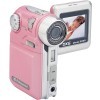
Expensive cameras are not for everyone, but everyone does want a camera with ample qualities to get the job done. DXG realizes this and as a result, they have released their 506V digital camera. To call it a digital camera is an understatement though, as it can act as a web cam, MP3 player and even a voice recorder.
Picking this camera up, I immediately noticed how lightweight it was, even with the batteries. This was in part due to the fact it does not take a heavy lithium block battery, but instead takes 4 AAA batteries. The four brand new batteries I put in the camera, lasted approximately 4 days of off and on use, but they are easier to replace than a proprietary cell and charger. I could take this camera to the desert and still find a store that could sell me batteries.
That being said, the fact it was light did not make it feel 'fragile', I felt like this little beauty could actually take a little bit of abuse. (Not that I abused it to find out!)
Electronics should feel natural in your hands. Your mouse, your cell phone, your mp3 players are all designed to sit in your hand and feel like they belong. This camera holds well in a small hand, and would be very comfortable for kids to use, but meatier mitts may have trouble. However, the way it seems to naturally sit in a right hand, partly caused by the balance of the unit, causes the holder's forefinger to cover the flash.
That being said, lefties can rejoice, you're not left out. I found this camera to be more comfortable and functional in my left hand, because the flipped out screen balanced on the side of my hand and I did not need to grip it the same way I did with my right hand, and therefore did not cover the flash.
Button placement is perfect; it's all in the thumb. All were easy to use and had a good 'click' feel when pressed. The design was intuitive both physically and in the on-screen menus. I never had to open the instruction manual, just as it should be. The lens cap fit REALLY tight at first and felt like I was going to crush the entire camera putting it on, but that loosened up and was never an issue after the first day. Just a note, remove the smaller lens cap strap before you thread the wrist strap into the camera loop, trust me on this one.
This camera comes with lots of supplemental accessories, a carrying case, lens cap, software, USB & AV cables, the list goes on, but the one little thing it was missing, and I found very odd, was there's no tripod attachment, there is no way to mount this camera onto a standard tripod, which means you'd have to use a beanbag type support.
Point and shoot! That instructional statement applies to firearms and cameras equally, with the exception of some of today's digital cameras, where the reality is more like Point, Shoot & Wait.
I understand that most cameras, of all price ranges have a little bit of shutter stutter and this camera from DXG was no exception. There won't be any action shots or lucky shots with this, as the shutter delay was easily twice as long as my other digital camera of similar value.
On that note, freeze! Don't move or that image will blur, and that goes for you and the subject. Even the flower blowing in the breeze blurred a little but don't worry there's an icon of a waving hand to tell you when –you're- not steady enough to take the picture. Sadly I had a tough time trying to get that hand to go away...

The image modes themselves are very easy to change once you learn what all the icons are for, three dots, five dots, shaky hand, light, etc, although it was a little hard to determine when I was in sepia tone or black & white mode. There are a lot of icons on the screen perhaps I simply overlooked them.

And finally, let there be light. If you don't have light, you simply don't have a picture. Full bright sunlight is always the best with any digital camera, but doubly so with this one, (since I usually had my finger over the flash as the only way to hold it securely). Twilight and dim light pictures turned grainy and just didn't work out. The times I needed the flash, it went off, however it took a long time for the flash to charge back up again. I have a feeling the batteries would have lasted much longer had I taken less flash required shots.
Since there are several settings on this camera, I took multiple photos of the same flower in most of the modes.
Can you tell the difference?
I think because of the way this camera is very much a one handed device, I liked taking movies MORE with this than my little square digital camera, there was more freedom of movement, a more natural feel to taking a movie.
Now keep in mind, you're not filming Braveheart here folks, think more Blair Witch. It actually did take fairly good movies and the sound was decent enough provided you weren't in a monsoon in a vehicle at the time of the film – the intense rainstorm turned out to sound more like radioactive static than rain, however the voices could be heard over the rain in the enclosed vehicle.
One outdoor movie I took was in a busy public area, and the people closest to me were all captured in the audio, and so was a loudspeaker announcement, but thankfully there wasn't an overall din from the area.
I did not have the opportunity to test this in a forum with a speaker at the head of an audience. I think if the person speaking was amplified, you'd have no problem catching the audio along with the video, you'd just have to be careful of your own anecdotal comments as they were supersede the more distant sound.
One nice surprise was the ability to take movies in both Sepia tone and Black and White. I had originally thought that feature only applied to the still images, but one mistakenly taken sepia movie later and I was actually thrilled at the thought of making 'oldies'.
I would have liked to share the videos I took, however one mysteriously disappeared from my hard drive and the others cannot be read by any software codec, including the programs that shipped with the camera itself, so I'm guessing the files are corrupt. (and sadly have since been deleted from the camera itself) I did a little digging and found some consumer comments and concerns that specifically addressed issues with pulling the videos off the camera. Hopefully this will be addressed at a later date.
Like most web cams, you need a well lit room, today it is VERY stormy (my ups has beeped to warn of brown outs twice three times now) so it's not my usual sunny bright room. I must admit, this could very well be the best feature technically. There is very little lag and the picture is smooth. Albeit, I'm not used to having a webcam hooked up and seeing myself sit here and type is more than just a little creepy.
Plugging it into the USB, the camera automatically senses a connection and switches to a menu to allow you to select Mass Storage, DPS or PC Camera. Once PC Camera is selected, the screen goes blank and you can close up the camera, which is a good thing because it does not sit up straight when the screen is open.
Now should you want to capture your video image as I was trying to do today, don't bother using printscreen, it doesn't capture the projected image. Nor does Fraps, or even the software it comes with, sadly. Ah well you don't need to see what my right arm looks like.
Keep in mind, this is not this camera's primary function, but the fact it does act as a pretty decent webcam, is definitely a bonus. Anyone viewing you is not going to be able to read a document you hold up and you do need lots of light as with any webcam, but I must say, it's certainly better than the other webcams I've dabbled with over the years without doubt.
It is a little hard to position simply because it has to stand on end to give you an upright view, however something like ThePod would solve that quickly and easily.
How well do you know your music?
At first I was a little dismayed to see that the MP3s are not named, they're numbered, simply titled 001, 002, 003 etc, but then I realized, we all already KNOW the songs on our playlist or we wouldn't have them and wouldn't have put them on the player itself, we're not going to find any songs on our mp3 players that make us look at it and say, what the heck is this song?
So unless you're trying to specifically find that one song and you don't remember where it was on your list - do you really care what the artist, album and song name are as you're waiting in your car at the mall? Probably not.
I certainly was surprised, though, when I accidentally yanked the headphone cord out and could still hear the song playing out of the little speaker on top of the camera! It wasn't loud by any means, but it was audible, and distinguishable within a few feet range.
Unfortunately the audio levels were very low, even with the volume maxed, the sound in the headphones was below normal listening level (for me).
Talking to yourself again?
No one really recognizes their own voice when they hear it played back and I'm no exception, I did use this as a personal voice recorder/reminder a few times, however that was always with the microphone less than 12" away from the sound source, if you tried to use this to record a speaker on a stage perhaps, it would probably perform as if you were taking a video, and while it would pick up the loudspeaker, the immediate area would override the distant speaker.
This did hold quite a bit of data though, and would be a very nice option for annotating the pictures and videos you took, such as listing the names of the people in the shot, or the time date and location.
Presto Video Works is the packaged video editor. I toyed with this briefly using other videos I have, not the ones taken with the camera as they either did not download off the camera properly or were corrupted in the transfer.
This software requires relatively quick installation and the usual caveats and agreements, however it does require that you restart your computer to effectively finish the install.
Mr Photo is the packaged picture editor, and it's more than a little fun to toy with. I'm an avid Photoshop user so I normally steer clear of little apps like this, but it was surprisingly intuitive to use, had some fun functions and seem to suit the camera's target audience as well.
Again, quick installation and setup, and you know me, never read the help file or the instructions so I dove in and played a bit. You can view all your image files in one folder as thumbnails of almost any size, using the slider to the upper right.
Then I found the toys!
Besides the usual trim, resize, rebalance colour and all that, there were some great alterations that could be placed on the pictures such as borders, effects and shaping.
But my all time favourite was the image mash up, or as they called it PhotoComposer. You take two images and combine them together. I put one of the Easter Island heads into the picture of the lone flooded tree, he's just poking his head in, saying hi.
See the results...
I was surprised at the simplicity of execution in what is normally a quite involved task. Had I done this exact task in Photoshop, it would have probably taken me longer.
Both forced themselves (and some other things) into my startup HLKM/Run registry key however thankfully I have Mike Lin's Startup Control Panel to get rid of those quickly.
Ok, this camera was slammed in reviews by other people who think it's supposed to do the same job as a top of the line all in one camera. If you pay $2k for a camera it's going to perform better than paying $100 for a camera, and you shouldn't expect any more from the less expensive one. Stop whining and take this camera for what it is, a fun summer toy.
Give this camera to your kids when they go to camp.
Take this camera on a weekend holiday.
Take this camera to parties.
Take this camera to the beach.
Use this as a webcam that can also be used on the go as a voice recorder/reminder.
Fill this camera with pictures and send it to a friend.
Keep it in your car in case of an accident, you can get digital pics right away.
Keep it at work for those impromptu moments.
Think of this as the first camera you won't cry over if you lose. It's only $100 people, the 4GB flash drive I put in it cost almost as much. Of course if you drop it, it's going to break and guess what, so is your $2,000 camera.
DXG has made a camera that isn't some serious piece of hardware to be babied and coddled, it's a fun little bonus to have with you. You're not going to record your wedding photos on this, and it may not capture that pic of the Loch Ness monster at dusk, but your outdoor, fun in the sun pictures and movies turn out great. Use it for that and quit complaining it won't take perfect pictures in the dark.
Cameraphiles aren't going to buy this device nor should they, but an 8 year old is going to absolutely LOVE it, and that right there is worth it. I recommend this camera be purchased for the audience it was intended; youth. It will be everything they need and more, without emptying your wallet.
I give this camera montage a 7/10, with the only detractors being a little awkward to hold in your right hand, some shutter stutter, and issues with downloading the videos. Oh and that missing tripod mount threw me for a curve. But all those were easily overcome by the rather amazing photos, the surprising abilities of the webcam function, the added voice recorder feature and the ease of use. It does so much for so little, and in a nice package. Personally, reviewers don't always get to keep the items they review, and this is the one item I wish I had been allowed to keep past the review deadline.
If you have a comment you wish to make on this review, feel free to head on into our forums! There is no need to register in order to reply to such threads.

Copyright © 2005-2008 Techgage Networks Inc. - All Rights Reserved.