Date: August 22, 2005 - Author: Rob Williams - Editor: Jen McPherson
If you are looking for a killer gaming card, but find the 7800GTX too expensive, then you will want to check out the recently released 7800GT. It's been scaled down to 20 Pipes and 7 Vertex Units but it still packs a massive punch. We are taking a look at the eVGA version, which comes pre-overclocked! Time to see what this beast can do.
It has not even been two months since the 7800GTX was released, that we see the 7800GT. Whenever a new card is released, the first question we usually ask ourselves is whether it's neccessary or not. In this case, it depends on your needs and budget.
The 7800GT is a scaled down version of the GTX, but it still has the potential to kick some serious ass. At $449US, the GT can't really be considered a budget card, but it's certainly more affordable than it's big brother which retails for $599US. Before we jump in any further, here is a quick bio blurb about eVGA.
Founded in 1999, EVGA has grown exponentially in the channel, serving the system builder, distribution and retail markets with products that offer the highest in quality and customer satisfaction, thereby making the computing experience transparent to the hardware in the box. eVGA only offers visual processing products based on NVIDIA chipsets and has recently expanded its product line to include motherboards.
eVGA doesn't usually throw any surprises at us when it comes to their packaging.. it's all very similar. It's always clean and classy looking and does nothing to hint at the power the product holds. The box art doesn't do much for the user, so let's tear it open.
Inside, it's tightly packed as expected. Included in the box are two DVI to VGA adapters, VIVO (S-Video / Composite In), HDTV Output, Molex to 6-Pin PCI-E power cable, manual and CD. No game bundle was included with this specific package, but you can buy a slightly more expensive version that includes BF2. What's fun about *paying* for a bundle though?
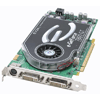
Looking at the card now, we can see that it's printed on standard green PCB. Not so interesting, but it works. eVGA is using the reference cooler design, which they brand with a great looking black eVGA sticker. It's too bad the PCB is green, and not blue or black, because that would look deadly.
The card follows reference design all over, including the dual DVI and S-Video connector. What makes the card special though are it's higher clock speeds. For those of you who are interested in looking over all the specs, here they are:
Now that all the specs are out of the way, let's move on to to see more of what this card has to offer.
NVIDIA chose a 400MHz Core and 1000MHz Memory, which eVGA happily overclocked to 445MHz and 1070MHz, respectively. This is a bonus, because those who do not want to risk voiding a warranty, don't have an immediate need to overclock. Even though the card is pre-overclocked, it comes complete with a lifetime warranty. Of course, BFG offered the same for quite a while, so it was only a matter of time before another company joined the fray. BFG's version of the card only overclocked the Core by 25MHz, so eVGA has the advantage here.
As already mentioned, the card contains 20 Pixel Pipelines and 7 Vertex Units. The card comes with 256MB 256-Bit GDDR3 memory, at 535MHz (Effectively 1,07GHz). The memory bandwidth can also reach an amazing 32GB/s. Lastly, the card is built upon a 0.11 process, and contains 302 Million transistors.
The 7800 GT inner workings are extremely similar to the GTX, so even though the card is scaled down, it has amazing potential. During the review, we are going to try to safely overclock our 7800 GT to see if it can reach GTX speeds, and keep respectable temps.
For those who are interested, here is a 6800GT and the 7800GT side by side. The 7800 is slightly larger, but is still nothing you will have to worry about. Ever since I've seen the size of the 6800GT for the Apple, I learned to never complain about size again.
The CD-Rom included with the package contained the 77.76 drivers, but since the 77.77 were available I chose to use them instead. Once everything was good to go, I loaded up RivaTuner to see what clocks I was dealing with.

We can see that in 2D mode, the Core Clock is kept at a safe 275MHz. This makes sense since nobody needs 445MHz during normal computer use. We can also see the Memory Clock in it's overclocked goodness at the promised 1.07GHz.

Now looking at the Performance 3D tab, we see the generous overclock on the Core, a full 45MHz. Now that we verified all the clocks, my next step was to check on the idle temperatures. In our BFG 6800GT review, I mentioned that the idle temps on that card were normally between 61C and 67C. This prevented overclocking of the card at all, since load temps could reach an unreal 100C!

That's what I'm talking about! With idle temps like these, I could expect the load to hit around 70C, which is certainly efficient enough to allow us to overclock a bit as long as the card agrees.
Let's now get into some of the main highlights of the 7800 series and then we can finally hit benchmarking!
Recently, NVIDIA has boasted about the Power of 3. What is this power exactly? SLi, High-Dynamic Range and Shader Model 3.0, all of which coincidently ATI has zero part of. These are all great technologies, so it's no wonder that NVIDIA is trying to shift focus on them.

Scalable Link Interface is the art of combining two of your identical NVIDIA cards to work in parellel to achieve up to 2x the performance in all of your games. If you plan on playing the newest games at 1600*1200 with all the goodies turned on, you may need to consider checking further into this technology. ATI's Crossfire seems to have been delayed, so it looks like NVIDIA will have the upperhand in this area for quite some time.
Personally, this is one of the greatest advances in graphics technology that I have seen lately. HDR makes use of the color palettes in amazing ways to create ultra-realistic lighting, which can seriously increase the immersiveness of a game. Currently only the 6*00 and 7*00 series can use HDR, however only the 7*00 series can handle it with relative ease.
Far Cry is the most popular game right now to make use of HDR, although it's not very stable. The developers of the game added the HDR feature many months after the games release, so it's not been perfected. In the future, once developers use HDR along the process of development, we can look forward to some amazing experiences. Half-Life's upcoming Lost Coast level will take complete advantage of HDR, and Valve is making sure it makes quite an impression. For clear examples of what HDR can do, here are three before and after screenshots of the Bunker, Regulator and Swamp levels in Far Cry.
This is no doubt going to be more impressive in the future. I personally can't wait to see more anouncements of developers utilizing HDR, since it really has the ability to add to the experience. Just ask anyone who's played Far Cry through with HDR enabled.. they'll tell you.
NVIDIA was the first adopter of SM3.0, although we have yet to see some games use it to the full potential. You can find out a lot more officially on SM3.0 over at the Microsoft site.
Far Cry is one game that does support SM3.0, which it introduced in the 1.30 patch.
Above is a screenshot of Far Cry using SM3.0. If I was sure on how to force the game to use SM2.0, I would have included a comparison shot.
What is this, and why does it deserve it's own page in the review? Anti-Aliasing, for those newer tech geeks, is the process of cleaning up jaggy edges in your games. Without AA, you can notice how flat or supposedly smooth surfaces can have jagged edges and can detract from your gameplay. Anti-Aliasing though, based on advanced algorithms, have the ability to smooth out those edges at varying degrees. You can learn a lot more about the algorithms and how they work in the Wikipedia.
The higher the Anti-Aliasing setting you choose though, the more it will affect your gameplay performance. While you may get 100FPS with no AA, with 4x AA, you may get 60FPS or less. You will see the varying affects with different AA modes in the upcoming screenshots.
With the introduction of the 7800GTX, NVIDIA introduced Multi-Sampling and Super Sampling, which are the only two modes of Transparent Anti-Aliasing. It's called Transparent because it works well with transparent textures. The most common example of this is a fence with various objects behind it. While the fence in the forefront may look great, the objects on the other side may not be pretty. Multi-Sampling is a great mode and looks fantastic, but it will cut down on your performance greatly. At 1280*1024 though, games were still completely playable and fluid. Super Sampling is another thing though, and will likely end up being more SLi users primarily.
These screenshots are all taken at 1280*1024 resolution, with the ingame details all set to high. Anti-Aliasing and Anisotropic Filtering are controlled through the display driver. All of the screenshots have 16x Anisotropic Filtering enabled.
The first screenshot above is taken without any AA, and the second has 4x AA enabled. You can immediately notice the difference. The first shot has the infamous jaggies all over the place, but are pretty well taken care of in the second shot. Of course, if you look hard enough, you will still find many. The third picture is 4x AA once again, but this time Multi-Sampling is enabled. If you compare the second and third picture directly, you can easily see the difference. Look closly at the ground Gordon is standing on.. very noticable difference.
Now we get into the hardcore of the hardcore settings! The first picture directly above, has 4x AA enabled and also Super Sampling. The game looks absolutely amazing in this setting! Shall we try 8x SAA and Super Sampling? The second picture is just that. The differences are very difficult to see right off, but if you save each picture to your computer and then flicker back and forth to each picture, you will see them.
Notice this trend though? No AA gave me great frames per second, and they diminished as the settings were increased. Even playing with 4x AA and Multi-Sampling, which looks fanstastic, delivered over 100 FPS. Change that Multi-Sampling to Super-Sampling and I lost 40FPS! Then crank up the AA to 8x, and that's where the differences are seen. 1280*1024, 8x AA, Super-Sampling and 16x AF for a still somewhat playable 30FPS!
I think it's safe to bet, that if you wish to use either MS or SS at a higher resolution than 1280*1024, you may be thinking even more about an SLi set-up :)
Now that all that techno babble is out of the way, let's jump right into benchmarking!
Now into the fun part, benchmarking! We are going to cover a collection of popular synthetic benchmarks. Even though they are loved by some and hated by others, they are still decent tools to use. We are also going to take a run through many games, some completely new and others that have been around for awhile. Here is a complete list of the benchmarks we are using:
For the Half-Life 2 and Battlefield 2 benchmarks, we've included results of applying Multi-Sampling and Super-Sampling. For the Far Cry section, we have included the performance results with HDR. Here are the stats for the system we are using during testing:
|
Processor |
AMD 64 3200+ S939 Venice @ 2.00GHz |
|
Motherboard |
|
|
Power Supply |
Ultra X-Finity 600W |
|
Memory |
|
|
Hard Disks |
200GB * 2 Western Digital 8MB Cache 160GB Western Digital 8MB Cache |
|
Sound Card |
|
|
Video Card |
eVGA 7800GT PCI-E 256MB Using official 77.77 drivers. |
|
Etcetera |
Windows XP Professional with SP2 |
Without further ado, let's start with the 3D Marks and Aquamark.
3D Mark 2001 first introduced itself shortly after DirectX 8.1 was being used, so the tests are based off of that version. This 3D Mark introduced Vertex Shading and Shader Model 1.4. Aquamark3 is based on DirectX 9, and is much different than the 3D Marks. It's comprised of different graphic capabilities, with tests such as Dynamic Occlusion Culling, High Particle Count and Large Scale Vegetation Rendering.


Both of the following benchmarks are popular for DX9.0 testing. 2003 only utilizes DX9 more so in the Nature test than the others. 2005 uses DX9.0c through all the tests. With each new 3D Mark release, we find out just how much our cards lack, because they usually make the cards cry. We always quickly catch up though, and I am not sure when we will be ready for another version!


These are great results. Most notable is the fact that overclocked, we scored over 7,800 3D Marks in '05. GTX speeds baybee! On to Half-Life 2!
Half-Life is one of the most popular games of all time, and with good reason. When it was released, the gameplay was impressive and the graphics AMAZING. Even though Doom III was more of a graphics hog, HL2 was far more realistic looking. No video card review would be complete without benchmarking this game, and chances are it will stay in the benchmarking scheme of things for a while.
To benchmark the game, I created two custom demos, one in the C17 level, the other in the Canals level. They are both hardware intensive and fun to watch. Lots of water, debree and shooting to be had.


I did not expect such an improvement over the 6800GT, but I am impressed. It goes to show that HL2 will eat up any graphics power you throw it's way, and it returns awesome results. I can certainly deal with 1280*1024, 4xAA 16xAF with 100FPS.

In the graph above, I played around with the Multi-Sampling and Super-Sampling modes. Even at 1280*1024 and 8xAA, Super Sampling allows the game to be completely playable. It will likely slow way down when the Super-Sampling really get's to work, such as the scene on page 5 of this review.
You may ask why I am benchmarking CS: Source, after benchmarking Half-Life 2, which is based on the same engine. The reason is simple.. people want to know exactly what performance they should expect out of this game. I see countless threads around the web by people who ONLY play CS: Source who want benchmarks so they know what card to buy.. so here it is.
Obviously, Counter-Strike: Source was an awesome reason to buy HL2, because it was included free. It took the original Counter-Strike, heavily updated the graphics and made the levels much more fun to play in. There's always a debate of which version of CS is better, but I'm definitely sticking with Source!
To benchmark the game, I recorded a 3 minute session in the cs_office level.. my favorite! I then played back the demo and captured the FPS information with Fraps, since CS: Source doesn't have a great in-game benchmarking system.

70 FPS at max settings, the game was smooth as heck. I haven't actually been be able to see any improvements in CS: Source with MS or SS enabled, but if you don't mind 70FPS, you can keep them on anyway. Now we are going to test out one of the biggest system hogs ever, Battlefield 2!
It was bound to happen! A game that begs you to throw more than 1GB of memory into your system. This is one of the most graphically beautiful games on the market currently, and requires a BEEFY system if you really want to take in all the game has to offer. That being said, this is one of two games in this review that we have benchmarked with 2GB of memory (512*4 Ballistix), at the same timings of 2.5-3-3-8 and CPU speed of 2.7GHz.
Benchmarking this was a little trickier than the others, so I chose single player mode and the Dalian Plant mission. I played the game normally for a few minutes, and recorded the FPS with Fraps. I first played the game at 1024*768 with 4xAA and 16xAF then tried out the same settings, but at 1280*960. I am also going to test using the previous setting, but with Super-Sampling enabled. The in-game detail settings are all high, except for Lighting which is Medium.

Please don't compare any of these results to one another, because each run-through I played brought completely different instances in the game. Once again though, these are fantastic results!
If you have never played Far Cry, you do NOT know what you are missing. The game was originally released over two years ago, but it is still a game that everyone uses in their benchmarks. When it was released, Crytek blew us away with the absolutely lush environments and extreme draw distances. Even today, at max settings, Far Cry is a great test for any video card.
Since this is one of the extremely few games to support HDR at all, we are going to use that in our benchmarking as well, since the 7800GT can handle it much better than the 6800GT. If these shots look good to you, and you have no bought the game yet.. go buy it at any store for less than $10.

Once again, we can see pretty good increases in performance from the 6800GT to 7800GT. Since many people who plan on already buying a 7800GT are looking forward to HDR support, the following graph shows the differences in performance simply by turning HDR on. We are using the r_hdrrendering 7 switch.

Impressive, I am loving these scores. With HDR on, it's higher than with it off. The reason for this though, is because HDR will automatically disable the Anti-Aliasing. So I would say it's safe to say, that 8xAA uses more GPU power than HDR :D
Todd Hollenshead promised us the scariest gaming experience, alongside with state of the art graphics. Personally, Doom III's graphics didn't do much for me, but they are no doubt system intensive, which is why it's a great game to benchmark with. Doom III still is the only game available to actually recommend a 512MB video card in order to use the Ultra graphics setting. Of course, the game is playable on this setting on a 256MB, so we will be using that setting in the benchmarks.
To benchmark DIII, I used the built-in demo1, which showcases many graphical effects into it's 30 second duration. The timedemo was run twice, with the second time being our final average. At 1024*768, we are using no AA or AF and are using the High detail setting. At 1280*1024, we chose the Ultra detail setting, and are using 4xAA and 16xAF.

I'll let the scale speak for itself. Now onto the F.E.A.R. demo!
Guild Wars takes the best elements of today's massively multiplayer online games and combines them with a new mission-based design that eliminates some of the more tedious aspects of those games. You can meet new friends in towns or outposts, form a party, and then go tackle a quest together. Your party always has its own unique copy of the quest map, so camping, kill-stealing, and long lines to complete quests are all things of the past. Within a Guild Wars quest you have unprecedented freedom and power to manipulate the world around you; with the dynamic quest system, your accomplishments have a unique influence on your future.
Even when released, Guild Wars did not push technical boundries. The graphics are superb and colorful, but don't do THAT much to push the graphics to the limit. We are using this as a benchmark to give you a general idea of what kind of performance to expect in this MMO. If these screenshots appeal to you, you may want to consider trying it out for yourself. It's the first commercial MMO that does not require a monthly fee, so that in itself is a great deal.

To benchmark, I ran my character through a bustling Ascalon City for two minutes, and captured the FPS information using Fraps. Each run would have been slightly different even if I took the same route, due to people moving and other factors.
Even though the game didn't hit 60FPS, it was so fluid that one would easily think it was much more. Even hitting only 40FPS at max settings at 1280 felt like 60 - 70FPS. If you currently play other MMO's with similar graphics style, such as World of Warcraft, you could expect similar performance.
For all you racing fans, let's next benchmark NFS: Underground 2.
Just like with Guild Wars, even when this game was released, it didn't push graphical boundries. Even so, the games graphics are full of eye candy and with the settings maxed, it's a blast to play. Hopefully for those of you who enjoy racing sims, this will give you an idea of performance with this card. The new NFS should be released in a few months, so when the time comes, we will use that in our reviews to replace this version.
To benchmark this game, I started off in Free Mode at the Airport. I then drove straight out and around the city for 2 minutes. Once again, each run was different each time, due to traffic and other normal factors. The in-game settings were all maxed, while the AA and AF information was handled through the NVIDIA driver.

Once again, these are great results. A consistent 60FPS at 1280*1024 with 4AA and 16AF is nice to see. Simply adding Super-Sampling into that mix cut the FPS nearly in half though, because there are many instances in the game when it is used.
We are almost near the end, so let's jump into benchmarking our last game, the F.E.A.R. demo.
Before Doom III was released, many people upgraded their PC's so that they could play the game with great quality. Well.. that was last year, and F.E.A.R. is this year. This game, by Monolith proves to be the next game that may require your upgrade if you want to play on high details, especially 1280*960 or higher. This game is extremely system intensive, therefore we are again benchmarking this game with 1GB and 2GB of system memory. Again, for the 2GB of memory (512*4 Ballistix), we are using the same timings of 2.5-3-3-8 and CPU speed of 2.7GHz.
To benchmark, I used the saviour of all benchmarking tools, Fraps. I ran through the demo for two minutes and then took the total average FPS with Fraps. The first graph is results with 1GB of ram, and the second is with 2GB. Trust me, this game was not very playable with 1GB of memory.


As you can easily see, the extra 1GB of memory made a massive difference. It was almost like adding a second GPU into the mix. This is one game that looks to almost require SLi if you plan on running 1600*1200. Insane graphics, but wow.. the requirements are the most extreme I've seen lately.
Now that the gaming reviews are done, let's check out the Overclocking ability on this card!
As I had hoped, the 7800GT is quite overclockable. Even though eVGA threw on a decent OC already, making the clocks 445/1.07GHz, I still wanted to bring it higher. After a lot of tinkering, the highest stable OC was 470/1.12GHz, and that's the settings that all the OC results in this review are of. I tried higher settings, such as 480/1.15, but games and 3D Mark will crash the majority of the time. I have seen some people clock at 490/1.2 and score around 8,200 on 3D Mark '05, on stock air. WC or performance cooling may bring even more amazing results.
When the 7800GTX's first came out, it was quickly noticed that the Core Clock would jump about 40MHz whenever it was using a 3D application. Not surprisingly, the same is true with the 7800GT.

Technically, whatever your real core is, it will be increased by approx. 40MHz in games. This doesn't really affect you directly, but because of this, we get better performance. Different parts of the Core apparently operate at different MHz, which is why we see a jump. More information can be had here.
The impressive thing is, that even overclocked the card manages to keep awesome temperatures. With all the benchmarking done in this review, the card did not go over 65ÂșC!
It would be nice if eVGA would offer their ACS cooling kit to the 7800GT. Then we could potentially reach even higher speeds at lower temps. If they ever release a version for this card, I will definitely be checking that out.
Whew, that was quite the lengthy test session. As we have seen in the tests, this card obviously kicks ass. Of course, the GTX is better, but it costs near $150 more. As we proved on page 6 with our 3D Mark '05 benches, we successfully reached GTX speeds with our simple overclock of 470/1.12. Thing is.. many people have clocked their cards much higher than this, and I believe it's my ambient room temp that could be holding me back. Equipped with an after market cooler or water-cooling, this card could easily beat the pants off of a stock GTX.
When compared to it's little brother, the 6800GT/Ultra, the 7800GT definitely shows the 6 series who's boss. In our benches, the 7800GT proved to be between 20% - 30% faster than the 6800GT. This is not bad, since just months ago, the 6800GT cost more than the card we reviewed today. Surprisingly, at the time of writing, most 6800GT's still cost near or more than the 7800GT.
The common question going around is, whether it's a worthy upgrade to go from a 6800GT to the new 7800GT. As with most things, this is up to your wants or needs. The new cards handle HDR much better than the 6 series for instance, and many people are looking forward to that tech. Multi-Sampling and Super-Sampling are new to the 7 series as well, but for use with very high resolutions (1600*1200+), you will likely want to consider an SLi set-up. Even still, I didn't find SS to bog down any games to an unplayable state. The closest I got to that point was in the scenes from page 5, which explains the TR tech. If these features don't interest you, the performance results should tell you whether you want the new card or not.
If you own anything smaller than a 6800GT/Ultra/X850, you may want to seriously consider a 7800GT. If you currently use a 6600GT for instance, the increase in performance will be an easy 150%, depending on the rest of your setup. No doubt, this is a kick ass card, and should not be overlooked. Only absolute hardcore gamers/enthusiast would want a GTX.
I should mention that the 7800GT, like the GTX, excels as well at higher resolutions, meaning 1600x1200. Sadly, I could not include any benchmarks with that resolution, due to the fact that my monitor doesn't support anything higher than 1280*1024. To me, this is fine, because that resolution is perfect all around, but I will likely get me a capable monitor in the coming weeks, so that the next GPU review will include those benchmarks. Either way though, the benchmarks we do have should give you a clear idea of whether this card is for you or not.
Overall, this card is kickass and receives a 9/10 and an Editors Choice award. I should also note that eVGA recently announced that all their cards now come with Lifetime Warranties. If you do not overclock, you may want to consider the eVGA over the BFG because it comes clocked higher. If you do plan to overclock though, from what I see so far, the BFG seems to overclock slightly higher.
Have any questions or comments about the review? We'd love to hear them, so please feel free to leave a comment in our forums, where you do not have to register to post. If there was anything you did not like about the review, please let us know. We would also love to hear recommendations and suggestions for our future reviews!


Copyright © 2005-2008 Techgage Networks Inc. - All Rights Reserved.