Date: October 2, 2006 - Author: Rob Williams - Editor: Matt Harris
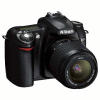
If you are looking to get into the D-SLR world but find it too expensive, then you may not know the value that awaits you. We are taking a look at the Nikon D50 6.1 megapixel camera, and given the pricerange, it packs a serious punch.
There is no better time than the present to get into photography regardless of what your skill level is. Like others, the camera market is jam packed with choice. This is a great thing, but can lead to confusion. The D50 that we are looking at today is suited for those looking to get into the Digital SLR realm. In the Nikon scheme of things, the D50 is the only option if you are on a relative budget.
If you are unfamiliar with "Single-Lens Reflex", you should check out the primer in the WikiPedia. Essentially, SLRs are unique in that they use movable mirror that's placed between the lens and the CCD sensor. It sounds simple, but it's a precise process as you can learn from that article.
Whether or not you care specifically about SLR, it's the current and the future. It's no surprise that it's the only option in the high-end digital camera market. As mentioned, the D50 is primarily designed for novice and intermediate photographers. Though, this does not take away from any of the quality you would expect from a good SLR. The D50 is priced appropriately, so that you can get yourself set up with a very quality setup for under $1,000, which would of course include the lens and a speedlight.
If you are to purchase a D50, you will have a few different options available to you. You could purchase the camera without a lens, but you can also purchase it with one or two lenses as well. Yes... you heard me right. Nikon offers a D50 kit that includes two lenses, and that's the kit I am taking a look at today. For indoor photography, especially with close-ups, it's apparent how necessary a speedlight is. So, we are also going to be using the SB-600 for all of the shots that required it.
The first lens included is the 18 - 55mm f3.5-5.6G ED, which is for all-around use. It's good for close-ups and also general photography. It's 27-82.5mm 35mm equivalent, that has an optical zoom of 3.0x. This is the lens I have used for all of the recent product shots, close-ups of nature and most anything else in general.
The second lens is the 55 - 200mm f4-5.6/g ED which has greater zoom capabilities than the other. It's equivalent to 82.5 - 300mm 35mm, and has a 3.6x zoom. While the 18 -55mm lens was appropriate for the majority of the pictures, this lens allows for a little more flexibility and distance. Whereas you could not really snap a photo of a license plate that's driving by with the 18 - 55mm lens, you could with this.
Finally, we have the Speedlight SB-600, which is the "norm" Speedlight for anyone who owns a Nikon D-SLR. You could go with a lower model, but lack in the large array of lighting possibilities. The next step up is the SB-800, but that costs near 80% more, so it's for people who really know what they are doing! The SB-600 takes advantage of the Creative Lighting System which allows it to co-exist with your camera seamlessly. It will recognize and analyze the situation so that you will get the best possible lighting.
Now that introductions are out of the way, let's jump into the specs and technical aspects to see what the camera offers.
The D50 is equipped with a DX CDD that allows for 6.1 Megapixel images. This equates to final images of 3,008 * 2,000 (1.504:1 Ratio). As I mentioned, this is a camera designed for a beginner shooter, which means the camera is not complicated to learn if you have never touched an SLR before. Using the Auto setting, you can take some pretty amazing pictures quickly.
The Auto mode will analyze your scene and adjusts the white balance, color and ISO for you. Once you feel more confident, or don't need the Auto for a particular shot, you can move onto full manual control. In all honesty though, if you are a beginner and just enjoy snapping photos more for fun than professionalism, you may never need to switch off of the Auto mode unless you wish to do close-ups. Most of the images I have had this mode churn out have been quite nice. Few have needed any real PP (post processing).
Here is Nikons stance on the camera:
2,000 images on a single charge may sound like an exaggeration, but I believe it could easily happen if you use a low quality setting. In my tests, I have been able to take over 900 RAW+JPEG images before a recharge. That also included a few formats and picture viewing... normal usage.

One benefit of Digital SLRs is the RAW picture format. Essentially, this is a lossless version of the photo that you can deal with later. However, RAW is not a format you want to deal with lightly, because each photo will take an upwards of 6MB. That said, RAW is not for normal uses... and you would not be using it in a slideshow. So, RAW+JPEG essentially saves the image both as a RAW file, .NEF in Nikon's case, and also a JPEG. I have one gripe with this though...
... In total, there are three main JPEG modes... Basic, Normal and Fine, the latter being the crispest quality available. If you wish to use RAW+JPEG then JPEG is actually Basic quality. There is no way to change it to... RAW+JPEG Fine for example. Though, this may also be a benefit. RAW+JPEG Fine would take longer to save to the camera. However, if you want the best quality photos available, you would have to manually save the .NEF file as a high-quality JPEG when you get back to your PC. Regardless of how long RAW+JPEG Fine would actually take to save, an option would have been nice.
Before we move onto a physical look at the camera, you may wish to review all of the official specs.
Ok, that's out of the way. Let's take a quick look at the various buttons around the camera.
The backside of the camera is where the majority of the options are, or at least the ones you may use most often. Here we have a "Play" button which shows the last photo you shot in the LCD screen. The bottom three buttons are dual-function. First we see an icon with squares... this displays the pictures on the screen as singles or in a 2*2 or 3*3 grid.
When you are in a menu and don't know what an option does, hitting the ? button will tell you. Note the lock also... this is for the picture viewer mode. It will lock the photo so that it cannot be accidently deleted. Menu and Enter are self-explanatory, I hope.
As for the dual functions, the ISO/WB and Qual are triggered by use of the dial on the top right side of the above photo. In shooting mode, you can hold down either button and use the dial at the same time to change the ISO, white balance of the quality of the pictures. It's a better way to get things done quick. However, you don't need to deal with any of this, except the Quality if you are relying solely on the Auto mode.
The front of the camera is what you would expect from a D-series Nikon. Beside the D50 logo is the Flash trigger button. In manual modes, pushing this will pop up the flash. Below the logo and not shown in the image is the lens manual/auto mode, and also the lens release button.
Below is a top down view of the camera... but this is the largest image that I could find off Nikons website. The dial has many options including auto, close-up, portrait and night-time portrait, landscape, sports and child. As for the manual modes, there is aperture priority auto, shutter priority auto, programmed auto and manual. Manual gives you complete control over the settings, and should be used by those who really understand the situation in which they are shooting.
In the center of the camera is a shoe designed for use with a speedlight. The on/off button is placed atop the shutter release button, for quick powering on of the camera. Beside the shutter release is a button for the shutter release delay, and also white balance control which ranges from -5 to +5 in intervals of ~0.3v or 0.5 depending on the option selected in the menu.

The screen includes all of the info you need to know... and I mean everything. Shutter speed, aperture, white balance, battery level, flash mode and more. More importantly, there is a counter listed here that tells you approximately how many photos it will take to use up the remaining space on the card. On average, I have found this number to be 20% off, in my favor. While RAW+JPEG on a 512MB card told me 59 pictures, I successfully took 71.
That wraps up the look at the camera itself. Now let's take a look at the lenses we will be dealing with.
If you purchase the D50, chances are good you will wind up with one of these lenses. If not, then you are probably looking for a more expensive lens with better capabilities. As an affordable D-SLR though, both of these lenses retail around the $200USD mark
I have already touched up on the lenses on the first page, but will elaborate on them here and also show examples of their capabilities.
If nothing else, this is the lens you should have with your D50. It's a great all-around lens that allows for relatively nice close-ups. The lens spans from 18-55mm which is equivalent to 27-82.5mm in 35mm format. As the name suggests, this lens uses ED glass which is designed to avoid various sorts of distortion in your shots. It weighs in at a comfortable 210g (0.46 pounds), so it won't add a lot of weight to the camera for carrying around. Its dimensions are 69 x 74mm, so it's far from being a huge lens... easy for transport.
Utilized here is Nikons SWM feature, or Silent Wave Motor. This allows for quiet operation when you are focusing on something. I can vouch that the motor is indeed extremely quiet. The loudest part of the camera by far is when you have acquired a perfect focus... a nice beep. The motor is no problem, after hearing this beep.
For some tests, I shot a picture at both 18mm and 55mm, so as to show you the full range this lens can offer you.
Not too shabby! Here is another more realistic test:
Here is a macro shot of the powerball, to give an idea of what to expect in that regard.
After using this lens for about a month, I've come to enjoy it far more than the one we will be looking at in a moment. It's a terrific all-around lens, whether you are shooting close-ups, portraits or nature.
The 55-200mm lens is designed to be a perfect compliment to the other lens. You may ask... why a 18-55mm and 55-200mm instead of a 18-200mm? Well, that lens retails for near $700. That's why ;-)
This lens is equivalent to 82.5-300mm in 35mm format, and Nikon gives this a zoom rating of 3.6x. It has the same physical characteristics as the previous lens, but is slightly larger at 68 x 79mm. It's near 18% heavier though, at 255g. This also uses the Silent Wave Motor, but I found it to be slightly louder than the 18-55mm.
I performed the same test as I did with the 18-55mm lens, and stood in the same spot. The first image is at 55mm and the second at 200mm. Note the poor quality of the photos. This could be due to the mode I selected, but I blame it on the lens itself. I believe there is a problem with this specific lens, but it didn't affect long range shots... only relative closeups. Should you purchase this lens, you may experience different results.
Luckily, I have a pretty decent vantage point from my window, so I stood there and took a shot at 55mm and then 200mm. The results are below.
The zoom capabilities are clearly better than the 18-55mm but are not that incredible. If I were to buy one lens with the D50, I think it's obvious which one it would be. However, if you are interested in better zoom capabilities than what the 55-200mm provides, you may want to check out the 70-300mm f4-5.6D ED Lens which retails for around $300 and offers a 4.3x zoom.
Lens are useless without great picture quality though, so lets move right along.
All of the pictures from here on out can be clicked on to view the original, unaltered JPEG Fine version at the 6MP resolution of 3,008*2,000. Two pictures also include the RAW .NEF file for download, should you have a program able to read it. The full view images range from 700Kb - 3MB each.
First up is one of my favorite shots taken with the D50, of my cat Obi. This was shot with the 55-200mm lens at 120mm 1/125s f/8.0. The camera did quite a good job capturing his black fur... it's incredibly accurate here. The clarity of the face is impressive also... overall a great shot.
Since we are a tech site and I constantly take pictures of new products, many photos here will be examples of what it can do. First up is the ASUS 7900GT TOP video card, which was taken with the 18-55mm lens at 28mm 1/60s f/4.2. I took numerous photos of the box, around 10, and this is the one that proved the most accurate. The glossy look of the lettering was the most difficult to capture accurately, but this was achieved by pointing the Speedlight towards the furthest wall. Bouncing off of the ceiling left a rather matte look.
Onto the actual video card itself. Here, the SB-600 was positioned differently, which resulted in a very different looking carpet. The carpet in the first photo is more accurate than the second, however the second is accurate with low light in the room. This photo was taken with the same 18-55mm lens at 42mm 1/125s f/8.0.
The following picture is pretty self explanatory, but I am not completely happy with how it turned out. This is my fault however, certainly not the cameras. At this time, I was still finding the optimal settings for the SB-600, but decided against using it at all for this shot. The difference is clear.
Regardless, the most important part of the picture is obviously the box, and it was reflected greatly. Overall, the picture as a whole turned out slightly darker than it should have, but it's nothing a little PP and cropping wouldn't fix. Photo was shot at 30mm 1/125s f/5.6.
Like the previous shot, this one clearly reflects what a noob I really am. It's dark, but a little brightening in PS or The GIMP fixes most of the issue. What I enjoy most about this picture is the absolute clarity of each item shown. It's crisp and clear.. I like it. Shot at 23mm 1/125s f/8.0.
If clarity is what I enjoyed about the previous picture, it's what I am incredibly satisfied with in this shot. At full resolution, you can easily read all of the codes on the board. This again, turned out a little dark but overall it's an extremely clear looking result. Like the last photo, this was also shot at 23mm 1/125s f/8.0.
If you have read any of my previous camera reviews, then you probably have realized that I love taking pictures of nature and animals. Why? Because nature seems to be everywhere in Saint John, New Brunswick. Same goes for animals... you never have to go very far. That said, lets take a look at some nature shots.
This first image, though simple, proves also to be one of my favorites. This was by far one of the easiest shots to take, due to the fact it's close to being right outside my window. Unlike the last few pictures, this one required the 55-200mm lens at 70mm 1/160s f/9.0. For this shot, the camera excelled at both the clarity and color... it proved very accurate. At full resolution though, there is a substantial amount of noise in the clouds.
With Winter coming along quick, these are likely to be the last flowers seen until spring. This is a vibrant shot that turned out great. The flower is slightly blurry in some spots, which could have been combated had I brought along a tripod. But overall, the center flower is well focused and has great color. Oh flowers, how I will miss thee. Shot used the 18-55m lens at 42mm 1/400s f/8.0.
On a recent trip to the park, I found three opportunity to snap some insects and animals. First up is a spider just hanging around. For this shot, I used the 18-55mm lens at 55mm. This is not a macro lens, but it handled this scene quite well. I recommend taking a look at this shot at full resolution because the camera did a fantastic job of keeping the spider clear. You can even see his lunch!
The background was a lake, for those interested. This was shot at 1/125s f/5.6.
Shortly after passing the spider, it was time to give the 55-200mm lens another go. This horse, was a good distance away from me, and I could not get any closer to him due to a fence being in the way. I actually had to stand atop a kids slide in a small park to capture a shot without the fence getting in the way. The shot was taken at 175mm... almost the max zoom capability of the lens. Shutter speed was 1/640s with an aperture of f/5.6.
This picture is overly bright in a few spots, but it's no surprise as it was a -very- bright day. At full view, the environment is not the crispest thing going, but the horse being the main focus is superb. In all honesty, I think he was posing because he knew I was near ;-)
Next up is where a tripod would have come in real handy. This was a very spontaneous photo, because I wanted to capture the duck before he swam too far away. So I crouched, used auto mode to focus in and snapped the picture. The fact that I didn't use a tripod is evident, but it still turned out quite nice regardless. You can even see his feet underwater.
Not much can be said about this picture that isn't obvious. It turned out great given the circumstances. This was also shot with the 55-200mm lens at 175mm 1/500s f/5.6.
Lastly, we have another spontaneous photo. One night while walking down a usual road, there was a lot of lighting going on, including this sign with the arrow. It's no surprise that a low shutter speed was used... 2.5s to be exact. Overall the picture turned out pretty sweet, but there is a lot of noise. Lots. This picture is obviously not showing off the capabilities of the camera, but is a fun picture nonetheless.
I hope you enjoyed all the subject matter chosen for the picture quality tests... I had a little too much fun capturing them. Now that this it out of the way, let's move onto some post processing and seeing where we can take these photos.
Post Processing is the process of editing your photos after the picture has been taken. For instance... turning the brightness up on a photo would be post processing. While this does not usually belong in a camera review... it does in mine ;-)
Whether or not you are a professional or novice, it's easy to know that pictures don't always come out the way you expect. Due to this fact, editing is a normal part of photography. To do some light touch-ups and effects, I used both Capture NX and Photoshop CS2.
First I took the picture of the blue and pink sky, alongside the power lines. This picture didn't really stand out to me, although I still enjoyed it for some reason. Just could not place my finger on it... So, I cranked up some highlights and contrast to come up with something quite a bit better. The entire picture stands out more.
The same "blah" factor came from this night-time photo. However, I quickly realized that it was noise that was detracting from the picture as a whole. If you take a look at the full view of the unedited photo, the noise clear... it's all over the place.
So, I ran it through a noise reducer in Photoshop and it spit out a nice result. Not perfect, but leaps and bounds beyond the unedited version.
The last PP example we have was accomplished with Capture NX. This program... is somewhat limited in one it can do. However, what it does, it does it incredibly well. One example they show in their Flash example is changing the sky color. So that's exactly what I did with the horse photo.
Useless? Hardly. You could create some great looking pictures, despite my poor example. It's great for changing contrast, hue, saturation, et cetera in specific areas of the photo. In this example, you can see that I changed the sky color, but that also reflected onto the horse. However, since it was in that specific area, it didn't affect the ground at all. This program certainly has it's uses, but it retails for around $100. It would have been great to see included with the camera.
I think we have just about covered everything. Conclusion time it is.
Truth: This is the first Digital-SLR I have used, and I walk away quite impressed. I would not hesitate to recommend the D50 to anyone looking to get into the D-SLR world, or those who just desire to have great looking photos for a reasonable price. I actually regret waiting so long before trying out such a camera. I can admit, once you use one, you will not be going back to anything else.
That said, this camera offers a lot for the price range. The 6.1 megapixel sensor is nothing incredible, but 3,008*2,000 resolution images are nothing to scoff at. The fact that most images still look crisp at the full resolution speaks for itself. In general, I have found the color output to be quite good also, though it's not perfect. One of the biggest problems with cameras is capturing pure black, and shooting that as the result in the image. This varies on what it is exactly that you are photographing. If you are taking a picture of a black sports car, it should very well turn out black. However, I had a few close-ups of my black cats, and also a black t-shirt and they looked more like a very dark brown, rather than pure black.
As for the physical aspects, this camera delivers in the best possible way. It's very comfortable to hold, and the button placement is intuitive. The only problem I have found to bother me is the viewfinder. The way it's designed, my nose pushes against the camera more than I feel it should, and I always had to squint to make sure I was focused properly. Higher-end Nikon D-SLRs have combated this problem a bit. Purchasing a new eyepiece may also fix that problem.
If you enjoy instant gratification, then you'll be happy to know that the camera has a 0.2 second power-up, and I have no reason to think otherwise. I have done many tests of snapping a photo immediately after power-on, and there's no doubt the camera is faster than I am. The fact is... turning on a camera and pushing the shutter release in under 0.2s would make you super human.
I didn't touch on the Menu system of the LCD in general, but will do so now quickly. I didn't have another camera on hand at the time to snap photos of the menu system, but will have such shots in future D-SLR reviews. Overall, the LCD is crisp, but not as much when compared to their D70s or D80. The menu system is very easy to follow, but you'll probably want to refer to the manual to full understand everything. Depending on which shooting mode you have selected, the options may differ.
Battery life... I have to say I am quite impressed with this aspect. I took near 1,000 RAW+JPEG images, in addition to regular camera use on a single charge. For me personally, I would never actually kill a battery while out shooting... 1,000 images in one session is a little extreme. But, for those who go on trip, such an extended battery life will be welcomed.
As for the lenses that can be included, I highly recommend the 18-55mm one. While the 55-200mm was good, I wouldn't recommend it unless you really need the extra range. As I mentioned earlier, the 70-300mm lens is just over $300. While I've never used it, I can imagine that it would deliver a much better effect and offer better performance at the $ per performance level.
The pricing is what sells the D50, and it's easy to see why. As you can probably see by our affiliate ads, the camera with the 18-55mm lens is $700. Add the $200 SB-600 and you have a superb D-SLR setup for just under $1,000. If you hold off from the 55-200mm lens, you could spend around $100 for a good 52mm Polarizer filter and capture some amazing shots. For this price range, I consider the D50 to be a great value. You could either spend $500 for a standard digital camera with a fixed lens, or purchase a setup that's mounds better.
After taking everything into consideration, I am awarding the Nikon D50 a 9 out of 10.
If you have a comment you wish to make on this review, feel free to head on into our forums! There is no need to register in order to reply to such threads.

Copyright © 2005-2008 Techgage Networks Inc. - All Rights Reserved.