
- Qualcomm Launches Snapdragon 4 Gen 2 Mobile Platform
- AMD Launches Ryzen PRO 7000 Series Mobile & Desktop Platform
- Intel Launches Sleek Single-Slot Arc Pro A60 Workstation Graphics Card
- NVIDIA Announces Latest Ada Lovelace Additions: GeForce RTX 4060 Ti & RTX 4060
- Maxon Redshift With AMD Radeon GPU Rendering Support Now Available

Social & RSS Feeds
Latest Videos



Latest News
OCZ 2GB Flex XLC PC2-9200

by Rob Williams on March 6, 2007 in Miscellaneous
OCZ is on the top of their game, which is evident just by taking a look at their recent inventory. I will be taking a look at their latest high-end kit today, which utilize the new water-cooling capable heat spreaders.
Page 1 – Introduction
|
|
OCZ has had so many product releases in the past year, it’s hard to recount them all. Even in the weeks past, we’ve seen a new silent CPU cooler, gaming mouse and even a memory cooler. The gaming mouse is one that stands out to me. OCZ is already known as being a company for gamers, so it’s only natural that they now extending their line to cater to their best customers.
Over the course of the last year, the memory market has been constantly busy, but not just with new kits released with higher frequencies. There’s only so far you can push a module before it becomes boring, so everyone is trying a new type of heatspreader. Corsair is the only other to actually get a new type of spreader out. While there are many others with new designs, such as GeIL, none have actually surfaced for consumer purchase.
OCZ decided to take a different route from the rest, to stray away from the “must use a fan” mentality. We’ve wanted to see a kit of memory capable of water cooling for a while (at least I did) and that day has finally arrived. As you probably already noticed, the stature of the modules themselves is intense… they are huge. They need to be in order to have enough room for water to run through while still retaining proper efficiency.
Similar to Corsairs Dominator, the Flex XLC has the same “comb” look, used to dissipate heat quickly. Thanks to the smart design, the kit does not require water cooling to retain stock speeds, but I highly recommend using some form of active cooling, because they will get very, very warm.
Closer Look
Instead of the water flowing over top of the chips themselves, they run through the top portion directly above the PCB. Effectively what this should do is help keep the spreader as a whole at a healthy temperature. I believe there are a few reasons why they chose to not coat the chips themselves with water.
To see this happen, the spreader would have to be twice as thick to compensate for the fact that there are chips on each side of the module. In turn, this would force a larger tubing requirement in order to push enough water through efficiently. So while it’s not impossible, it’s impractical. Flex XLC is thick enough as is. Any thicker and you might not be able to fit two in your machine side by side.
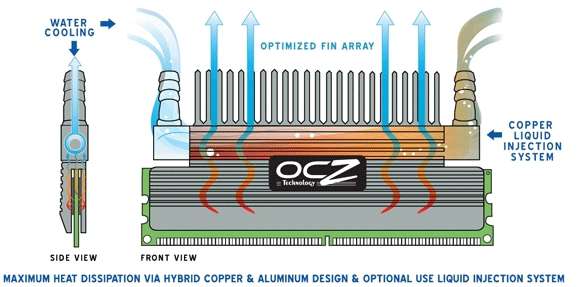
Since the design doesn’t allow water over the chips, the spreader incorporates the usual design goal of smart heat dissipation, which we can see by the rippled sides and fins on top.
The Flex also incorporates a custom 8-layer PCB to compliment the dissipation scheme. OCZ states that this PCB contains conductive power and ground planes to guide the heat away from the interconnects. It’s hard to determine whether or not this is a beneficial design, but it’s not going to counter the goal either. Solder balls underneath the chips already offer a source of heat transfer, so it could be that this PCB aides in guiding the heat up and out quicker than others.
As you would expect, the Flex XLC are delivered in the usual plastic blister pack. It is however far larger than most, since these modules are huge. This is not really the best method for these modules as far as I am concerned, only because that they do not stay in place. The sheer weight and size made them slide around a bit during initial shipment and even while I store them. I blame the fact that the pack stays shut solely by the two indent tabs on the top. The only solution I can figure would be to make the packaging slightly thicker so that it can handle more action.

Even though they are massive, I really do love the design and style of the modules. They are beefy and just scream a quality build. Each one includes an OCZ badge straight in the middle which works with the rest of the design to offer a great looking product overall.

In the following image you can see how the spreader does not cover as much of the PCB as many others do, including the Dominator. I assume this is to aide in the extra benefits that the 8-layer PCB offers by allowing more room for heat to leave.

The fins found on the top are thick and plentiful.

The tubing connections are found on each end, naturally. These accept 1/4" sizing, which leaves me out since all of my WC’ing rigs use 3/8". That’s one thing to bear in mine when pondering a purchase if that’s your primary goal. Looking at the surrounding area, it appears that there would be enough room for a larger fitting. I feel that deciding to use 1/4" will leave more people in the dust than if they had gone with one larger, but I am hoping to see a revision in the future. Anything is possible if the current versions sell well.
The front looked great, but the back is vastly different. I would have preferred a replicated look on the back, but I can see two reasons why they decided against that. First, they needed a spot to put the warranty sticker, since the front really offered no spot at all. Notice the three screws as well. Since this is a beefier than normal spreader, it’s no surprise that they are required.

While I am not a huge fan of the back, I am pleased with the Flex XLC as a whole. I see a few areas where there could be improvement, but considering that this was the first module sent out to “test the waters”, I’m pleased with what I see. To prove just how large the heatspreader is, I provide to you a comparison of the Flex to OCZs own XTC and also Corsairs Dominator.

The Flex completely dwarfs the XTC! When I first received the Dominator, I thought it was huge compared to a regular module, but no more! The Flex is one solid offering, I can say that much.
|
|

Support our efforts! With ad revenue at an all-time low for written websites, we're relying more than ever on reader support to help us continue putting so much effort into this type of content. You can support us by becoming a Patron, or by using our Amazon shopping affiliate links listed through our articles. Thanks for your support!

Rob Williams
Rob founded Techgage in 2005 to be an 'Advocate of the consumer', focusing on fair reviews and keeping people apprised of news in the tech world. Catering to both enthusiasts and businesses alike; from desktop gaming to professional workstations, and all the supporting software.


