Date: December 4, 2006 - Author: Rob Williams - Editor: Greg King
Super Talent impressed us earlier this year with their PC2-6400 enthusiast kit. Their latest product features DDR2-1000 speeds with a tight CAS latency of 4. Will they impress us once again?
Its been quite a while since I've had the opportunity to play with some Super Talent modules, so I was looking forward to seeing what I could muster with their latest DDR2-1000 sticks. When I reviewed their PC2-6400 kit this past April, I was absolutely blown away by their potential. Those specifically could have been the modules that helped Super Talent become a small stature in the enthusiast community. They are now trying to continue with their growth in that area, so we can hope to have some great tweaking ability with these modules today.
As we are all well aware, buying such a fast kit does not come cheap. Quickly checking a popular e-tailer I found these modules for $419.99. Surprisingly enough, this price is actually a deal after taking a look at the other PC2-8000 kits. This one we are taking a look at today has the benefit of a 4 CAS latency, while most others have straight 5-5-5-15 timings.
Since April, Super Talent has been making some headway into e-tailer placement. Back then, it was difficult to find their modules anywhere, but as I have found out, quick searches through a few of the popular e-tailers should bring up a couple listings now. Not only has that fact changed since our last review, but the packaging and heatspreaders have also been redesigned. Without further ado, let's take a look at the modules themselves and then move onto testing.
The packaging this time around has been improved. The original version was a simple clamshell, which wasn't too bad to begin with but was unpleasing to the eyes. This packaging is more colorful and uses the more standard package design that most memory manufacturers use.
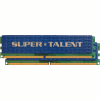
No more plain Jane silver heatspreaders here! Super Talent now uses these dark blue colored spreaders which are designed to dissipate heat better than the prior version. What makes the spreaders stand out is the huge Super Talent logo that stretches across the front. At first I wasn't impressed by these spreaders at all, but after using them for a bit they have grown on me. Not the best looking spreaders out there, but the main thing is heat dissipation, which these should easily handle well.
One complaint I had with the original performance modules from these guys is that there was no information on the packaging or the modules themselves. Unless you are a memory enthusiast, you will probably not have a sweet clue what speeds or frequencies these modules are. Even as an enthusiast, all you can decipher is that these are rated for DDR2-1000 and have a CAS latency of 4. You can easily hit up their website to find out that the timings are 4-5-4-15, but you will have to figure out the voltage on your own.
These are nice looking modules. What I liked most though, is that they felt solid to hold... it's one tough spreader.
I have already referred to the Super Talent PC2-6400 that I reviewed this past April, and I will do so again because both of these kits have a lot of similarities. Primarily the chips that they both use, which is Micron D9GKX. That's not to say you should run out and purchase one of the previously mentioned kits, because shortly after our review the modules were converted over to use D9GMH chips instead. Those are still excellent, but GKX is really the cream of the crop.
GKX actually come from Micron with the recommended CAS latency of 5, but that's foolish for such a high-end chip, and -really- playing it safe. There's little doubt that these chips are being used in most of the top-end memory kits available right now, and to earn that rating most will have a CL of 4.
Chips aside, these modules as mentioned include stock timings of 4-5-4-15, which I find a little odd. These modules had absolutely no problem handling 4-4-4-15 at stock voltage, so they could have easily considered that to be the actual timings. However, that's not to say that 4-4-4 will work on all systems, so perhaps tRCD of 5 is a wise move.
One point of interest is that these modules actually include a 500MHz setting in the SPD, which not all DDR2-1000 modules include for whatever reason. Everything is in check, except tRC which they have at 27. This is not a problem, but I wasn't even aware you could go beyond a tRC of 26 on any system. At least on my past two AM2 motherboards I could not.
That said, I did have some fun overclocking with these modules, but due to a CPU bottleneck I was unable to push them as far as I'd like to. My X2 4600+ maxes out at 2.75GHz, and even that is not 100% reliable. I have a Core 2 Duo machine arriving in a few weeks which should better cater to reaching maximum overclocks. So bare in mind, even though I max out at DDR2-1100, chances are good that they can reach DDR2-1200 and beyond since that's not uncommon for neither D9GMH nor D9GKX.
One thing you may be asking yourself is, "Does this guy believe in even numbers?" and the answer is no. That aside though, the DFI M2R/G motherboard has FSB options in multiples of 2, therefore 275FSB is not possible, but 274 or 276 is. When I run into a spot where I'd like an odd number, I just use the next best setting. In that case, our max overclock was accomplished using 276FSB and a 10x multiplier.
The system we are using for testing:
Regardless of what product we are benchmarking, our testing machine goes through optimizations before we begin. All testing is performed on a stand-alone version of Windows XP Professional with SP2. System services not needed are closed down, in addition to unwanted programs in the system tray. Computer is cleaned up of scrap files, which includes emptying of the recycle bin. Directly before any testing occurs, the OS hard drive is defragged using Diskeeper 10 Pro Premier. Finally, we assure that the computer has adequate cooling and airflow.
For comparison sake, I am also benchmarking Kingstons 2GB HyperX kit, which also has a stock speed of DDR2-1000 and uses Micron D9GKX chips. While we don't expect one kit to be a better performer (they are the same price and specs), we like to see if the Super Talent kit can keep up to the competiton. If it fails to do so, then somethings wrong. During the afternoon of testing, the room temperature hovered between 79°F and 80°F. Yes, it still gets that warm in this room in December with a window open. As sad as that is.
Sandra is one of those applications that enthusiasts are not foolish enough to leave out of their toolbox. It's not only a memory benchmarking tool, but can test the performance of anything else in your system. They have recently updated their application to XI, which resulted in a small redesign of the app.

At stock speeds we managed to hit the 9500 area which is nice to see, and at our "max" overclock we well broke through 10K.

Before you take any creedance in our unbuffered results, please take a quick look at our precise settings. We disable a lot of CPU related optimizations to truly see the power the ram has. Breaking 6K at our max overclock is a sweet deal. It's effectively 25% "faster" than stock DDR2-800 settings.
Everest is another popular benchmarking tool, but primarily handles memory and CPU, in addition to some disk testing. One thing to note with Everest is that with each new version, the results in the tests can change drastically. That being the case, results from 3.0 cannot be compared to results from 3.5.

Thanks to my wimpy 4600+ CPU, I could not muster a 10K Everest score. However, we did pass through 9K with ease. 3.0GHz on the CPU should be able to push it over 10K, but that's not what is important here ;-)

The results above were gathered after three runs of the latency test on each setting. Since each run can prove to make up a 1.0ns difference, I simply grabbed the average from the three. We came so close to breaking the 40ns mark, on both modules. It was a tease, let me tell you.
Without a doubt, Sciencemark has proven to be one of my favorite CPU and memory benching tools. Oddly enough, the developers behind the program seem to have lost their domain, so it's unlikely we will ever see a Sciencemark 3. It's too bad too, considering it gives far more in-depth results than anything else out there.

Neither kit had a definite advantage, but the Super Talent kit took the crown for three out of four runs.
Super Pi is a great tool for wagering the performance of your CPU. The faster the chip, the faster your computer can compute 1 million digits past the decimal in a not so simple Pi equation. Memory latencies and speeds can play a big part in the success of low scores (that being a good thing) so it's good to include it in our tests.

At our maximum overclock, the Kingston modules gave us a slightly better time. As surprising as it was to see, both kits really did score the -exact- same time on the second setting. Just wanted to clarify before I received an e-mail for a typo that didn't exist!
In order to provide more accurate results in our memory and CPU reviews, we are currently in the process of reconsidering which tools we use. We will no longer use PC Mark 05 or 3D Mark 01 in our memory reviews simply because the scores fluctuate far too much in between each test, making it unreliable.
That said, one area of computing that will benefit from faster CPU and memory speeds is multi-media work. This can include DVD Ripping, video conversion, audio conversion and even image conversion. The latter three will be included in our results below. These tests will be refined in the coming weeks and we are hoping to have a solid multi-media benchmarking suite to use in our future reviews.
Before the results though, allow me to explain which each process consists of:

Avoiding the video recoding since it was apparently implemented improperly, the Super Talent modules took the lead the majority of the time here, especially with the max overclock and the Image Resize and Audio #1 tests. Beside those results, the rest all are quite close as expected. The overclocked settings made quite a difference over stock. Not that this is a big deal with these small tests, the benefits would be more evident with seriously time intensive tasks.
When taking a look at a kit of ram that costs over $400, it's hard to outright recommend them to everyone. There are not too many people who would jump at the opportunity to hand over so much for a kit of ram. If you have the cash and don't mind the price though, this is a fantastic kit when compared to the competition. The stock timings of 4-5-4 is what helps this stand out among the others, but 4-4-4 would have been even cooler to see. Regardless, 4-4-4 is possible out of the box at the stock timings. Your milage may vary however.
Since these are based on D9GKX chips, these modules have obvious pushing power. If you have a better cpu than I do, perferably one that can hit 3GHz (or a very overclockable Intel), you will easily be able to push these modules further than I was able to. DDR2-1200 speeds should prove to be easily possible, but you would not want to try that without some sort of active cooling. That goes for any heavily overclockable modules though.
If the $400 asking price is a little out of your league, you may want to consider Super Talents PC2-6400 D9GMH based kit. While they may not be able to be pushed as far as these ones, they should be lenient enough to make a happy overclocker out of you.
That said, I am awarding the T1000UX2G4 an 8 out of 10... a fantastic showing from Super Talent. I look forward to seeing what they have up their sleeves next!
If you have a comment you wish to make on this review, feel free to head on into our forums! There is no need to register in order to reply to such threads.

Copyright © 2005-2009 Techgage Networks Inc. - All Rights Reserved.