
- Qualcomm Launches Snapdragon 4 Gen 2 Mobile Platform
- AMD Launches Ryzen PRO 7000 Series Mobile & Desktop Platform
- Intel Launches Sleek Single-Slot Arc Pro A60 Workstation Graphics Card
- NVIDIA Announces Latest Ada Lovelace Additions: GeForce RTX 4060 Ti & RTX 4060
- Maxon Redshift With AMD Radeon GPU Rendering Support Now Available

Social & RSS Feeds
Latest Videos



Latest News
Thirteen OS X Widgets You Should Be Using


by Don Williams on July 20, 2007 in Software
As attractive as OS X is, one reason most people have fun with it is by adding a slew of widgets to help keep things interesting. Among the thousands available, you should have no problem finding a handful that you enjoy. To help get you started, we are taking a look at our personal favorites.
Page 1 – Introduction
|
|
Two years ago Apple introduced to OS X Tiger a feature called Widgets. These are simple Java based applications that reside in a special window and are designed to give users access to various things such as updated weather reports, stock quotes, games, etc. It caught on, as Microsoft added a similar feature called Gadgets to its new Vista OS.
Apple equips each copy of Tiger with about twenty of these nifty little jewels, but now, thanks to the open sourced community, the numbers of OS X Widget applications have exploded into a virtual flood now totaling well over 4,500, with dozens appearing each and every day. These Widgets run the gamut from the not so useful, to the very useful and, in some cases, absolutely indispensable.
Today, we at Techgage, would like to highlight thirteen of our favorite Widgets currently available for OS X in hope that some may be of interest to the growing numbers using this modern ‘Unix’ based OS.
Our first Widget, Package Tracker, by Monkey Business Labs, is a great widget if you wish to know ‘where-on-earth’ that new fangled’ thing-a-ma-jig’ that you just order is at any given place or time.
Simply by activating this widget from OS X’s Dashboard, Package Tracker will track any delivery from DHL, FedEX or UPS, by first supplying it with it’s tracking number, thus allowing you to see, at a glance, the current location of your ‘thing-a-ma-jig,’ when it will be delivered, and the most recent scan activity. Package Tracker will also light up to attract your attention after your package has been delivered, and by simply by clicking on the status indicator your browser will go straight to the carrier’s tracking page.
Package Tracker is simple, fast, convenient and very well integrated to give you instant gratification. I only wish I had this little baby years ago, it would have spared me a lot of fret and worry and nail biting.



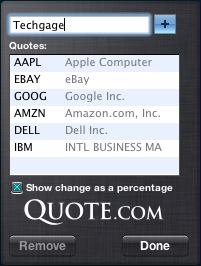
The Stock Widget is one of Tiger’s default Widgets that I consider not only handy but also one of those indispensable widgets, one I wouldn’t dare do without. This widget simply displays your favorite stocks and their current activity. The Highs and Lows of your stocks can be viewed either as a percentage or as a dollar numerical value. To boot, you can even display a little graph to help you visualize your stocks performance.

Widsense is a handy widget if you have a Google Adsense account, as it will automatically connect to your Adsense account and download the last update of your CSV file. Widsense will then display the various statistics on the number of impressions, clicks and revenues for the current day, and, as well, the two previous days and the current month. You can save your login and password, so that you do not need to mention it each time you launch the Dashboard.

Book-Bot.com Reader is a new and fantastic widget that allows you to read absolutely free over 14,000 books! When you have other things to do, the Book-bot.com widget will collapse back unto the menu bar, but it will also remember the exact page of the last book that you were reading, so you can easily and quickly go back and read it next time. This widget also allows you to read your book in a ‘low eyestrain’ form without any need for scrolling the text. If you love to read, you’ll love to use this widget.


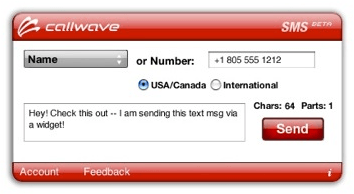
CallWave Text Messaging is a widget for you text messaging lovers. This widget will allow you easily, from your computer, to send SMS messages to anyone, anywhere to virtually anyone. This widget is now easier to use, and it has much better integration with the Mac’s built-in Address Book. If you love SMS you can now text to your heart’s content easier and more conveniently than ever, all with a little help from this handy widget.
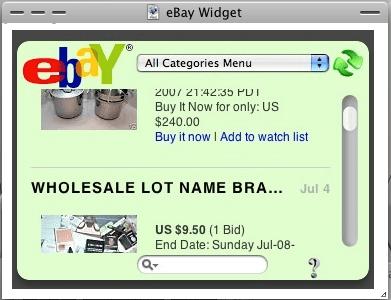
Ebay Explorer needs no explanation, as it’s name says it all… allows you, in real time, to explore the world of eBay. Shop to your heart’s content or just ‘window shop.’ This little widget will keep you entertained for hours, so if you’re an eBayer lover this widget is definitely for you.
With our first six widgets out of the way, let’s move onto the last seven!
|
|

Support our efforts! With ad revenue at an all-time low for written websites, we're relying more than ever on reader support to help us continue putting so much effort into this type of content. You can support us by becoming a Patron, or by using our Amazon shopping affiliate links listed through our articles. Thanks for your support!