Techgage logo

DFI Infinity 975X/G

Date: December 8, 2006 - Author: Greg King - Editor: Rob Williams

Long known for their overclocker friendly motherboards, DFI is back with a board for the highly popular and extremely powerful Core 2 Duo. Using Intels 975X chipset, the DFI Infinity 975 X/G looks to introduce the enthusiast crowd to Conroe, DFI style. Using the BIOS that shipped with the board, we got less than spectacular results, forcing us to go with a popular Beta. How high could we get the FSB and is the board worth it?


Introduction

If you’re a computer enthusiast, more than likely you have heard of DFI. Long known in the industry as an overclockers best friend in the motherboard arena, DFI has produced some of the best performing motherboards to date. Their LanParty series has catapulted them to the top tier of enthusiast motherboard manufacturers by offering superb performance and an ungodly amount of extras bundled. While the LanParty has garnered all of the accolades and attention, the Infinity series of motherboards has been around for those of us with somewhat restricting budgets.

With most of the attention going to the LanParty series, the Infinity can sometimes be looked over. While the Infinity series lacks the bundled extras that the LanParty offers, it still gets its fair share of attention from the DFI engineers.

Now that 2006 is almost behind us, looking back, it’s obvious that the CPU market is nothing like it was this time last year. Intel has retaken the performance crown from AMD, dual core CPUs are a common place and more importantly, affordable and the emergence of quad core CPUs is happening as well. The DFI Infinity 975 X/G, which we are working with today, uses the same 975 Intel chipset that has been around for a while now. Using this chipset, the 975 X/G is Core 2 Duo ready and with a BIOS upgrade, quad core ready as well. With the following that DFI has developed, there is a lot riding on this motherboard and in working with the 975 X/G over the past 4 weeks, we have been working with it to find out if it’s truly a board that the Core 2 Duo crown has been waiting for as well as if it’s a value to the consumer as the Infinity name implies.

About the 975 X/G

Packaging and Layout

DFI clearly wants to distinguish their Infinity boards from the LanParty board that they have built their name on. As the box shows, its nothing like the LanParty boxes but still informative.

Packaging & Layout

Once open, we see that DFI has included a few essential cables and that’s it. DFI is clearly holding true to the Infinity “budget” labeling. This is not a big deal for most, knowing that an Infinity purchase isn’t going to net you an insane amount of extras. The Infinity is almost a polar opposite of the LanParty in this regard. This is actually nice to be honest. The no nonsense approach allows DFI to keep costs down a bit as well as give the end user all that they will need to get going, but that’s about it.

Here we see the manual. For most, this is the first item that is thrown to the side. I personally keep mine around for various information in case I need it.

Next we see the I/O plate, one IDE ribbon, a pair of SATA cables as well as one 4-pin molex to SATA power connector. As stated before, not a lot, but just enough to get your PC build off the ground.

Finally we get to the driver disks. With the need for RAID drivers in XP, DFI has included a pair of 3.5” driver disks as well as a CD with all of the necessary Windows drivers on it. These drivers include the chipset drivers, ATI and NVIDIA video display drivers, Ethernet drivers and many more. Also included on the disk is Smart Guardian PC monitoring software.

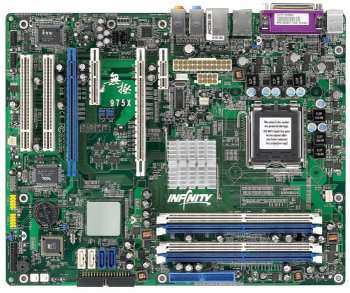
Moving past the packaging and included bundle, we move to the Infinity 975 X/G itself. With a rather bland looking green PCB, the 975 X/G certainly lacks the bling that other motherboard posses but is this really a problem?

The first thing that we notice is the passive northbridge. Held down by a retention wire, the aluminum heatsink passively cools the northbridge with fairly tall fins. With 96 fins in all, there is certainly a lot of surface area to keep the northbridge cool and does so completely silent.

If we move from there, just to the left of the northbridge, we see the power connectors. This, to me, is an odd place to put these connectors as the PSU cables will have to run either on top of the CPU cooler or just above or below. This also could effect the northbridge cooling as there won’t be an active fan cooling the chip and the PSU cables running so close to it could interfere with airflow. On other motherboards, the LanParty included, the power connections are in the upper right side of the board, allowing for the cables to run into the case, not across the board. For power, we have a standard 24-pin connector, an 8-pin auxiliary connector and a floppy power connector. While the placement is somewhat puzzling and far from ideal, the positioning is manageable and can be dealt with.

Just below the power connections, we find the PCI slots. On top, there is an x1 slot. Obviously this isn’t the place for high end graphics cards but there are cards out there that could use this slot. Below the x1 slot, there is an x16 slot for video cards. There is also another x16 speed but they cannot be populated by two video cards and still operate at x16. It’s either x16 and x1 or x8 and x8. This isn’t a huge deal as the bandwidth used by PCI Express cards isn’t maxed out to begin with. In-between the 2 x16 slots is an x4 slot. Under the second PCI-E x16 slot, there are 2 legacy PCI slots for your sound card, TV Tuner card or whatever else you might use them for… perhaps even an Ageia PhysX card if your into that sort of thing.

At the bottom of the board, there is an assortment of headers. These include one IEEE 1394 Firewire connection, a pair of USB 2.0 connections, headers for your on/off switch, HDD activity, reset and power LED. Directly above the USB headers, we see the CMOS battery and just above it and to the right, the clear CMOS jumper. While DFI kind of botched the placement of the power connections, they did well on the clear CMOS jumper. To the immediate right of the batter is the BIOS chip. DFI uses a Phoenix – Award BIOS for those of you keeping track at home.

The Firewire is controlled by a dedicated VIA chip that is located directly above the Firewire headers themselves.

To help monitor temps, there is an ITE chip. This is where the included monitoring software, Smart Guardian, will pull its information from.

An addition to the LanParty series motherboards has made its way to the Infinity board. On the right side of the 975 X/G, near the bottom is a pair of on-board switches. The inclusion of an on/off and reset button is sure to keep the enthusiast crowd happy.

Moving up a bit, the Southbridge is located directly above the clear CMOS jumper and the BIOS chip. Directly to the right of the Southbridge are 4 SATA II ports. Capable of up to 3Gb/s, SATA II has a distinct advantage over SATA I as test have shown but rest easy, you can use SATA I hard drives without a problem. As covered earlier, RAID 1 through 5 can be run on the 975 X/G through the 4 available SATA II ports.

Closer look at the layout

One thing to mention is the cooling that DFI choose to use on the Southbridge. On the chip, DFI has placed a square of ceramic material to keep the chip cool. As bad as it looks, it actually cools quite well. Ceramic is far denser than aluminum and can handle more heat. The one complaint I have of this is that the top of the ceramic plate is flat. While I did not measure the temps of the Southbridge, a few ripples or ridges would have greatly improved the surface area of the ceramic cooler, thus allowing it to cool better than it does now.

Jut to the right of the Southbridge and the SATA ports, there is one IDE connector, rotated 90 degrees and facing away from the motherboard. IDE is something that is slowly being phased out and because of this, DFI only included one, presumably for an optical drive however, there are still many people who use IDE hard drives.

The 975 X/G can take up to 8 GB of 240-pin DDR2 DIMMs. Color coded for aesthetics and use, the 975 X/G allows the user to run their matching RAM modules in dual channel. The 975 X/G only supports DDR2 553 / 667 / and 800.

Some of the capacitors used around the DFI 975 X/G:

Finally, placed where it should be is the CPU socket. Sporting a LGA 775 socket and supporting a FSB of 533, 800 and 1066, the 975 X/G can handle any socket 775 CPU out today. This includes the P4, Celeron, Pentium D and the new and beloved Core 2 Duo line of processors. Like any other Intel motherboard, the pins are on the motherboard itself and not on the CPU. You simply undo the retention bar, raise the socket lid, place the CPU in the socket, close the lid and redo the retention bar. Simple huh?

Fitting snuggly in the socket, I have finally found a home for my E6600 “Conroe” Core 2 Duo. Once installed correctly, the socket lid should fit comfortably around the CPU’s raised heat spreader.

On the outer edges of the motherboard, we have the I/O section. Included on the 975 X/G is:

While nothing out of the ordinary, the inclusion of high definition surround sound audio is nice, as well as the eSATA port. I pine for the day when parallel ports are a thing of the past and while some motherboards now ship without the said port, the 975 X/G unfortunately does. At least it’s pink…

BIOS

DFI has always been known as an overclocker’s best friend with their LanParty series of motherboards. A primary reason for this is their in-depth BIOS options. Using a Phoenix – Award BIOS, the 975 X/G looks to compete with its flashier brothers with its many options.

The opening screen should look familiar as it’s almost identical to the other BIOS shots that we have taken in past DFI reviews.

Next up we see the Standard CMOS screen. This screen is where you can change the CMOS clock, CMOS date and view your connected drive information. For Drive A, I change it to NONE as I just don’t have a floppy drive connected unless I need to update my BIOS.

In the advanced BIOS screen, we can change the boot sequence, decide which HDD we want to boot from, control whether the number lock is on, etc… The most important setting on this screen is found at the very bottom of the list and not shown in the picture. It is the setting to enable/disable the starting logo that comes up when you first power on your machine. I would much rather watch the PC POST than stare at the Infinity logo so I obviously have the logo disabled.

In the advanced Chipset screen, we have the ability to control the settings of the chipset but for 99% of all users, these settings will not need to be touched.

The Integrated Peripherals screen proves to be a bit more useful for the user. On this screen, we have the option to enable the keyboard past the POST screen as well as turn on and off different settings that you will either need or not need. Again, most users will not need to go to this screen but for me personally; I like to enable the keyboard to work past POST.

Next we move onto the Power Management screen. The options are pretty straight forward and to the point. Again, this screen is one that most will not have to worry about. For the review, we did not have to change any settings on this screen.

In the PnP/PCI screen, you have more settings to work with. In all honesty, I am not sure what some of these settings control and therefore, did not change any of them for testing.

In the PC Health screen, you can monitor the status of your computers vital hardware. This is the screen where you can find out your CPU and northbridge temps and voltage readings as well as set shutdown thresholds.

The Genie BIOS is where it’s all at. In this screen, we virtually have full control over our PC. This is where we can overclock our CPU or RAM and up the voltages if needed to get our overclocks stable. When one overclocks, sometimes it’s as simple as raising the FSB (Front Side Bus). This is fine for small overclocks but if we wanted to go all out and attempt to find the top speed that this motherboard will allow, we will need to adjust our RAM timings. Which leads us into…

The DRAM timing and configuration screen can be rather intimidating if you don’t know what you are working with. With so many different timings to work with, it’s easy to get confused but with some research, the finer points of overclocking can suddenly become second nature. When overclocking RAM, the more you mess with it, and the more you use trial and error, the better you will understand it.

To change your settings, you can either manually change them or set them to increase with the FSB. For all of you AMD fans out there, if you expand the System Memory Frequency option, this is where you will find what AMD users call a divider. It sets your RAM starting speed instead of staying at a 1:1 ratio with the FSB.

Testing Methodology

Throughout all of our benchmarks regardless of what we are reviewing, testing is done in a clean and stand-alone version of Windows XP Professional with SP2. Prior to testing, these conditions are met:

In the results, you will see 2 different scores. These scores are from the same PC but one will be stock and the other score will be with the system overclocked. Since this is our first Core 2 Duo motherboard review, we unfortunately do not have another motherboard to compare to the Infinity 975 X/G to. In time however, this motherboard and the results we gather today will be used in other motherboard reviews.

When overclocking the system, the max overclock will be found by upping the FSB until we get a frequency that can run stable for an extended amount of time. Most poorly made motherboards will crap out relatively quickly when pushed and to consider an overclock stable, we will start out with Prime 95 and then add in CPU Burn-In on top of it. Normal users will not tax their systems to this extent, and not all hardware will perform like this board. Some will get results less than ours and some will get more. That’s simply the nature of the industry. With that in mind, we sure as hell want to make sure the settings are stable before we publish results that could possibly lead our readers astray.

Before we get into the testing, the test system is:

One last thing before we begin testing. I am using a BETA BIOS from DFI. With the latest DFI issued BIOS, I was unable to get anywhere higher than 320 MHz on the FSB. This BIOS corrected everything and eliminated any and all problems that I was having. We at Techgage do not recommend using a BETA BIOS unless you completely understand the negative issues that can come up. There have been many people who have either not taken their time and read up on what to do or used any old BIOS, both of which will more than likely kill your motherboard, rendering it unusable. Using a BETA BIOS can void your warranty. You have been warned.

Testing Results

To start out with, SiSoft’s Sandra will be used to test the CPU in the 975 X/G. The arithmetic and multi-media are good tests for the CPU.

Next up, we are going to use Everest. Once again, we are going to stress the CPU.

What would any review be without the beloved Futuremark benches? In this review, the dated 2001 will be used along side 2005 and 2006. The results from ‘05 and ’06 only include the CPU score.

One of the favorites around Techgage is Sciencemark. The program gives us a lot of information when it has completed and the tests it runs are quite interesting as well.

Cinebench is a tool to measure your multi-media rendering... in this case a high-resolution image. It has two small separate tests, one single threaded and the other multi-threaded.

While completely useless for most, I am a fan of Super Pi because it gives us a good idea of the raw horsepower in our CPU. For not enjoying math in high school and college, I sure love calculating Pi to the millionth place. This program is also a quick and easy way to shave a few tenths of a second off your time for no other purpose than to brag about it. In this test, Pi will be calculated to the 1 millionth, 4 millionth, 8 millionth and the 32 millionth place.

Overclocking, Final Thoughts

When overclocking this motherboard, I first did my homework. Having been a long time AMD user, I knew that Intel systems overclocked a bit differently than AMD machines and I wanted to find out all that I could. One place that I recommend everyone visit is DFI-Street. The DFI-Street forums are full of people that know these motherboards inside and out and are even home to a few DFI employees as well. The amount of knowledge in these forums is vast and a quick search through the threads can more often than not turn up an answer. If not, simply post and wait because whatever your problem might be, there is someone else who has dealt with it and worked through it.

The max 100% stable overclock that we were able to obtain was 3.33 GHz with a FSB of 370. From reading around, I know that there is more in this motherboard, and we even got up to a 405 FSB and a speed of 3.64 GHz. That’s well over a full 1 GHz overclock. However, this was not entirely stable and after some pressing, it failed and we had to start back at scratch. While I am not satisfied with where we got, I am content. Even with the overclocks we got, the numbers are all the proof that we need when performance comes into question.

Conclusion

When the Infinity 975 X/G was released, it was an answer to many questions about DFI’s answer to the Core 2 Duo launch. At that time, the board came with a premium price. The board was well over 200 dollars and with the results we had with the board, I am not sure it would have been worth it. The board ships with support for all Core 2 Duo processors as well as Intel’s new QX6700 Quad Core CPU.

The 975 X/G also ships with a BIOS that does not overclock well at all. Others have had success with this same BIOS but it wasn’t until I flashed to a BETA BIOS, offered on DFI’s Taiwan website, that we could even get close to a respectable overclock. At this time, I am confident that there is more in this motherboard, CPU and RAM but to make deadline, the above mentioned highest stable overclock (370 x 9 = 3338.2 MHz) was the highest we could achieve. Yes we could go higher but some of the tests would fail, hard locking the computer.

There are quite a few positive points on this motherboard. The board ships with one gigabit Ethernet ports and the 8 channel high definition audio is a plus as well. The support for ATI’s CrossFire is a definite plus and the SATA II capabilities are without a doubt far superior to SATA I and welcome on this board. The overall layout of the board leaves little to be desired though. The placement of the power connectors baffles me and while the positioning really doesn’t affect performance, it wouldn’t have taken much I don’t think to have placed them in a decent area of the board.

For those of you who like to tweak, there are rumors that SLI can be ran on this motherboard with a pair of matching NVIDIA GPUs and a modified driver. By rumors, read “It’s actually been done.” Our 7800 GTs are in route for an RMA so we were unable to test this out but when they get back in, rest assured, it will be tested out and the results will be reported.

As it is when shipped, the 975 X/G doesn’t offer the performance that the DFI lovers have come to expect. With the stability of this BETA BIOS, I wouldn’t be surprised to see this BIOS as an official release in the coming weeks or month but please know that I have no way to confirm or deny this. DFI has always showered the LanParty series of motherboards with the most attention and this is evident in the 975 X/G.

All in all, the 975 X/G offers an extremely stable motherboard to owners of a Core 2 Duo CPUs and at this time, this is the only motherboard for the C2D line of CPUs from Intel. With rumors of the highly anticipated RD600 motherboard, DFI fans might want to wait a bit for this board to be released but if you are bold enough to use a Beta BIOS, or just want a stable system that’s going to run stock or slightly overclocked, the 975 X/G is a smart choice. It does lack the bling of other 975X motherboards but with a current street price of $164.99 (US), it’s considerably cheaper than the motherboards with the said bling.

When it comes down to it, I feel that the DFI 975 X/G is deserving of an 8 out of 10. There are so many small things that could make this motherboard better but it is an Infinity series and thus, is supposed to have less than a LanParty. If your looking for a strong stock motherboard than this is for you and the price is right. Should DFI release the BETA BIOS to the public in the foreseeable future, then this motherboard suddenly becomes an instant winner but since the BETA BIOS voids your warranty, we can’t recommend using it to anyone but the bravest of the brave.

Discuss in our forums!

If you have a comment you wish to make on this review, feel free to head on into our forums! There is no need to register in order to reply to such threads.


Copyright © 2005-2009 Techgage Networks Inc. - All Rights Reserved.